sku: SEN-10586
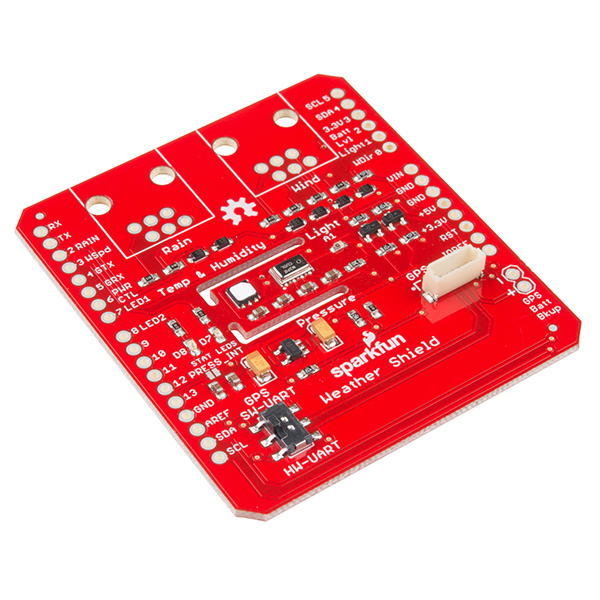
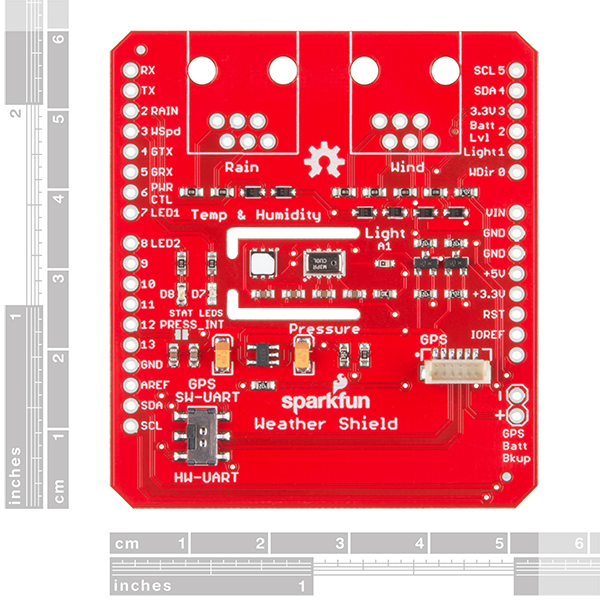
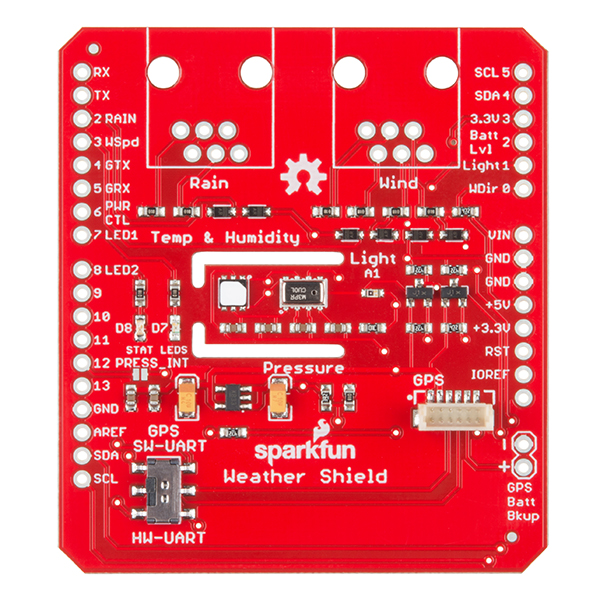
Description: Got weather? This board can handle it. The USB Weather Board includes onboard sensors for barometric pressure, humidity, temperature, and light level. We've also added headers in the new version so you can connect the board to our weather meters (not included), adding sensors for wind speed, wind direction, and rainfall. You can send all this data to a computer or datalogger via mini-USB cable, TTL serial (3.3V), or wirelessly via Bluetooth or XBee (not included). Finally, the board is Arduino-compatible for easy customization.
This board has a wealth of headers for various sensor and communication connections. Check the related items below for the appropriate connecting hardware. Our weather meters can be connected to the weather board with the addition of RJ11connectors. Wireless communication can be achieved through either Bluetooth, by the addition of 0.1" headers and a BlueSMiRF radio, or Zigbee by addition of an XBee radio and the appropriate XBee sockets.
Features:
Documents:
Replaces: SEN-09800
PRT-08272
2mm 10pin XBee SocketSEN-08942
Weather MetersCAB-00598
USB Mini-B Cable - 6 FootPRT-00132
RJ11 6-Pin ConnectorPRT-00116
Break Away Headers - StraightPRT-00115
Break Away Female HeadersWRL-09819
XBee Explorer Dongle
Comments 88 comments
We are working to get these in stock. We have them in the building, we just need to get them into our system and on the shelves. We expect to have plenty in stock as of the end of the day Friday.
I like the isolation you guys did around the humidity and pressure sensors.
Despite the “Got weather? This board can handle it.” line, you probably should put this in a case before deploying:)
Or smother it in hot glue.
Since we’re talking only relative measurements, why not use some Light Pipe – Clear Core 6 mm to bring “daylight” to the light sensor?
Great idea! The board has also been set up so it’s straightforward to add an external light sensor.
Hi,
Can it be used with an Xbee different from the 1mW one? I need more distance.
Yes, it should work with every xbee module except for the XTend.
Also, can I change the temperature from F° to C°?
It’s even easier than that – there’s a menu option for English or metric. If you want Kelvins, you’ll need to modify the code. ;)
Check the firmware link above, you can change the code to output whatever you want.
You can use this formula to do so:
C = 5/9(F-32)
Metric isn’t English?
Hopefully a future version can support data output compatible with Peet Bros. Ultimeter series. There’s plenty of documentation for their formats.
It’s confusing. Here in the US, “English” is a common term for non-SI units, though it’s probably more accurate to say “imperial”, or according to Wikipedia, “United States Customary Units” (bleh).
Great call on more data formats! The code is VERY easy to modify to output new formats, so don’t be afraid of diving in if you need the board to do something special.
Does this have any capability of charging the battery while connected to USB or another external power source?
Nope, sorry, couldn’t fit it in there! We have various chargers though.
Can I use lcd display with this board. is it possible?
Yup, it’s all set to work directly with our serial enabled LCD displays.
Ok. I have sparkfun serial enabled LCD display. Can you tell me how can I connect LCD display to sparkfun weather board.
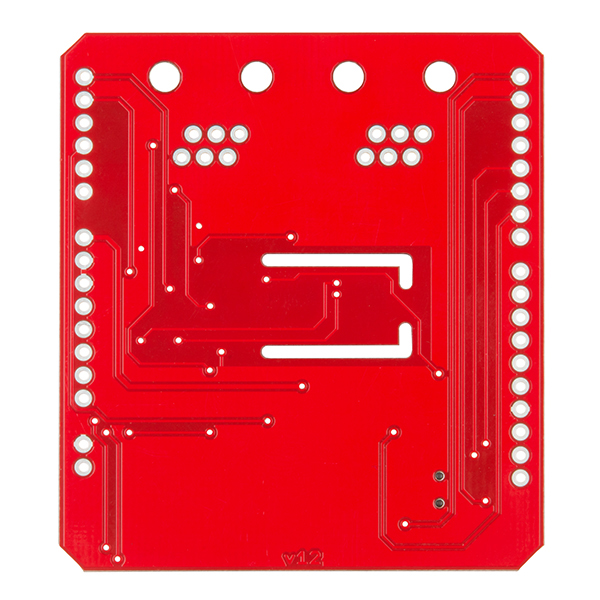
First, configure the Weather Board to output the LCD format using the menu, and save that configuration. Then connect the Weather Board’s TX line to the LCD’s RX line. The easiest place to do this is probably the XBee header JP6, which also includes VCC (3.3V) and GND to power the display (the bottom of the board has markings for pin numbering).
Can you add an ethernet shield to this board? If so, could someone point me in the right direction on how to do so. Thanks!
The easiest way to accomplish this would likely be to send data from the Weather Board to an Arduino plus Ethernet Shield programmed to pass the serial text data to whatever Ethernet address/port you require.
I have connected weather board to weather meters. rainIRQ() interrupt routine is giving false counts. Any suggestions?
When the rain gauge switches, the switch contact mechanically bounces. A fast IRQ routine counts some of those bounces thereby giving a false reading. There are two solutions:
Hardware: check out the MC14490. It’s a great chip for solving this type of problem.
Software: add a 100ms interlock to the IRQ routine. Get the current millisecond time and compare to last time IRQ was called. If less than 100ms, do nothing. If more than 100ms, update time of last IRQ and increment count.
I have bought the sensor USB Weather Board v3.0 .
A series of problems has happened to me on having been connecting / disconnecting to the sensor. When I have disconnected several times, and I return to connect, only it comes to me for the serial port the word “RESET” and already it does not come at all more…
I have been checking the code and have thought that it might be that exists any crash in the protocols I2C and have left a small delay after the line:
TWCR |= _BV(TWEN);
// Delay
delay(250);
// start BMP085 temperature reading
With this one line added, it seems that me the sensor goes better. But i’m not sure that with this it solves…
You has this happened to someone already?
We solve all the problems of the arduino code. In few days, we upload a version of code in our page. I hope that sparkfun’s programmers haven’t any problem.
1.0 initial release, 2011/06/27 http://www.sparkfun.com
1.1 grualia beta, 2011/08/12 http://www.grualia.com
1.2 grualia release, 2011/08/19 http://www.grualia.com
We are development project about (Research + Development + Innovation) (RDI).
We post here a link to download the new code.
Hi all.
We present the new version of code:
1.1 grualia beta, 2011/08/12 http://www.grualia.com
Download in the link:
http://www.grualia.es/download/software/Weather/WeatherBoard3v11.rar
In the next version 1.2 we will allow view correctly the altimeter.
Remember update all libraries added in the compress file.
1.1
– fix errors that math formulas, sensor infinites waiting, bad logarithmic operations, communication port blockings, memory access problems,
– we change the CSV (it is NMEA really) and ANSI string. We have to do it because in the next version 1.2 release, we can to select if sensor is a BASE (to send corrections to other sensors) or MOVIL (that receive the correction). Now, we can have one MOVIL fitted correctly with one BASE. Of this way, we can have one real ALTITUDE corrected.
– more units of temperature, pressure…
In playing around with it, I can’t set a working sample rate longer than 32 seconds. I’m guessing something is being stored or interpreted as an integer (32k value) and that’s causing this funny business but I haven’t found it in the code yet.
The problem is solved. You can put up to 1 send each 255 seconds.
Download in the link:
http://www.grualia.es/download/software/Weather/WeatherBoard3v11.rar
Ok, this tuesday we look the code for fix this problem. What sample rate do you guess? I think that maximum is a byte, 255 seconds, I dont’t know why don’t accept 32 seconds the code? We look it this the tuesday, ok?
Thanks for report problems.
New version of code for the USB Weather Board v3.0:
1.2 grualia release, 2011/08/18 http://www.grualia.com
Download in the link:
http://www.grualia.es/download/software/Weather/WeatherBoard3v12.rar
Functionalities:
– the sensor works as an altimeter
– with two sensors, we can run one as a BASE and another as MOBILE, where it can be more accurately adjust their altitude with corrections that will send the BASE
– fast menu
– the code does not fit in the memory of the micro, which are a compilation constants we can indicate what output format we want and if we want a description or a quick menu
We are very grateful that we use it and report any error. Thanks
New firmware V1.1 is available on the product page. The main change was eliminating the 32-second limitation on delays. Delays are now 32-bit allowing up to 47 days between readings. You can see the version number of the installed firmware in the menu. The Grualia firmware is another good choice.
Couple of questions.
1. How does this connect to the ARDUINO?
2. If I put a GPS on the ARDUINO, would it still talk to your PC via the Zigbee on the weatherboard?
I’m intending to add some extra I/O devices to this board, when it arrives. I was hopeful that the expansion connector would break out some of the unused microcontroller pins, but this doesn’t appear to be the case.
However, looking through the code, it appears that RF-CTS, RF-RTS, MISO, MOSI, and SCK are connected but not used (Arduino pins D5, D6, D11, D12 and D13). Can anybody confirm this?
That’s correct, those pins are available for your use. The expansion connector does breakout the I2C bus and power, making it easy to add additional I2C sensors.
Thanks Mike, I hadn’t thought of using I2C. On reflection an Arduino Pro hooked up as an I2C slave is probably what I need.
Why is FAIL showing up on random lines of the boards output?
Using xBee, can communicate both directions (responds to +++ fine), can see the boards menu, getting data every 5 seconds.. But temperature, pressure, light and wind speed show FAIL at the end of their data lines…
Yesterday it was temperature and humidity.. What has Failed, why is FAIL(ed) being displayed?
Thanks
Every board we build is tested so that we know it was built correctly. To support this, the default ANSI mode in the supplied firmware will test each sensor output and display FAIL if it is out of range. The ranges were chosen to be reasonable for our factory floor where testing is done, For example, the temperature should be between 65F and 85F. If the reading is outside that range, there’s either a problem with the board, or with our HVAC system. If you don’t have the Weather Meters connected to the board, windspeed and rainfall readings of zero will show as FAIL since our test jig simulates input to those sensors. (Note that you can turn off data from the nonexistent Weather Meters via the menu).
If you’re getting reasonable values for the actual sensor outputs for your location (which may have different conditions than our factory floor), than nothing has FAILed. If the actual sensor numbers do look very wrong (e.g. the temperature is 255F and you’re still alive), then there’s likely a problem with your board, and if you contact techsupport at sparkfun, we’ll be happy to help you with it.
If you don’t want the board to output these pass/fail values, you can switch to a different output mode, or easily alter the firmware to delete those statements. Hope this helps!
sorry for being dump!! I am applying CTRL-Z combination but no change occur… no menu nothing.. I am using arduino serial monitor and also tried on hyper terminal.. but still no luck!! waiting for input.. kindly suggest what should i do now?
Got the answer!! my bad.. flow control should be none. .. with baud rate 4800.
I’m having the same issue, not getting any config menu when sending CTRL-Z, continues to to receive. Tried the above solution but unfortunately isn’t working for me either.
Try a different terminal program (Tera-Term, Coolterm, Realterm, Hyperterm); the serial monitor built into Arduino isn’t great at sending control codes.
i had this problem also, no matter what software i used. what i did was open up the code and change the:
if (Serial.read() == 0x1A) // CTRL-Z
to:
if (Serial.read() == 0x6A) // lowercase j
then all you do is press ‘j’ to access the menu.
Just curious if anyone has had success powering one of these from a solar panel with a lipo plugged in for overnight power? I’d like to mount this in the middle of a yard and use a solar panel to charge the battery during the day and still maintain sensor readings and transmission via an xbee.
If you are interested, I have connected this weather board to embedded WiFi board called Carambola. See project details here: http://www.8devices.com/wiki_carambola/doku.php/carambola_pachube
.
So does this board support LiPo battery charging as well?
No, this board doesn’t have an onboard charger, but you can use one of our separate LiPo charger boards to do so.
So, can someone tell me exactly how they compile and upload code to this board? I’ve tried several versions, both firmware from here as well as alt firmware and none of the firmwares compile.
Can someone tell me how they’ve compiled the code, and how they were able to connect to the board to upload it? I’ve tried as a Uno, a ATMega with 328, etc. I pasted a copy of my error here: http://pastebin.com/vSNU8TK0
Actually I just looked on page 7, and saw instructions for how to connect. Will retry, thanks.
Yea, still get the same errors, I’ll give it a rest for now, any help would be appreciated tho.
You should be able to use the standard Arduino IDE to compile and upload code to the board. The main gotchas I know are:
Make sure both switches are set to “USB” before uploading code.
Ensure you’ve set the Arduino IDE to the correct board type (“Arduino Pro or Pro Mini (3.3V, 8MHz) w/ ATmega328”)
Also ensure you’ve selected the right COM port (you can check this in the Windows Device Manager)
If you’re using a Mac, you may need to press the reset button on the board right when upload begins.
Do you own another Arduino product, and can you successfully program that one? If you’re continuing to have problems, please contact tech support and we’ll be happy to help you out.
I’m going to feel rather stupid when someone answers this. But, at least I won’t be (quite as) uninformed.
In the “Weather_Board_3.pde”, there’s an #include directive:
include <avr[backslash]eeprom.h>
Where do I find that header file?
Includes are often very hard to find, so don’t feel stupid. On my system, avr/eeprom.h is in C:\Program Files\arduino-0022\hardware\tools\avr\avr\include\avr. Windows search is a good way to find deeply-buried files like this.
Thanks, Mike. I’ve got WINAVR, CodeVision, and AVR Studio on my system, and a Windows search just opened a floodgate. I’ve never used the Arduino IDE (I like CodeVision just fine!) but porting code just to make a few tweaks isn’t worth the trouble.
Do you SFE folks have a hex file image of the Version 3.1 firmware? It would be awfully nice to have a known good backup in case I manage to foul something up.
If you’ve used a hardware programmer to wipe the bootloader (encouraged!), you can restore it by first reinstalling the Arduino bootloader using the hardware programmer, then uploading the sketch over serial using the Arduino IDE.
Call me paranoid, but I still don’t entirely trust the Arduino programming environment. “If it ain’t in hex, it ain’t real!” Certified dino-speak, eh? If I start saying, “Back in the old days….” shoot me! Please!
New to both Weatherboard and Arduino so be gentle. I’m compiling the firmware V1.1 ( I will need to make some changes later) and coming up with some errors. The board is NOT connected yet.
3 have me scratching my head.
C:\Users\Bill\Desktop\arduino-1.0\libraries\SHT1x/SHT1x.h:18:22: error: WProgram.h: No such file or directory // the file is there. The version that came with the firmware so I’m not getting why this one.
Weather_Board_3.pde:-1: error: conflicting declaration ‘const int SCK’ C:\Users\Bill\Desktop\arduino-1.0\hardware\arduino\variants\standard/pins_arduino.h:43: error: ‘SCK’ has a previous declaration as ‘const uint8_t SCK’
// these look related. But odd
Have I missed a basic setting in the environment somewhere ?
Oops! Good catch. Those errors are there because the firmware hasn’t been updated for Arduino 1.0 (which has several features that are not backwards-compatible). You can try compiling it with an earlier version of Arduino, or wait a few days while we update the code. Watch this space for an announcement. Thanks for the bug report!
I am too much of a rookie to go back ! I have enough on my plate. Thanks for the lightening fast response.
We’ve updated the firmware for Arduino 1.0; it’s available at the top of the product page. Please let us know if you find any problems, and have fun!
New firmware update (1.2) is available on the product page. This firmware has been updated to work with Arduino 1.0 and later. If you’re upgrading, be sure to replace the existing libraries in your libraries folder with the new ones. If you’d rather stick with a previous version of Arduino, you can; firmware version 1.1 is still available, and there are no functionality changes between 1.1 and 1.2.
Compiled perfectly. Thanks
I built up a clone of this board with all basic components, You can check out my work here. http://www.stoaks.net/index.php/2012/02/19/building-a-weather-station-clone/
Has anyone connected this using a WiFly RN-XV module SFN pn WRL-10822? If so does the firmware work with the WiFly module?
I, too, would like to interface a WiFly to this, but upon reviewing the schematic, it appears as though only 3 of the necessary 4 pins are broken out (D10(SS) is not, D11-D13 are). I’m not one to solder leads straight to SMDs so not sure if this is feasible.
Not to reply to my own reply, but now I see there is the WRL-10822 which looks to be hardware compatible with the XBee hardware but uses WiFi. Has anyone actually tested this with this weather board? There appears to be a picture of the setup on the WRL-10822 page.
Before I ask what may be my last question on the board, I have to say you folks have been amazingly patient with me on this project. Thank you.
So my (hopefully) last question is – where is the solder jumper that I need to break to add my external light sensor ? I just want to make sure I cut the right trace
Thanks
If you hold the board so the “Light” label is right side up, the solder jumper is the solder blob inside the white square immediately to the left of the light sensor. You don’t need to cut anything, just heat and remove the solder blob so that the two halves are separated (solder wick is the easiest way to do this), and connect your external light sensor to the nearby header pins (labeled on the underside of the board). If anything is unclear, always feel free to ask.
Hi guys one question i can connect the Wheather board with xbee? i wish do system with xbees and arduino any suggestions?
Yes, the Weather Board has a footprint on it for an XBee. See the datasheet for more information.
thanks mike Sorry my question is for the weather board version 2
Hi guys one question i can connect the Wheather board with xbee? i wish do system with xbees and arduino any suggestions?
MikeGrusin|about 12 hours ago 1
reply|report
Yes, the Weather Board has a footprint on it for an XBee. See the datasheet for more information.
It’s easier to connect an XBee to the new Weather Board as opposed to the older one, but it can be done. The product page for the older Weather Board, including schematics, is here. The older Weather Board doesn’t have a footprint for an XBee, but it does have a header for a BlueSMiRF, and you can run those signals to an XBee. You’ll probably want an XBee Breakout Board and sockets to make it easier to connect the XBee to the Weather Board. Good luck!
If I hook a 1-wire device into PD7 or PB2, is Arduino going to support this? That is, will the pin assignment work? I will probably use the code laid down by sheepdogsoftware.co.uk to handle the actual communication. I got a little hesitant when the Arduino Port wasn’t called out in the schematic.
Unfortunately neither PD7 nor PB2 are broken out of the chip (when routing a board you sometimes need to make sacrifices). Possible workarounds are: (1) if you absolutely need those pins and are skilled at soldering, you could solder fine wire directly to the chip, or (2) alter your 1-wire code to use different pins that are available on the board (if you’re not using ISP programming, B3 B4 and B5 are unused and broken out to the ISP header).
Question… Do you test every board?
(yes, this is a trick question.)
Yes. Did I get it right?
Well, the one i got today, the humidity sensor was crooked on the board, with 2 of the legs with no solder on them or connected whatsoever. i took pics, then soldered them and it worked fine. i didn’t notice it till i connected it to the pc through usb and the humidity and humidity temp were reading negative values and saying “FAIL”. i figured i’d just fix it myself instead of going through the hassle of sending it back and waiting for a new one.
FYI, i could use a set of the weather meters for my troubles when they come back in stock. ;)
Very sorry about that. Every board is visually inspected and physically tested, so I don’t know how that happened (maybe it was physically damaged in shipment?) You can always contact our customer service or tech support departments if you have any problems with any of our products, and we’ll do what it takes to make things right.
It’s all good, it’s working now and i can proceed with my project. things happen sometimes and in no way does this affect me buying from you guys again. Sparkfun ROCKS!
I have asked Brian, of weather-display software,
http://www.weather-display.com/index.php
to add support for this board. after a week of beta testing with him, he has released a new version of the software that now supports the sparkfun usb weather board. i have used this software in the past and if you’re serious about weather, this is the software to use! Go check it out and if anyone has questions on how to set it up with the sparkfun usb weather board, just ask me and ill be glad to help!
Anyone of you have an example or tutorial of how this board must be deployed, i mean, the correct packaging for outdoors and work properly without damaging the board beause the rain, sun, humidity, etc. thanks a lot.
We’re not professional meteorologists, but you’ll find a lot of advice out there to help you out.
To ensure accurate readings you’ll want to choose your station location carefully (away from large areas of hot asphalt, etc.) You’ll also want to protect the board from direct exposure to sun and rain, while ensuring that it is still exposed to freely moving, unheated ambient air. This can be tricky, but If you look at professional (government) weather stations, you’ll see that they use louvered structures to protect the instruments from sun and rain while still exposing them to airflow. Many of them also use small fans to keep air moving across the instruments.
You can replicate this type of enclosure yourself, see these web pages for construction ideas: Stevenson screen box, and radiation shield.
Any other advice out there? Post your ideas here!
Thanks for advice Mike, i’ll study the options you gave to me. Only i have one more question: any sensor needs special protection? or are designed for heavy-duty forecasting? regards.
The only serious rule I know of is that you shouldn’t get the humidity or barometric sensors wet. They can deal with high humidity, but not liquid water. (For that matter, like any of our boards, it shouldn’t be allowed to get wet while in operation, as this will eventually lead to corrosion and failure.) But with a proper enclosure and protection from the elements, the board should perform very well.
ok, thanks a lot for all the help, i’ll do my best.