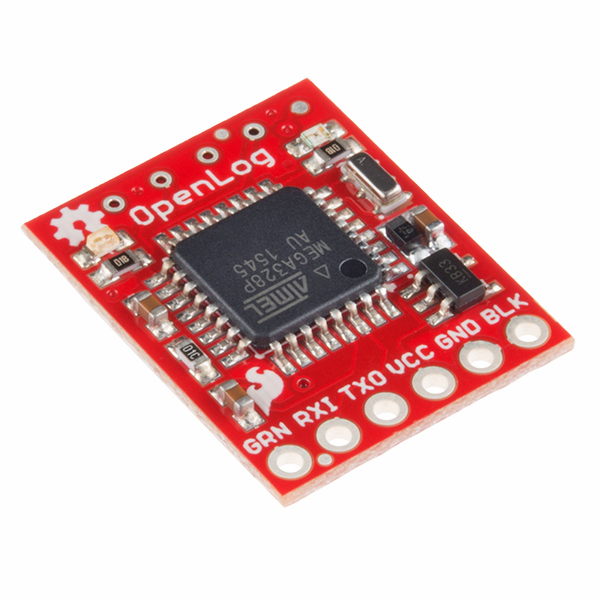
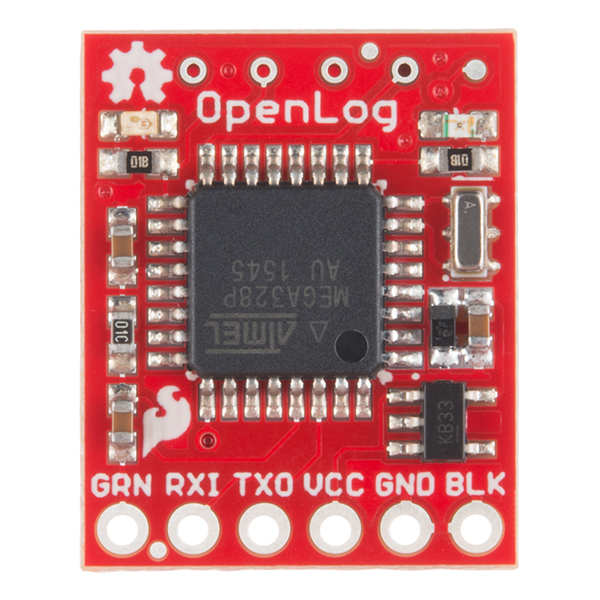
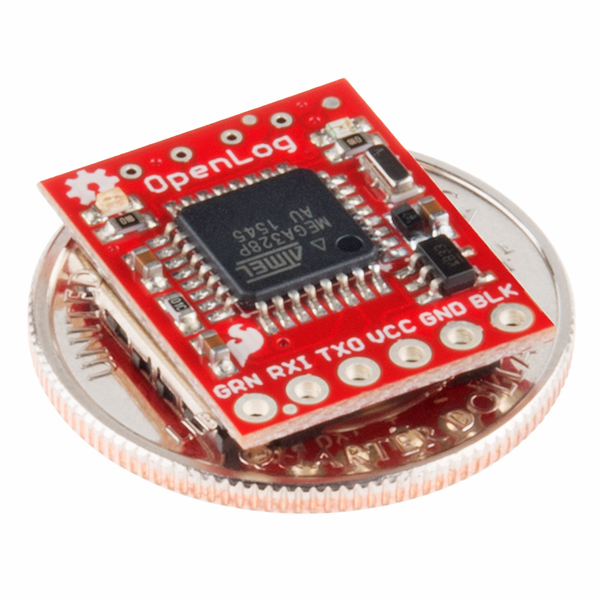
sku: DEV-09530
Description: OpenLog is an open source data logger. Simple to use, simple to change. We wanted to create a serial logger that just worked. Power up this device and it will start logging any received serial data at 9600bps. Sending Ctrl+z three times will drop out of logging and in to command mode. 'new' will create a new file. 'md' makes a directory. '?' brings up the list of commands. OpenLog doesn't do a lot, but it does log serial streams extremely well. Example:
That's really it! OpenLog firmware is open source and is based on Bill Greiman's sdfatlib. OpenLog currently supports FAT16 and FAT32 microSD cards (we've tested up to 16GB!).
All the design files (schematic, PCB layout, firmware) are open source released under the CC-SA v3 license and are available through GitHub.
Note: Although this device will run at baud rates higher than 9600, operation at higher baud rates can become unreliable because of the limitations of the system when moving data to the SD card. You can find more information on this and tips to help you get logging at higher rates here.
Features:
PRT-00116
Break Away Headers - StraightDEV-09220
Arduino Pro Mini 328 - 3.3V/8MHzPRT-00127
microSD Socket for TransflashPRT-00115
Break Away Female HeadersPRT-00553
Break Away Male Headers - Right AngleWRL-09358
Bluetooth Mate GoldCOM-08163
Flash Memory - microSD 1GBCOM-09433
microSD USB ReaderDEV-10915
Arduino Pro 328 - 5V/16MHzDEV-10914
Arduino Pro 328 - 3.3V/8MHzDEV-09218
Arduino Pro Mini 328 - 5V/16MHzPRT-09429
6 Pin Right Angle Female Header
Comments 217 comments
Got a couple of these, work exactly as advertised!
If anyone else is looking to modify the firmware and is unfamiliar with the workflow to get the serial bootloader working (like i was) then i can highly recommend Nate’s walkthrough of his process here:
http://www.sparkfun.com/commerce/tutorial_info.php?tutorials_id=142
(this took me heaps longer to find than it should have, and so i found lots of ways to not make it work in the meantime. Hopefully putting the link here saves someone else that pleasure…)
So, how do you actually upload a new version of code to the device?
The guide doesn’t talk about this particular model.
I can’t get ISP via usbtiny (sparkfun) or anything with stk500 to work with avrdude.
SPARKFUN
?Description: OpenLog is an open source data logger. Simple to use, simple to change. We wanted to create a serial logger that just worked. Power this device up and it will start logging any received serial data at 9600bps?
Datasheet (GITHUB)
?OpenLog is a simple serial logger based on the ATmega328 running at 16MHz. The ATmega328 should be able to talk to high capacity (larger than 2GB) SD cards. The whole purpose of this logger was to create a logger that just powered up and worked. OpenLog ships with a standard serial bootloader so you can load new firmware with a simple serial connection.?
I can?t get the darn thing to operate. I?m rather incompetent at some of this stuff . However, not just because of my incompetence, but also judging by the previous comments about the device, OpenLog is not as simple to get operating as stated.
PO?T
I’m trying my new OpenLog, but in Hyperterminal I see
12>
Why don’t start with
12<
????
I need the
New File Logging (default)
function.
Can you help me?
It looks like your unit is automatically entering command mode (‘12>’) instead of logging mode (‘12<’). Do read the datasheet over here: http://wiki.github.com/nseidle/OpenLog/datasheet
If you have any version above v1.0, you will be able to put the module back into automatic logging mode by using the ‘set’ command.
I haven’t been able to get mine working. Filed an issue over at the github page (http://github.com/nseidle/OpenLog/issues#issue/48)
Essentially the problem appears to be with activating the SD card, though the light that’s supposed to tell me it’s having trouble reading the SD card isn’t blinking.
Hi StarkRG. You get a big thumbs up from me. Thank you for posting your issue to github. Sounds like you had a heck of a time chasing down the bug, but it ended up being a cold solder joint on your header into OpenLog. Nice work! I’m glad you got it fixed.
Just bought one of these and I’m stunned by how simple is to set up and use. Just wire TX, RX, Vcc and GND; power it up and start sending data through the USART/UART interface of your microcontroller. Just be sure to cross the RX and TX lines. That’s it, you have a datalogger!
it is exactly what is written!! you have just to conect 3 wires. you dont have to write a single line of code in arduino. it is like a spy no the wires.
Got my OpenLog and it works perfect right out of the box. Logging data was cake! Using a PIC18F4620, basic UART at 9600. Works perfect.
Awesome product, I recommend it.
couple of questions, Is 8mA a constant current or Can it be turned off completely ?
Is there a website or project page to find more info or send patches?
Thank you,
Juan
8mA is what is takes to have the device on and waiting for a command. To power down the device, you would need an external control such as a MOSFET or transistor.
We don’t have a good repository spot yet. Maybe google code. Looks like there are a few people out there doing similar work:
http://code.google.com/p/sdfatlib/
For now, email patches to spark at sparkfun.com. Thanks! We appreciate any help.
If you modify the code to shut off the unused parts of the chip, you can get down to close to 2mA when nothing is being received.
It may be possible to go lower by setting the port pins to the SCI to consume less current when idle.
Beyond that, it becomes very tricky since the UART needs its clock to see a character and wake up. Otherwise there could be a deeper sleep.
There are some subtle changes between SD and SDHC. This page has a bit of information about it:
http://elm-chan.org/docs/mmc/mmc_e.html
Might be worth having a poke at the page here:
http://elm-chan.org/fsw/ff/00index_e.html
The sample projects may be of particular interest.
At the link, it talks about MMC v.s. SD, but I didn’t see anything at all about SD v.s. SDHC.
See the section titled “How to support SDC Ver2 and high capacity cards” – on the other hand, the firmware above also has support for SDHC…
This is very nice, less than half the price of the logomatic, much tinier, and with the more familiar AVR.
It would be nice to see this grow and gain the same triggering-on-specified-character abilities as well, I see a lot of promise in this!
Just got it working! Very nice.
Couple of hints for others.
—Default baud is 9600 8n1.
—Make sure your card is formated as fat16.
—If you hook it directly up to FTDI Basic don’t forget to cross the rx and tx lines.
The schematic shows an AVR328, 3.3v and a 16Mhz crystal.
One of the three values is wrong or Atmel has a new version of the chip. A 3.3v 16Mhz arduino would be welcome…
Good catch, maybe the idea is that the system works down to 3.3V but you need to update the firmware and fuse bits yourself?
oh it looks like the system runs on 3.3V always… which throws my theory out the window
well if it fails mysteriously, you know why
Hi TZ – Check the ATmega328 docs again. The ATmega328 can run within spec at 16MHz at 3.3V. Currently on page 318 of the datasheet inside Electrical Characteristics.
Do you have a link to whatever datasheet contains the 16Mhz/3.3v? I can’t find it – and I assume there is some specific suffix or something indicating the speed grade?
(And when are we going to see 3.3v/16Mhz Arduinos?)
Do a search for ‘atmega328’. It should bring up Atmel first. I’m looking at the 10/09 version D datasheet. Under the “Electrical Characteristics” chapter it shows figure 28-1, a linear line from 1.8 to about 4.5V. Assuming 1MHz/.27V, we can run 3.3V at 12.22MHz. So running at 16MHz @ 3.3V, we are not inside the safe gray area. This doesn’t keep me up at night. We test every board in production and haven’t had one fail yet. Once we prove FAT16/32 works at 8MHz, we may downgrade the resonator.
It probably works when you test it, but I’d worry about having one recording (or trying to) around Yuma, AZ next summer.
The firmware works on an Arduino Pro Mini at 3.3v/8Mhz to a microSD breakout (after fixing the frequency defs in the makefile and config). I didn’t check the second LED though :).
It would be slower at reading and writing – the maximum SPI SCK rate is used, which is based on CPU speed.
I’m incorporating the OpenLog design into a project I’m working on, but I’m having trouble finding the source files for version 1 on GitHub. Are these still available? I really just want to change to a slower crystal since I’ll be running at 3.3V. Version 1 sounds more stable and that’s very important in the project I’m working on.
It is possible to fix this overclocking with no change to the hardware. Set the CKDIV8 fuse, then first thing in the bootloader switch up to 8MHz with the clock divider register. Two instructions. No more overclock. The software needs rebuilt against the 8MHz library. I am not using openLog software exactly (need CRC on the data), but am using the same SD library, and it works this way. Open source is great, you can do what you need.
Could someone try putting an SDHC formatted with just a FAT16 partition (I have several cards but they don’t have any more stock as I write this).
At least that would confirm the hardware would work without change.
I just did (a 16Gb card) and it won’t get past the “1”. It is a FAT16 2g partition, the only one, as the first.
… and SD_RAW_SDHC was set to zero in the config, so the current firmware won’t support SDHC.
I suppose there is no arduino bootloader, so I’ll need a programming adapter?
The Makefile for the firmware link here is set to a 168, not a 328, though there seems to be some problem with the defines.
And of course nothing says what the fuses need to be set to much less “make fuse”…
I’m going to be busy on christmas day.
Hi TZ – please check again. The file called ‘Makefile’ in the zip listed above has ATmega328 listed at the top. And I’m not sure what you’re trying to do with a ‘make fuse’ command. You should never need to set the ATmega328 fuses.
I too am working on FAT32 – I won’t have one of these but I may try to do it on one of my arduinos.
Read works – I already have it scanning every partion (including an extended partition) for FAT32, then getting the boot sector and geometry, reading the root directory and able to read an entire file by following the FAT chain. In about 200 lines of code, 1 512 byte sector buffer, several limitations (512 byte sectors, no fs errors, short filenames only, etc.), but every FAT32 format I’ve seen does this.
I hope to get write working this weekend.
Another bit of strangeness – you have the reset circuit the same as the one on the arduino.
So connecting it to the arduino will result in the DTR line being functionally open – capacitor to capacitor.
Another (for me) annoyance is the inability to do binary. I suppose you could use a break condition to signal going back to command mode.
I agree, a binary interface is a good thing to have. There are many options that we intentionally left out to keep it simple. If there are options you’d like to add, help us out!
I have a 3.3v ftdi breakout (which works on all my arduinos).
I have it hooked up as in the datasheet on git, but avrdude can’t find it. Do I need 5v to do serial bootloading?
Nor can it find it if I connect it via ISP.
I can communicate fine in a terminal program and even work at different baud rates.
Does anyone have an avrdude command line that will recognize it?
Hi TZ – I use a 3.3V FTDI Basic (with a TX/RX swap in between) to do all my development. 3.3V is fine even though the regulator on OpenLog is probably dropping this to 3.2V.
To repeat for clarity -
It would help greatly if someone could give me an avrdude command line that will verify the above firmware’s hex file (I’m assuming that is what is in the unit), and one that will reflash it.
Also if there is anything tricky about using an ISP – the 4 data pins out of the six are on the other side. I’m using the sparkfun usbtiny but can try something else.
To use the firmware from the link on this page on a 3.3v arduino (e.g. pro mini) to the uSD breakout, you can flash directly using something like:
avrdude -c stk500v1 -b 57600 -P /dev/ttyUSB0 -p m328p -Uflash:w:main.hex
however the baud rates for the application will be off since the crystal is 8Mhz instead of 16. To fix that (so you can try enabling debug and SDHC) you need to add a line around line 76 of uart.c after it selects the baud rate by reading the eeprom.:
You will also need to adjust F_CPU to 8000000 in the makefile.
The breakout use CD. VCC and GND go to the 3.3 regulated out and grounds from the arduino.
The bottom four pins near the LED are the SPI.
From the bottom going up (10 going to 13):
pin func uSD
10 – SS – CS
11 – MOSI – DI
12 – MISO – DO
13 – SCK – SCK
SDHC cards are recognized if you set the option in sd_raw_config.h, and they can read FAT16, but doing ls, md, or trying to write will cause a reset (at least if debug is on).
2>disk
manuf: 0x03
oem: SD
prod: SU16G
rev: 80
serial: 0x7045eef6
date: 8/8
size: 15193MB
copy: 1
wr.pr.: 0/0
format: 0
free: 1029341184/1029816320
Connecting A2 (pc2, a/d2) on the arduino to the card detect enables that function – it works too.
Now flashing the openLog – there seems to be a problem between avrdude – linux ftdi – 3.3v ftdi breakout – reset on the arduinos. Note I have 3 FTDI breakouts all 3.3v and it happens on all three.
I have a similar problem on my 3.3v arduinos (but they have a button and I’m used to pressing it). Fortunately the square framed hold is “reset” and shorting it to the uSD holder will ground it causing a reset – and releasing it will allow avrdude to flash.
Hi all, if any of you are trying to flash the firmware, i have written a short guide which is aimed at getting the OpenLog working with the UAV Dev Board, but includes information on getting new firmware onto the board. Unfortunately windows based, using winAVR, but the avrdude commands should be the same anywhere i guess. The guide is here:
http://code.google.com/p/gentlenav/wiki/OpenLogConnection
I have found the code to be very unstable in my environment for some reason. The code as supplied works fine, and simple changes (such as changing some baud rate stuff to enable 19200) work fine. But anything more complex seems to cause the code to fail in wierd ways. It still compiles and loads onto the OpenLog board fine, but code unrelated to the changes i have made will stop working. ie the ‘ls’ command will print out half the disk information table, then the device will crash and reboot. Seems like some sort of memory corruption, although i would have thought the stack and heap should be ok, as code use is only about 50% of capacity. Any thoughts?
Just noticed the github link, have moved my code issue over there…
1) Which one is STAT1 LED and STAT2 LED? I just wonder it be better if different color coding is used or label on PCB.
2) I just send out serial character “Hello” from Atmel to OpenLog. What should I expect as output? Will I see a text file if I read SD card from PC?
Thanks!
Finally, up and running. My unit is in command mode at power up ( I guess ver 1.1 will be different). It took me quite a few hours to guess. I think the best is to connect the unit to Hyperterminal or Tera Term or any terminal emulator. This will help you in debugging. Also, please don’t forget to send line feed character after every command.
good luck,
Great idea about the different LED colors. I’ll try to get that changed on the next run of boards.
Please see the datasheet for the LED definitions:
http://wiki.github.com/nseidle/OpenLog/datasheet
STAT1 LED is the LED right of the word OpenLog and is sitting on PD5 (Arduino D5). This LED toggles on/off every time a new character is received. This LED helps troubleshoot and indicate serial communication is working.
STAT2 LED is the LED left of the word OpenLog and is sitting on PB5 (Arduino D13). This LED is attached to the SPI Serial Clock line. You will see this LED flash rarely. It only turns on when the SPI interface is active and this is rare as the OpenLog buffers 512 bytes at a time before recording to the SD card. Recording 512 bytes is very fast so the LED is on for very little.
I successfully fed data into the logger and it works as expected.
Is it a “must” to read out the logger with a separate FTDI breakout or is there a way of using the Arduino for that? I can’t find a hint or even a tutorial.
To read the contents of a log, I usually pull the card from OpenLog and use a microSD to USB card reader like this one: https://www.sparkfun.com/commerce/product_info.php?products_id=9433
You can also read a file from the command prompt. We added the ‘read’ command in version 1.2 of the firmware. http://wiki.github.com/nseidle/OpenLog/command-set
read file start stop
Example: read LOG00704.txt 0 100
will output the first 100 characters of the log file to the terminal (only visible ASCII characters will be visible).
http://harleyhacking.blogspot.com/2010/01/fat32lib-01-zap-your-card-edition.html
Alpha quality, but for really early adopters…
Flashable firmware, source with build-able library and sdhc driver. FAT32 only with 8.3 names only, but 11k for the lib and sd/sdhc driver.
Direct link: http://www.zdez.org/fat32lib-0.1.zip
As usual, I missed a few things. Update code and link:
http://www.zdez.org/fat32lib-0.1a.zip
The addition of a real-time clock would make this perfect for some apps I have in mind. Even if the clock’s only function is to put a timestamp on the log files.
I was wondering if anyone ran into the issue of a microSD card not support SPI mode?
I was reading that this is optional for microSD cards is this true?
I have a dozen (different!) from 512Mb to 16Gb – all support SPI. I don’t think it is optional (even for SDIO).
I don’t know about the earlier MMC, or how compliant the SD models are.
http://www.interfacebus.com/MicroSD_Card_Pinout.html
The SPI mode is optional in the microSD format.
http://en.wikipedia.org/wiki/SD_Card
All cards must support all three modes, except for microSD where SPI is optional.
The link doesn’t go to the spec. I’ve seen discussion on MMC cards but don’t have a full spec. On MMC, SPI is optional, but that doesn’t tell me precisely how to talk to one (where it is different from the SD cards).
But there are no micro MMCs.
Hi
How do I connect this to Arduino Duemilanove?
for mini:
GRN: Reset pin and connects to the GRN pin on the Arduino Pro Mini. Pulling this line low will reset the ATmega328. Because there is a capacitor on this line, holding this line low will not keep OpenLog in reset.
RXI: Serial input into OpenLog.
TXO: Serial output from OpenLog.
VCC: 3.3V to 12V input.
GND: Ground
BLK: This pin is connected to GND. Connect this pin to BLK on the Arduino Pro Mini.
Thanks
For the adventurous:
http://github.com/tz1/hyperlog
Works at 57600 default. Other baud rates by adding a 1-line (with line ending) HYPERLOG.CFG file containing the baud rate, e.g. “115200”.
Boots and starts logging. Break flushes, plus flush timer.
Hi tz,
Link broken
I can’t edit it here.
http://github.com/tz1/sparkfun in the hyperlog directory (source).
I’ve been testing these modules prior to installing in some equipment, ready to log long term on a beta product.
Apart from teething trouble at the start (the instructions for flashing are now out of date), I have managed to recompile and flash the firmware correctly. I have changed the code to 115200 in all cases.
I am using a 2gig SD card (not SDHC). Amongst other testing, I tested the open log by filling the card with 1.6gig of data (a 1.6gig file), then inserted the card into the openlog device. It fails to log with an “error writing to file” always. If I reformat and do not put 1.6gb data into the card, it always works correctly, it can log data.
My query is, has the openlog been tested to capacity of a 2gig SD card. Has anyone actually managed to fill a 2 gig card without errors?
I’m wondering at what point the logger starts to fail?
Any ideas?
ok. A bit more testing later. The logger fails when just over 1gig. Is this known about?
I’ve started an issue on GitHub for you:
http://github.com/nseidle/OpenLog/issues/issue/20
I need to do some additional testing with very large log sets such as yours. The current solution is not great, but try to keep the microSD card as clean as possible. Having lots of extra files (large ones) on the SD card will cause the write times to increase.
Can the something like the Arduino read the file from this card and be able to transmit the information over an xbee to another xbee to store on another open log device?
I finaly got arround to tinkering with this. I connected it to my openlog with a 5v regulator and heat sink to power the vcc on both and so far the results are amazing. It was a bit of a challange to build a box but I have replaced a serial printer on a phone system with the openlog a 2GB SD card this RS232 Shifter SMD, project case. I reccomend a 5v power regulator and heat sink even if you have a 5v power supply because a quick test of any power supply on a multimeter will show you they all lie and with the high side of the openlog at 5v there’s just no point risking it all for a 2 dollar part.
If I could change anything about the openlog I would give it the option to write/read it’s settings to the flash card so they could be backed up, would not constantly write flash for file name incraments, could switched easily by swaping cards with two different pourposes, could easily be reset if bodrate etc was forgotten you could just format the sd card.
Great idea:
http://github.com/nseidle/OpenLog/issues/issue/21
I’ll work on that next week.
OpenLog can now be configured from the CONFIG.txt file. New firmware v1.6 adds this feature.
I lost track of this project for so long I didn’t know you addressed my ideas. I will be loading the new firmware to mine to take advantage of these new features you have added. That will make it much easier to use and copy the settings of the OpenLog. Thank you Nate!
I should note on my advice to use a 5v regulator like an LM7805C I did find out the hard way that the LM7805C needs about 7.5V to power It’s self correctly and supply 5V.
I’m having trouble withe the OpenLog dropping data. I’ve seen the problem at 57600 and 115200 baud. Here’s an example of the problem. I’m trying to log the sensor data for my AVC entry. The first column is the data point number and the second column is the time in ms.
2634, 134048, 80, 309.7, 512, 0, 0, 39.98120880, -105.24263000, 11.1460, 0.3200, 2.4900, 0.0000, 94.6021, 3
2635, 134098, 16, 310.3, 510, 0, 0, 39.98120880, -105.24263000, 11.090, 39.98121261, -105.24263000, 11.0720, 0.3500, 2.0600, 0.0000, 94.6038, 3
2641, 134398, 0, 309.7, 522, 0, 0, 39.98121261, -105.24263000, 11.0720, 0.3500, 2.0600, 0.0000, 94.6038, 3
2642, 134448, 0, 309.7, 510, 0, 0, 39.98121261, -105.24263000, 11.0720, 0.3500, 2.0600, 0.0000, 94.6038, 3
Sorry for the long lines, but you can see that data points between #2635-#2641 are missing and the dropout takes about 300 ms. This test was done at 115200, but I see the same thing at 57600. These sorts of dropouts appear in my data stream about every 0.5 to 1 second.
I’ve got the OpenLog hooked up to the Serial Tx of an Arduino Mega. If I look at the data stream via USB, it’s rock solid. No dropouts.
Any ideas?
Running the SD Card formatter from http://www.sdcard.org/consumers/formatter/ seems to help, but I still get about 1 glich per minute of data.
That sounds about right for a full cluster (1 minute at the rate). The current codebase has to first link in a new cluster (one or two read-writes, perhaps more since the code doesn’t appear to try to minimize this), then write the sector data (read-write if buffered), then it updates the directory entry (another read-write). One other thing is that the code waits for the transaction to complete, so there is no overlap – you can’t be filling the sector buffer while the SD card is busy finishing the last write.
115200 is about 100uS per character, or 10 per mS, so you have about 50mS before you go over 512.
For my FAT32 library (at github.com/tz1), I write the sector, then link the clusters if needed, and require a call to update the directory entry, so it is 3 operations, write-read-write, with the final one allowing for overlap while the card is busy, or more if the next free cluster needs searching more sectors: w r(r..)RWrw.
Scott – this issue is resolved in v1.4 of the firmware. See http://github.com/nseidle/OpenLog/issues#issue/12
Hi there.
Bought one time ago but I would need the new “read” command to avoid removing the card everytime.
I found the source code on the site but…
can someone help me in the whole process? compiling and bootloading?
No way to have the hex files ready to be bootloaded?
Forgive me. I a beginner, never used winavr or whatever.
Any help would be appreciated.
Many thanks in advance.
Hi Mario – Good idea! Another customer pointed out how nice it would be to have a compiled hex of the latest firmware, so I added it here:
http://github.com/nseidle/OpenLog/raw/master/Code/main.hex
I’ll put this link in the product description as well. Since this is a hard link to the github page, you won’t be able to tell the version until you upload the file to OpenLog and type ‘?’. Version # is shown at the top of the menu.
To physically load the firmware onto OpenLog, you will need a serial connection. This is normally done with an FTDI Basic board. More info here: http://wiki.github.com/nseidle/OpenLog/flashing-firmware
My Openlog works well when connected via a FTDI Basic to Hyperterminal at 9600 baud. However I want to connect to TTL feeds at 4800 baud. Can anyone provide the firmware update that will (say) replace the currently available 2400 baud option with 4800 ? Thanks
Hi – I just added 4800 and 19200bps support in v1.5 of the firmware. I also just updated the step by step instructions on how to update the firmware here: http://wiki.github.com/nseidle/OpenLog/flashing-firmware
Hi,
I just received my openLog. Unfortunately, I see only empty files or files with 32kb of giberish (as seen in emacs). I am using 2Gb microSD card from Samsung. At the power-up the first led flashes and then he second flashes and stays on. I did verify that the card is FAT16 formated.
I do not have FTDI Basic so I can’t really debug with a terminal.
Question: is the default to start logging data or to wait for a command from terminal?
never mind!
Thanks Nate, 4800 baud works well. I had a few teething problems with avrdude and finally found that I needed to get a copy of libusb0.dll and add it to the Win32 folder. After that it all worked as your upgrade firmware sheet said. Many thanks a great result for me. John W
Hrmm. I’m guessing because my machine had WinAVR already installed, that it also had libusb0.dll installed. Looks like it’s also in the Arduino root directory. I’ll add a note to the upgrading firmware page. Thanks!
Hi,
We’re using a few of these to log RFID via an Arduino Nano – in most cases this is working great, but a couple of the OpenLogs seem to have fallen into an unresponsive state – no serial response, no LEDs, no reset response. Connections look fine, no apparent damage on board. Any thoughts?
Rob
Please start an issue on GitHub so we can diagnose it. We need to know what version of firmware you have. The RFID unit may be sending ctrl+z to OpenLog causing it to enter command mode instead of continuing to log data. v1.51 of the firmware corrects for this by allowing for multiple escape characters. If you ever get OpenLog really stuck, there is a safety mechanism built in: http://wiki.github.com/nseidle/OpenLog/
Hey Rob, I ’ve recently been having some trouble with Logomatics failing with inconsistent symptoms after use in a clinical research environment. The problem turned out to be various .1uF decoupling caps breaking down on different parts of the boards. I’d be interested to hear what happens if you replace the two .1uF caps on your OpenLog units. You could also just do a continuity test across them first. A short across one of those would certainly explain an unresponsive unit.
Have done, thanks
I’m using a FTDI 3.3v (DEV-09717) cable connected to my OpenLog. Using teraterm on COM10 I can make a connection to the device. all is good.
to upgrade the firmware I’m using the follow cmd:
avrdude.exe -p atmega328p -P COM10 -c stk500v1 -b 57600 -Cavrdude.conf -U flash:w:main.hex
and get this response:
avrdude.exe: ser_open(): can’t open device “COM10”: The system cannot find the file specified.
I have put libusb0.dll in the system32 directory.
is the problem that arvdude can’t handle high number com ports?
thank you
gek
I did a little hacking with regedt32 and changed the comport from 10 to 3. I can now update the firmware.
see:
http://www.ftdichip.com/Documents/AppNotes/AN_132_Re-Assigning_COM_Port_Numbers_Using_Registry.pdf
The registry remembers all FTDI converters that have been used. The driver does not reassign unused comport numbers. In some cases that a good thing. It would be nice to be able to “reserve” a set of comport numbers to be reused as devices are used and removed.
Thanks for posting your solution! You are correct – some USB COM ports get large enough avrdude can’t see them.
I’ve got a wiring question about the openlog unit I just ordered and received. I currently have a daq unit set up to receive data from a few instruments and send it on request as a serial data stream via a usb connection on a com port I manage with a basic hyperterminal-like program (only in windows 7).
What I’d like to do, is initiate the daq unit’s serial data stream from the instruments by laptop and have openlog record the data to SD while I leave the whole unit unattended for a couple days.
what I’m wondering is if I can just clip the signal wire between the daq unit and the usb terminal and solder the open log in at that point and let it run (assuming I’ve wired up the vcc and gnd too).
Will that work? also, will my data “flow through” the openlog and be able to still be accessed by usb too? I’d rather not have to interface with the openlog if I don’t have to and I have very little experience with electronics or programing.
thanks for your help,
Justin
Hey Jeellis2, This is an interesting question. I would like to say the simple answer is, this should work. The more complicated answer is that it should work if your baud rates, and voltages match with the ULog and daq. Also I think that you can splice the Ulog into the system without data flow problems. I think as long as you only power the Ulog when you want to record data, it could stay in your system permanently without interfering with the general flow of data when it is not needed. Thanks
Thanks for the reply Single T, I’m trying to change the baud rate right now and I guess I just don’t understand how the interface is supposed to work.
I’ve tested the openlog with the Arduino and it logs data very nicely that I can access on the SD card. However, I was under the impression that, upon being powered up,the openlog would create a config.txt file on the SD card that I can edit to change the settings.
Am I wrong? Am I missing a step? Why might there be no config file on my sd card?
Thanks again!
Regards,
Justin
Gentlemen!
I am trying (unsuccessfully) to flash the firmware in my OpenLog using usbtiny.
I have connected MISO, MOSI SCK, VCC, and GND pins of OpenLog to corresponding pins of the programming cable. I am using this avrdude syntax:
avrdude -c usbtiny -p atmega328p -P usb -F -U flash:w:main.hex:i
And getting this:
avrdude: initialization failed, rc=-1
avrdude: AVR device initialized and ready to accept instructions
avrdude: Device signature = 0x000000
avrdude: Yikes! Invalid device signature.
avrdude: Expected signature for ATMEGA328P is 1E 95 0F
avrdude: NOTE: FLASH memory has been specified, an erase cycle will be performed
avrdude done. Thank you.
I have noticed that we have 1k resistor on SCK pin (17). Is it the reason? will simply removing it fix the problem? or should I somehow remove the bootloader first?
Thank you,
James
N.B. I can program stand alone AVR’s…
Why are you trying to do ISP on the AVR? OpenLog ships with an easy to use serial bootloader to avoid having to hardware program the AVR. Please see ‘how to upgrade the firmware’ page: http://wiki.github.com/nseidle/OpenLog/flashing-firmware
I do see that you don’t mention attaching to the reset pin. This is perhaps why your programming is failing.
The 1K resistor on the SCK pin is there to limit the current into the green LED.
Alright, finally got mine to work with the bus pirate. Here is what I found out:
to format FAT16 with dos in xp:
c:>format e: /fs:fat
*where e: was my removable uSD drive
fat can only handle up to 4GB, i was able to try both 2GB and 8GB. I could not figure out how to partition the 8GB with XP and could not format the 8GB. The 2GB worked fine.
I was not able to get to command mode with the bus pirate. Ctrl+z or decimal equivalent 26 or 0x1A three times only result in garbage output. I will try directly connecting to the rs232 of my pc later to see if this gives me different results. I’m a little sick of decrypting hex input and output from bus pirate.
Hi there,
the OpenLog makes my current project a lot easier than expected, but there is one thing that could be optimized, maybe you know more:
Is there any possibility to reduce the bootup time of the OpenLog, for example by bypassing the bootloader or something.
I only want to read from the module, ideally as fast as possible after startup.
What do you think?
Martin
The boot-up time shouldn’t be longer than 1-2 seconds. The bootloader does need some time to time-out (it’s less than a second). Are you power cycling your system? How fast do you need it to boot?
Hi Nate,
yes, at the moment it is about 2 seconds. Maybe it is a litte faster vith firmware v.2. But a bigger improvement would be to burn it without a bootloader…? Are there pins to do this like on the standard Arduino?
My target is to let it boot in less than 300ms.
Boot time under 300ms is possible but you will have to reprogram the ATmega using the ISP connections (reset, MISO, MOSI, CLK, and VCC/GND). These are exposed under the SD socket. Not for the lay user, but if you really need it, that’s how you would do it.
Hi, I need to record rs232 serial data from a pc then play it back through a servo controller. I figure this will record the data but can I play it back directly into my servo controller. Normally the PC goes straight to the controller card but I want to eliminate the pc in the field and just play back a recorded sequence from this card. Anyone know if this would work? Or a better idea?
Thanks
Can the Atmega328p take a 5V signal on its serial in, or is it only 3.3V? I don’t want to fry this little logger…
The ATmega can handle 5V signals without a problem.
I had the same question. The 328 data sheet says Vih max for any pin is VCC + 0.5. Since you are powered from 3.3v, the highest voltage on any input should be 3.8v
What is the status on the FAT32 support? I have noticed that tz has created something, do I flash the openlog as if I were updating the firmware? Possible link to the most up to date version of tz’s FAT32 SDHC code?
Thanks
Hi Rocketman – we’ve released v2.0 on GitHub last week. v2 supports FAT32 and up to 8GB (the biggest microSD card on my desk at the moment). I’m still hammering out some smaller bugs so we’re not shipping with it yet, but it’s an Arduino sketch now, so updating the firmware should be much easier. Please give it a try and let us know what you think!
Updated to V2.1 w/ Arduino 00118 after having the repeated 12< problem. The logger creates new files, and can be interfaced over the serial port, but the log files are always empty. Connecting to an Arduino Pro Mini 328 5V 16Hz.
Also, the reference to how to upgrade the firmware should be taken off, I only figured out that flashing the Open Log was no longer necessary when it was discovered that there is no main.hex file anywhere to be found…
I still hope that I can get my Open Log to work!
Thanks for the recommendation. I’ve updated the Flashing Firmware page to reflect the differences between v1 and v2. Please feel free to edit the wiki pages if you see lacking information somewhere. I can always use help :)
Not sure why your OpenLog is not logging. Always start with a serial connection to a terminal window so that you can more easily troubleshoot the problem.
The v2 code is just awesome! Now I have the ability to eliminate the Arduino that I had use to sort through the data stream. Question: If I were to add some code that would analyze the data, and choose what to log. Which loop would that go in? (I am not a strong coder)
All the magic happens in the “uint8_t append_file(char* file_name)” function. Be careful though – OldLog wasn’t designed to filter, it was only designed to record everything thrown at it. By adding too much character checking, OpenLog will get bogged down and may begin to miss incoming serial characters.
Was not expecting a quick response. =] Thanks for letting me know where the “magic happens”. I will post my results after messing around with it.
Thanks again
Hi, great stuff, already started to assemble five Razor 9DOF+OpenLog for my experiments ;–)
However, I struggle to get this combination working and hope somebody is able to help me with this. I can connect to the OpenLog with the FTDI cable but “disk” only returns a “error reading disk info” and recording fails as no logfiles are created.
I’m using the 1.61 firmware with a 2GB card from SanDisk.
I already had to format the card once with a FAT 16 filesystem and also tried to repartition under Linux (mkfs.msdos)
Any ideas what could cause these troubles?
Thanks!
BTW: I strongly support the idea of creating a trimmed-down version of the firmware that only supports raw logging, i.e. without the menu etc. This would not only allow – as you suggested – to increase the buffer but may also to add additional functionality.
Thanks!
With the 2.2 firmware I was now at least able to read out the card’s info:
Card type: SD2
Manufacturer ID: 3
OEM ID: SD
Product: SU02G
Version: 8.0
Serial number: 2611410752
Manufacturing date: 11/2009
Card Size: 1931264 KB
Different question concerning the latest 2.2 firmware:
I just tried to use that firmware trying to solve my problem mentioned earlier and found something weird: Although the baud rate is set to 9600 (no config.txt on the card, menu output) I have to connect to the OpenLog with 19200 bps…
Hm, the 2.2 firmware is able to read out the disk info (see above) but if I let Razor AHRS and OpenLog run for a couple of minutes the logfile is there but empty :–(
First meaningful data with Razor 9DOF AHRS set to 19200 bps and OpenLog (v2.2) to 9600 bps???
This works great!!! — but is there a way to stop the blue LED (STAT1, to the right of the ‘g’ in “openLog” written on the board)?
It keeps flashing, perhaps to indicate serial communication between my arduino board and the openLog.
I want to do day-long logging of biometric signals (initially at a high data rate, to figure out what is going on, then hopefully at a lower rate) – and I wonder how much of the battery gets used up by the blue LED flashing non-stop.
Right now I am just using an Arduino mini, an openLog, and a 3-axis accelerometer, and logging x,y,z at 4Hz draws 10mA from the battery!
Thanks,
PLM.
Good question. The blue status LED turns on/off with every other character received. It would save only a few milliamps, but it may be worth it to add an option to disable the LED. I’ll put an issue into GitHub.
Is there a way to use an RTC with this device simply to get a time and date stamp for free running logging operations? Has someone done this?
Thanks,
KB
Adding RTC to the ATmega is fairly trivial, but it will become pretty inaccurate over time. The resonator on OpenLog will probably drift minutes of time over a 24 hour period. You would be better off if you relied on the system that was outputting the serial data. For example, the temperature logger I built had seconds as the first number, then the temp:
5662, 14
5665, 14
etc.
OpenLog simply logged the incoming data whenever it arrived.
One problem with my Logging V1.61:
I can not use any set Command. I sent:
“set New File Number”. And it replied:
System Configuration
Current boot mode: Command
Current escape character and amount: 26 x 3
Change to:
1) New file logging
2) Append file logging
3) Command prompt
4) Reset new file number
5) New escape character
6) Number of escape characters
x) Exit
Oh! Sorry, it’s not that complicated. Type ‘set’ (no single quotes) and press enter to get into the settings menu. Then type ‘4’ and press enter. It should then reset the new log number to LOG00000.TXT.
Hi guys,
I’m having some troubles with my OpenLog.
Here’s the setup:
OpenLog FW:2.21
PC –> FTDI basic breakout –> OpenLog.
2Go micro-SD formated FAT32, with only 2 files : config.txt and settings.txt (406 bytes long).
I open a terminal app (TeraTerm) on COM3, 9600,8N1.
I can read both files with the read command.
But, if I first try to get the size of a file (ex. “size settings.txt”), and then try to read the same file (with or without any parameter), it ends with an error to open the file… ;(
Then, I have to switch off and on the OpenLog to be able to read a file again… the “init” command doesn’t change anything.
Any idea ?
thanks.
P.S: I tried to restore FW 1.61, but each time avrdude says everything is ok, but I get the blue led dimmed (like pwm'ed at ~20%), and no communication at all …
Hi – sorry I missed your comment. Please post issues to GitHub. I’m able to see them much easier there.
I am able to re-create what you describe. Nice bug find. Very odd. I’ll create an issue and see if we can get it fixed in the next version.
Issue 50 resolved in v2.4:
https://github.com/nseidle/OpenLog/issues/closed#issue/50
Great ! Thanks :)
I am having an issue with my openlog, it stops logging after about 15 to 20 minutes even though the blue status light still blinks. I am using a 2GB card, and have it hooked up to a Lilypad. Does anyone have an idea of what could be happening? It did seem to work longer on the first day that I used it. Any help would be much appreciated.
Thanks, Julio.
Hi Julio – please post your issue to github so we can track it. Please fully describe your setup. What voltage are you running the LilyPad at? What power source are you using?
Have you fully erased/formatted your 2GB card?
Has anybody used this for over a few days without stopping? I have found a problem that after about 10 hours or 5 mb of data some numbers start to be replaced by letters. The replacements are always the same eg. 0 turns into p.
Any thoughts on this?
Hi Autocar – please post your issue (it does sound like you’re having a problem) to Github. There we can track it and resolve it much easier.
I am currently concentrating on large volume, high speed data recording. I haven’t run any long term tests like you describe but I would really like to look at some. Please post to the issues and we’ll get some people to help. Thanks!
Bought the OpenLog a few months ago and left it in a drawer. I finally found the time to try it out this week and I cannot get it to work to save my life…
Basically the green LED blinks three times indicating no SD card initialized constantly. I have tried several different SDs (SanDisk @2G, PNY @2G and 4G), made a point of formatting them to FAT16 (using a number of different methods), all to no avail. I reflashed the OpenLog to the latest firmware, now I can see a “1 error card.init” on power up.
This almost appears to be a hardware issue – has anybody else had similar issues?
I just hooked up a OPenLog to my Arduino Duemilano .
I tried the OpenLogTest.pde file. The led on the OpenLog indicates it is getting data but I see no files being created.
I even created a CONFIG.TXT file — It did not create one.
I am using a 2GB card. I did not format it , but my PC reads it just fine…
Any ideas?
Could I have overwritten the Flash, if it was connected when I downloaded a sketch to my duemilano. It seems to use the same I/O pins??
Thanks
It’s really very hard to accidentally re-flash OpenLog’s firmware.
Start simple. I would format the card and make sure that config.txt gets created when powered up. Once the file is there, try sending it a few serial strings. The example Sketch is meant to really hammer OpenLog to its extreme at 57600bps. A default OpenLog is default to 9600bps so you probably won’t see anything but gibberish in the log files.
HardWare keylogger, anyone?
Been using OpenLog for 3 days now. It’s exactly what I was looking for. Works like a charm (once I understood how to enter command mode ;–)). I am using Kubuntu with a Seeeduino V328.
This is an excellent example of a product which simply works, period. Thanks Nate.
Regards, Garry
Sorry, I forgot!, Merry christmas.
Can I flash version firmware 2,41 while connected to my Seeduino, or will this only work with an FTDI board
regards, Garry
Nope, forgot the DTR
Garry
It’s best to remove OpenLog from any system when trying to update the firmware. Too many things sitting on the TX/RX bus is a scary thing.
How easy is it to wire this up to the SD card socket break out board? http://www.sparkfun.com/products/204
A royal PITA? I’d rather not have to get the MicroSD socket BOB, too.
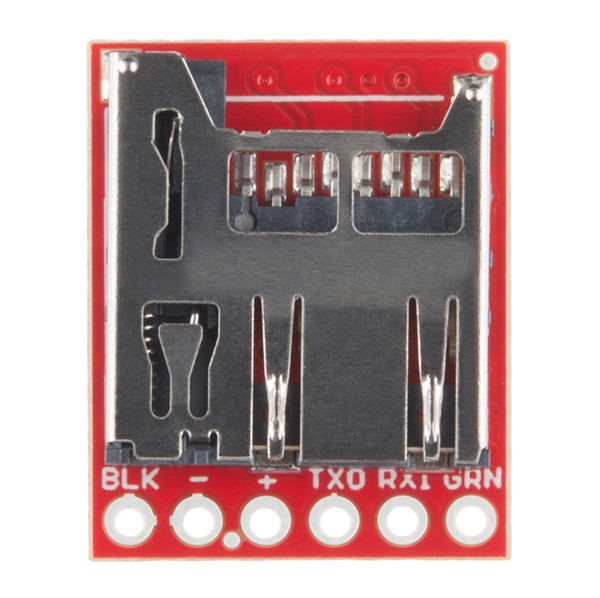
OpenLog has a microSD socket built in so you don’t need to wire up an external socket.
I bought one of these.. but cannot get it to work.
I dont have the FDTI cable, so I cant use any of the commands. I’m just sending text to the serial monitor, is it just supposed log? or is anything additional that needs to be done? as far as wiring the rx on openlog should be connected to the tx on the arduino?
You are correct, you should only need to power OpenLog (5V/GND from the Arduino) and TX on the Arduino to RX on OpenLog. You really should wire up an external comm port so that you can see what’s going on. Depending on when and who you got OpenLog from, it’s hard to say what firmware version you have.
How is long term (months) stability at low/moderate logging speed? I see some comments having problem with this.
/
Hello, I have a card to make and i want to know, how a can program the Micro-SD.
It’s possible to program the Micro-SD with for exemple an ATmega16 ? and can we connect this card to the ATmega16 UART ?
Thank
Good question – I haven’t personally run tests longer than a few weeks. But we have had thousands of OpenLogs in the field for over a year. There are always some technical issues but none that I have heard of intrinsically to problems logging over very long periods.
OpenLog should be fine. I recommend power cycle or resetting OpenLog every 24 to 168 hours (1 week) so that OpenLog closes its current log and opens a new log.
I need to transmit the data stored in a SD card that is inside a datalogger Openlog with xbee, How can I read the data remotely through openlog?
You would need an external controller to put OpenLog into command mode. Once in command mode, issue the ‘read’ command for whatever file you would like to look at. Once OpenLog starts outputting the text, you would need to read in that text and output it to an XBee. You may be able to chain two items (the micro and the XBee) on the TX pin of OpenLog.
would reading the sd card cancel recording?
i would imagine it would go something like this…
log to file1 for duration1
@ end of duration1, close file1, log to file2 for duration2, read file1 and send over xbee
rinse and repeat.
can the openlog do both simultaneously?
thx
Just tested my OpenLog device. Works great at first step but pushing it up a little makes it losing data quickly…
Sending a continuous data flow to the OpenLog at 9600bps is ok. But it starts loosing some bytes at 19200bps.
I am quite disappointed as the description & datasheet pages say that it’s working at 57600bps and even at 115200bps! :–(
Hi greydet – please open an issue ticket on Github so we can better track your problem.
* What are you hooked up to? Arduino? PIC? Other?
* Are you using Arduino v21(good) or v22(does weird stuff at 57600)?
* What size microSD?
* Is there anything else on the card?
Many questions – please use github and we’ll help you out.
It says that the chip has:
“Configurable baud rates (2400 to 115200bps)"
but
"Doesn’t drop characters even at full-blast 57600bp"
So what is the maximum baud rate that this chip can take without dropping characters? Has anyone tested this chip and found the the actual max baud rate and storage capacity?
I test OpenLog regularly. The current version (2.5) is able to record 33kb of data at 57600 onto a fresh 8GB and 16GB microSD card without dropping characters.
Please see this issue for a great breakdown of what can be recorded at different baud rates with different types of SD cards:
https://github.com/nseidle/OpenLog/issues#issue/62
Can I use this with 9 Degrees of Freedom – Sensor Stick
sku: SEN-10321?
Yes. But it takes a bit of hacking. I had to wire the A4/A5 (SDA and SCL) pins on the ATmega to the sensor stick. This requires some spot soldering of wire wrap wire. You then have to reprogram OpenLog to log I2C. Not hard, but not trivial.
http://www.sparkfun.com/news/499
Hi – I am trying to use this board along with a the 9DOF Serial AHRS board. The 9DOF is putting out what I expect over the serial port. When I connect the OpenLog, the blue light blinks and it appears to try to read, but I get mostly glitchy output at 57600. Any suggestions? (sample output below). OpenLog reads the CONFIG file correctly and makes a new file for the data but it’s glitchy… (though it looks OK when I read the serial port not through OpenLogger – gives good 9DOF outputs in Arduino Serial Monitor).
372
38SH¯416
·j
5SH®Ÿ≤j
!ANîjÇ.0L r72 r∫4C·!ANG:Krí2,1.78,1.sLC·!AÍÈ-1.05,3.0&˘&)Ój
!ANG:K& íbìâ.b˛&)Çj
!ANîjíríÆb~M Vb˛&)éj
!ANîjNräÇ,6.79,4.73
!ANGßIríÇbÓr≤Çb5.12
This is a known issue with Arduino v22 and the AHRS firmware, not OpenLog. See these closed issues on Github:
https://github.com/nseidle/OpenLog/issues/closed#issue/38
https://github.com/nseidle/OpenLog/issues/closed#issue/63
Solution: Use Arduino v21 to compile AHRS firmware or change to ANY other baud.
Usefull thing!
I was wondering if there is any way to set this up to transmit data on startup.
My project idea is a gps logger, but it looks like the gps has to be initialized first. I imagine it would be easy enough to edit the firmware but only the hex file is posted.
Thanks
Hi – Please do see github. All the source is there including the main Arduino sketch called OpenLog_v2.pde.
I’m having a huge problem with one on firmware 1.6. It just keeps giving me ‘cannot create config file’ and ‘too many logs’ even with a clean formattted, SMALL card (16 MB). SOme other cards simply cause it to send a series of 1’s.
Please open an Issue on Github. I’m less and less familiar with version 1 these days but I’m happy to help where possible.
Hello,
I got one openlog, but I currently am unable to get it to work. When I power it up, it outputs the 1 over an FTDI converter and then it stops. Blue LED will blink 3 times after a while (= problems initializing the card). So far so good. I tried to update the firmware to the newest 2.41 version, as I’m using a 4GB SDHC (Toshiba) card (formatted FAT16 and FAT32, both didn’t work). I’ve downloaded the newest firmware from the github and tried to bootload it. The bootloading seems to work as V1 can be bootloaded without any problems, but when loading V2 avrdude reports me an error. It starts programming 32768 bytes (which is maximum of the ATMega) and during verifing I’m getting the error:
avrdude.exe: verification error, first mismatch at byte 0x7800
Strange is also, that the file sizes between V1 and V2 are very different. The current V1 hex file has 69.108 bytes and the V2 hex file (filename: OpenLog_v2.cpp.hex) has 247.589 Bytes?!
Anyone any ideas?
Greetings from Germany,
Mike
Got the solution. If you are on the github webinterface (https://github.com/nseidle/OpenLog/tree/master/OpenLog_v2/) do NOT just right click on the hex-file and “save-link-as” it! You should click on the hex-file-link which then takes you to a new page. There you will see a lot of numbers and characters (Intel hex format). On the right there’s a link called raw. Right click there and do the “save-link-as” there. Then you’ll be downloading the wanted hex-file. Flashed it and openlog works like a charme with my 4GB (FAT32) SDHC disc.
I just love it!
Awesome project, I really appreciate it!!
Regards,
Mike
Nice work Mike! I’ve hit that same problem with Github. Glad you got it worked out.
I’m not sure if mine is bad or not. I plug it into power, and the serial terminal receives a 1 repeated every second with a sdhc card plugged in. When I unplug the sdhc card, the character changes to the ‘n’ and when a character is typed into the terminal (putty) it changes to the ‘u’. I think I may have broken it, however, the fact that the output changes when I modify conditions makes me think that it is still functional.
I have attempted to re-flash it using the command prompt utility, however no luck.
any help?
-Alex
I have very similar problem. Try hard re-flash (w/ Arduino as ISP if nothing else )
Actually, I have it up and running right now. What voltage are you using to power the logger? I was attempting to use 3.3, but when I increased it to 5, it started working.
It is homemade. I used Arduino DIP and a full size SD, and am powering it from the Arduino 3.3v pin. Previously, I used a regulator powered by 5 volts like the manufactured Openlog uses. No change was observed.
Interesting. Could it have been your serial adapter not being able to read 3.3V signals?
I haven’t see what you describe when powered with 3.3V. I’ll pull some more sample units and see at what voltage I start to see problems. My guess is ~2V, the microSD card will start to have problems.
what oscillator is on the board. It’s tiny! Can I get a part number?
It’s a 16MHz resonator from Murata: CSTCE16M0V53-R0 (I’m pretty sure)
Hi,
Anyone encountered this problem while flashing the firmware? Thanks!
Bryan
C:\openlog>avrdude.exe -p atmega328p -P COM6 -c stk500v1 -b 57600 -Cavrdude.conf
-U flash:w:main.hex
avrdude.exe: stk500_getsync(): not in sync: resp=0x00
avrdude.exe: stk500_disable(): protocol error, expect=0x14, resp=0x51
avrdude.exe done. Thank you.
ok..solved. you need to connect all pins of FTDI Basic board and openLog. Not just TX/RX/5V/GND won’t be able to download.
https://github.com/nseidle/OpenLog/wiki/Datasheet
Under this topic
How do I attach a FTDI Basic board to OpenLog for configuring and bootloading?
Hi,
Does anyone encounter this error while flashing firmware? Thanks!
Bryan
C:\openlog>avrdude.exe -p atmega328p -P COM6 -c stk500v1 -b 57600 -Cavrdude.conf
-U flash:w:main.hex
avrdude.exe: stk500_getsync(): not in sync: resp=0x00
avrdude.exe: stk500_disable(): protocol error, expect=0x14, resp=0x51
avrdude.exe done. Thank you.
Based on your comment date (2011), why are you trying to load main.hex? That would be one of the older commits (pre version 2.0).
A protocol error is sometimes caused because the ATmega is not responding like avrdude expects. I would be sure you’ve got the DTR pin correctly connected – I suspect the ATmega is not getting reset appropriately by avrdude.
Is there a way to start logging to the OpenLog based on an external trigger? if yes, how?
Hmm. Interesting question. OpenLog is very simple/passive. There is not a good way on OpenLog itself. Most of the time, OpenLog is attached to a system that is doing all the heavy lifting. That system would be the best place for an external trigger.
When the stock will be available?
I ordered two Openlogs. One came with firmware v2.5 and supports the ‘reset’-command in commandmode. The other (as I figured out after some hours of testing around and cursing (g) was only firmware v2.41 which doesn’t support resetting.
I tried to compile v2.5 using the latest Arduino-IDE and following the steps explained on the datasheet precisely.
At the first try my OpenLog suddenly only logged chinese characters (which were definitively not “thrown” at him). Now after a reboot of my computer v2.5 won’t even compile because some error in the ‘special’ HardwareSerial.cpp supplied for programming v2 onto OpenLog using the Arduino-IDE.
I then tried to upload the latest .hex file using avrdude. But the latest .hex-file on GitHub is v2.41. Could you please make a .hex for v2.5 available? Thanks in advance.
This is somewhat new to me so excuse by basic questions. I have a system on my airplane that displays all the engine temps and pressures but does not record data. It does have a serial data out line so I bought an OpenLog, made up a 5 volt power supply using a 7805 voltage regulator, and wired it up. I then formatted the card using my laptop, plugged it into OpenLog, and turned on the electrical system and data display system for a few minutes. Then I took the card to my laptop to see what had been generated.
OpenLog made a CONFIG.TXT file and a data file named LOGO0015.TXT. The CONFIG file is fine and reads 9600, 26, 3, 0, but the LOGO file is not text, it’s lots of funny characters.
So how do I convert everything to text I can parse into a spreadsheet?
Here is what the data looks like:
úþþþþþ.þþžÆþþnþþÖ 1 1žžîüþþþþþþþ þþþ2 þþþþþþþþþþþþþþ²þ®þ²þÒþº
Sounds like OpenLog is doing what we expect (creating a config file and an initial log file).
What board is in your plane? Make sure the board is outputting 9600bps because that is what OpenLog is expecting. Make sure the TX pin on your plane-board is truly and output and connected to the RX pin on OpenLog.
Is the serial TTL serial or RS232? RS232 would be a problem. TTL should work fine.
Bubblehead, Which engine monitor are you using? I’m trying to do the same thing using a Grand Rapids Technologies EIS unit to output serial data. Like you the CONFIG.TXT and log files are created, but the logged data is unusable. Works fine connecting the EIS to a FireFly Serial/Bluetooth converter and recording data with a Laptop and HyperTerminal. I’ve contacted GRT to see what level the serial data is transmitted (12V, 5V, 3.3V, etc). If it’s 5V or 3.3V, I’m not sure what’s up.
UPDATE: I got word back that the output can be as high as 12V on the serial output of the Engine Monitor (EIS). Yesterday I used the Sparkfun SMD Level Shifter board between the OpenLog and Engine Monitor and it worked GREAT! I got NO errors in recording over 30 minutes. Worked like a champ! No more lugging a PC to the airport to log engine data! woo hoo!!!
SALUT
JE VOUDRAIT ACHETER UN OPENLOG
POUR TRANSFERER LES DONNEES COMME EX:2235687611234567//2345678987654324567 AVEC LE OPENLOG UNIQUEMENT ET LIRE DONNé simplement comme avec l'exaple project sensor sur sparkfun
mais juste ce que je veut faire c'es la meme chose sauf que c'est avec une tete magnetic que je veus utiliser avec le openlog;quelq'un peut aider ?
SALVATION
I would buy a OPENLOG FOR TRANSFERRING DATA AS EX: 2235687611234567 / / 2345678987654324567 WITH OPENLOG just as with the example project on sensor Sparkfun but just what I want to do the same thing c'es but with a magnetic head that I veus Use with openlog, I am not very strong in electronics, can you help if possible thanks
I don’t quite understand. If you are trying to read magnetic heading, you will need a microcontroller to read from your sensor then output a serial stream to OpenLog. It is actually quite easy to add OpenLog once you have the basic system working.
I’m having problems dropping my OpenLogs into command mode from my Arduino. The Arduino is connected to a GPS so it knows the time and date; i would like OpenLog to name a new file with this information. I have tried multiple ways of sending character “26,” BYTE, BIN, HEX, OCT, DEC, line feeds between each send, no line feeds… maybe i’m just not doing something right; but does anyone know how I can drop it into command mode? Also, is it capable of logging to two files, if it enters command mode and alternates between these two files? does anyone know how long it takes to switch between two files?
Any and all responses appreciated.
Controlling OpenLog from another micro is mostly covered in issue 66. Basically you need to do this:
See the commit notes for v2.51.
OpenLog can open a file, record to it, close it, and then open a different/new file, but it doesn’t currently have the ability to maintain two open logs.
There’s also an example sketch for controlling OpenLog from an Arduino here.
EXCUSE ME IF I HAVE DONE WRONG UNDERSTANDING.
WHAT I WANTED TO SAY MY QUESTION IS:
I would like to directly connect a magnetic head (read magnetic tracks) with openlog and read the data without basic module, with only the console log and a magnetic head, I hope you understand me thank you for your help
I am having trouble using the openLog with NewSoftSerial on an Arduino Uno. It seems to log alright and I can get the openLog into command mode but when I have openLog return serial data (with commands like ls or ?) there are random characters missing. For example ? returns:
OpenLog v2.5
Basic commands:
new : Creates
append : Appends text to end of . The texti edfo h ATi temadi o cod iihb edn tlz(SI 6
m drcoy rae ietr ald
…
I have rx set to pin 6 and tx set to pin 7. GRN connected to reset on the Arduino. Otherwise I have GND and VCC to 5V connected. Changing the baud rate does not improve things.
Any advice? Is NewSoftSerial not capable to receive the serial data correctly or do I need additional settings?
Thanks in advance.
I need MMC support to run project in Proteus (SD/SDHC doesn’t work with it)
And how i can compile this project without arduino IDE?
How does the soldering work on a board like this which has components to be mounted to both sides? can you still use the hot plate method?
Double sided boards are tricky to reflow on a hot plate. We use an oven.
How many channels can this thing do?
Can I simultaneously log data from 3,4,5 etc inputs?
Currently OpenLog only supports one incoming serial stream.
Is there a chance that you’ll carry just the bare ATmega preprogrammed with the OpenLog firmware?
Recently got some of these, and found with an ISP that the efuse was invalid. The brownout bits were 000. That is listed as “reserved” in the datasheet, wonder what it does? I think they are supposed to be 101, or “5”. Was it shipped that way I assume? By the way, hooking a pod to openLog is a bit of a pain…
The GitHub has ver 2 firmware sources available.
Are the ver 1.61 firmware sources available ??
thanks
Has anyone besides me noticed the 3M logo on the slot?
Now that you mention it… what about it? :) If anything I guess that means they chose a quality part for the slot ;)
We do use 3M microSD sockets on some builds but our suppliers change quickly. Good eyes! :)
I ovewrwrite the program in the microcontroller chip. How do I restore it. I want the old program back. I am using SPI programming method by codeVision software
Can we edit files on this from an arduino? I was going to try and use this as a hard drive with the arduino pro mini.
With enough low-level commands you can read and edit files. See the command test example sketch for some starting code.
Using this to test:
https://github.com/nseidle/OpenLog/tree/master/OpenLog_Test_Sketch
It drops 40-80 consecutive characters
every 100 lines or so at 115kbaud.
What good is this?
If it consistently fails?
Am I doing something wrong?
Can I add a delay to cure it?
I’ve made a wiki page just for you! Continuous Logging
I could not get 57600 to work. But it wouldn’t be fast enough for my application anyway, so I stopped trying. Instead at 115 kbaud this works for awhile:
delayMicroseconds(80)
I’m happy with that EXCEPT…
About every 60-100K the data is corrupted. 10 files are created. Normally the blue light appears solid, instead it flashes slowly alternating with the yellow light. This is not acceptable. Even using a delay of 800 it happens less often. This is very slow.
Please help!
57600bps is a known issue.
Dropped characters during continuous logging, please see this page
This is related to a delay allocating the next cluster from the FAT. How can we work around it?
Got it to work kinda by delaying 30ms every 600 bytes using Serial.write. Trial and error. This is about 7K/sec. Usually it’ll go 1-2GB before it misses a single byte, then it misses 100+. That’s the best I can do. Only a little bit better then 57600 baud in theory. Which I have not tried. For a short while I can write at 8K/sec. Keep in mind I’m using an old slow SD card.
Still missing characters when trying to send 8K/sec at 115kbaud. After a year of this problem it’s still not resolved? Using trial and error I’ve found some delays that seem to work. This took hours of experimenting to resolve. Great I thought! Then I tried a different (faster) SD card. I’m back to square one. It misses 10-500 characters in a row about ever 1000. Which firmware will resolve this? Is there any way to work around it? If I knew when it was about to miss, I would wait. But there seems to be no pattern it’s different every time. Please help!
I Have loaded Version 2 in my new open log hardware and on power up i am getting 12< but after that i am logging data with 9600 baud rate and i am unable to log it and not getting echo too.
Please help me what should be the problem?
Thanks
Priyank Patel.
Please friends help me and reply me as soon as possible.
Thanks in advance.
Please post issues to Github
OpenLog does not echo characters, only logs them. Please post an example of one of your problem logs to the issue as well. We’ll help you get it fixed.
I’m trying to find or make something that will log serial data out of an controller. The controller will output serial data, but needs to be asked to send it. I’ve looked through all the documentation but can’t find the answer anywhere…
Can the OpenLog send a command to trigger some data? As an example, I’d want to send 02 0A 41 01 00 02 69 01 00 69 02 00 03 19 01 as a hex string which should then give back something like 02 03 40 01 21 41 01 02 16 03 5A.
I then would need to check the last few bytes to see if it’s an error and if not, store the data from some bytes further back in the string.
If I haven’t asked in the right place or you need some clarification, please shout :)
what version of the firmware do these currently ship with?
I set the config system mode to 2,my Hyperterminal start with 12>,but when I enter ‘new a.txt’ ,nothing has happen,why can’t I creat a new a.txt .
why my command is no use?