- Home
- Product Categories
- XBee
- XBee 2mW Wire Antenna - Series 2 (ZigBee Mesh)



XBee 2mW Wire Antenna - Series 2 (ZigBee Mesh)
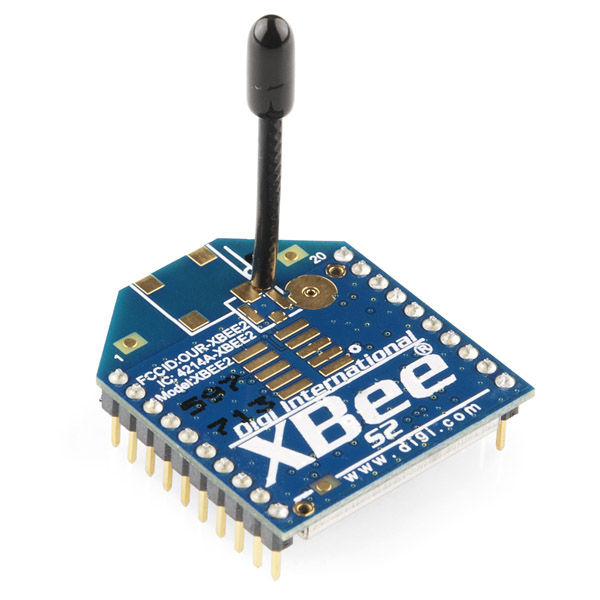
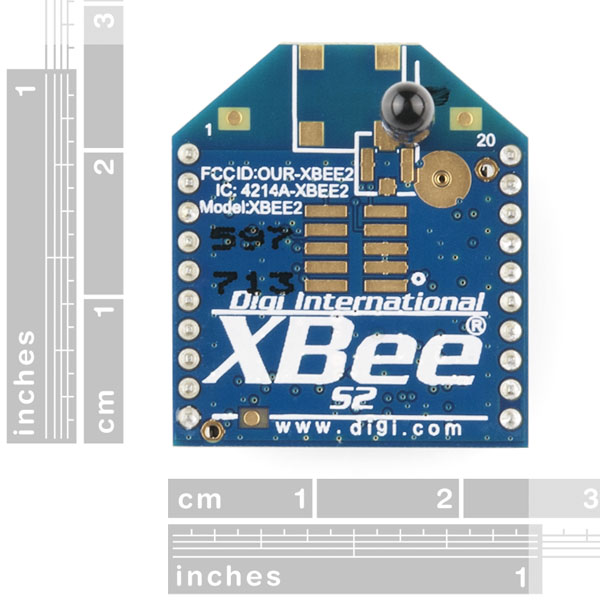
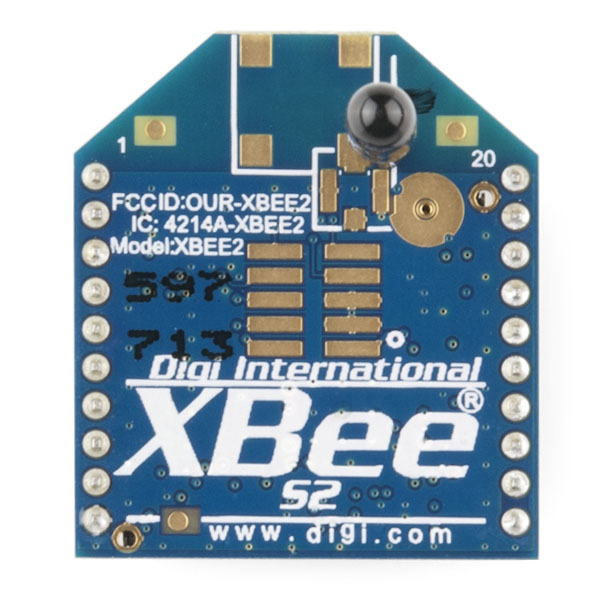
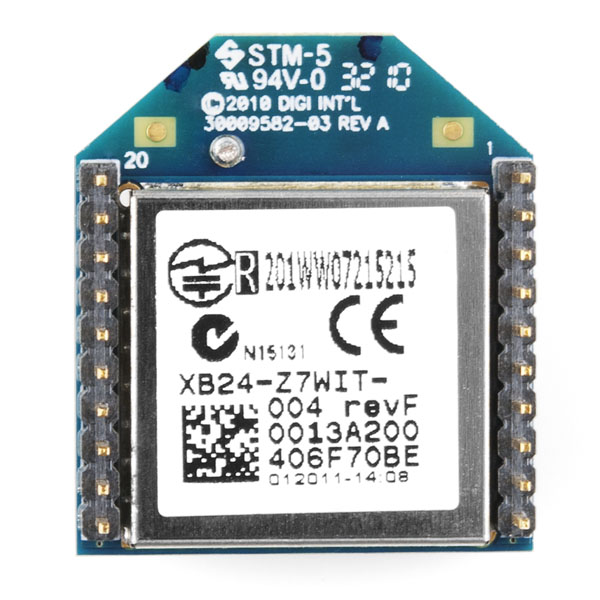
This is the XBee XB24-Z7WIT-004 module from Digi. Series 2 improves on the power output and data protocol. Series 2 modules allow you to create complex mesh networks based on the XBee ZB ZigBee mesh firmware. These modules allow a very reliable and simple communication between microcontrollers, computers, systems, really anything with a serial port! Point to point and multi-point networks are supported.
These are essentially the same hardware as the older Series 2.5, but have updated firmware. They will work with Series 2.5 modules if you update the firmware through X-CTU.
Not sure which XBee module or accessory is right for you? Check out our XBee Buying Guide!
Note: If you are looking for a simple point-to-point configuration, you might want to try the Series 1 instead. The Series 2 requires considerable setup and configuration. We highly recommend Building Wireless Sensor Networks as a guide for setting up mesh networks.
Note: Series 1 and Series 2 XBee modules have the same pin-out. However, Series 1 modules cannot communicate with Series 2 modules.
Note: If you are using these outside of the United States, please check with your local laws regarding radio communication.
- 3.3V @ 40mA
- 250kbps Max data rate
- 2mW output (+3dBm)
- 400ft (120m) range
- Built-in antenna
- Fully FCC certified
- 6 10-bit ADC input pins
- 8 digital IO pins
- 128-bit encryption
- Local or over-air configuration
- AT or API command set
XBee 2mW Wire Antenna - Series 2 (ZigBee Mesh) Product Help and Resources
Core Skill: Programming
If a board needs code or communicates somehow, you're going to need to know how to program or interface with it. The programming skill is all about communication and code.
Skill Level: Competent - The toolchain for programming is a bit more complex and will examples may not be explicitly provided for you. You will be required to have a fundamental knowledge of programming and be required to provide your own code. You may need to modify existing libraries or code to work with your specific hardware. Sensor and hardware interfaces will be SPI or I2C.
See all skill levels
Core Skill: Electrical Prototyping
If it requires power, you need to know how much, what all the pins do, and how to hook it up. You may need to reference datasheets, schematics, and know the ins and outs of electronics.
Skill Level: Noob - You don't need to reference a datasheet, but you will need to know basic power requirements.
See all skill levels
Comments
Looking for answers to technical questions?
We welcome your comments and suggestions below. However, if you are looking for solutions to technical questions please see our Technical Assistance page.
Customer Reviews
4.6 out of 5
Based on 8 ratings:
5 of 5 found this helpful:
Straightforward to use
I used two of these to communicate between an Arduino and a Raspberry Pi in my Internet Connected Fundraising Signboard. They worked well, but it does take some configuration, soldering, and a lot of bits and pieces to get them running. You also need an XBee Explorer USB. I wasn't able to get them reliably working over the claimed 400' range, though they reliably worked outdoors at 200' line of sight in clear weather. When it's raining, the range is definitely reduced. You can connect them directly to a Raspberry Pi (if you disable console input/output, but you'll need the XBee shield to work with the Arduino, since the XBee operates at 3.3Volts, and needs the serial lines level shifted.
4 of 4 found this helpful:
I/O Data Sample Rx Indicator
I use my Xbees in combination with arduino mini pros to send digital data frames. A sensor is reading data, the arduino sets the power high or low on the Xbee digital inputs and the Xbee is sending the data frames to the coordinator. After this, the arduino puts himself and the xbee to sleep. On the oter side my raspberry pi reads the serial input with a java program and writes the received data in a database. Everything works fine and reliable. It took me a bit of time...
3 of 3 found this helpful:
awsome
they take a little learning at first, but they are really quite easy to setup up once you get the hang of it. I was really impressed at how powerful their capabilities are. I wish i started using them a while ago.
It's a radio!
Once you learn how to set them up (YouTube: tunnelsup) and some programming via the Arduino IDE, they are the ducks guts!
Excellent product
It takes a bit to understand how ZigBee works and how to configure it. I was trying to get this to connect to a ZigBee Home Automation device. The article below helped me. Once I followed it, it worked like a charm.
http://www.desert-home.com/2014/10/ok-back-to-zigbee-protocol-and-xbees.html
communication
good device for sending data to a wireless building automation.
The bread & butter. The heart and soul.
Use these little badasses to power the IoT! They're incredible. The book Sparkfun recommends will teach you how to use them.
You will need the USB dongle and some Xbee-spaced headers. You will also need terminal software for your computer, and the XCTU software from Digi. (Free, Mac+Windows).
Contrary to what the description says, this is the module to get. Don't bother with Series 1 unless all you're doing is a Hello World.
Oh and get more than one, or else (as they say in the book): it's like getting one walkie talkie for Christmas!
Somewhat complicated to set up, but doable.
Fun to play with and learn. Got to admit I haven't found a practical application yet. I found "Building Wireless Sensor Networks Using Arduino" by Matthijs Kooijman to be a valuable text for an Xbee novice like me, along with the docs from Digi.
Hello, what product replaces this XB24-Z7WIT-004 ?
Hello sparkfun team, Why this product was retired? Thank you.
Hi!
Im doing a tracking device for my final year project and honestly I am quite new to wireless sensor network (and clueless!). Do you know how if this module are able to do that(What localization protocols does this module able to implement?) and can I interface a key fob to this module so that it can turn on LED? (in other words, i use remote control and turn on LED on the module?) Im sorry if its quite difficult to understand my question as Im quite new! Hope you guys are able to help me out!
Husyi
Hello,
My father purchased me a pair of these Xbees, the explorer, and an arduino shield for my birthday. I've been able to for the most part set things up pretty well. I've gotten them to chat back and forth in AT mode thanks to the Sparkfun tutorial. But the very next day, all of the sudden, neither xbees are being even recognized by the XCTU software, and I have no idea why it could be.
I have not done anything to ruin it; they've not been connected to anything but USB. Is there a way to hard reset them or something? I'd really appreciate an answer, as I'm beginning to be concerned. Thanks-
Marco
Make sure you have the correct COM port selected and you are successfully talking to the Explorer. If you are see if you can send any AT commands to the board? You can also reinstall the firmware, just remember to have 1 and only 1 in coordinator mode. If you are still having problems feel free to email our techsupport team.
Used a couple of XBee Series 2 in a project with Raspberry Pi and Python. Had trouble with serial libraries for Python and ended up using the radios in AT mode. They worked like a charm and we manage to send commands from the command center to the rover and receive photos and instrument data from the rover. Project blog: https://rpyrover.wordpress.com
XBee Series 2 Defaults as of 8/8/2014 if you ever brick your XBee:
Product Family: XB24-ZB
Function Set: Zigbee Router AT
Firmware Version: 22A7
Thank you so much for leaving this comment!!! I bought these about 4 years ago and messed around with them but then put them aside. I just pulled them out again because I had a project idea for them but had no idea what firmware was on them and couldn't communicate with them at all. I flashed them using these recommendations and was able to get them up and running again!
Cool. I'm glad I was able to help out with this post! I have posted the defaults that I have obtained other XBees in the product page comments in hopes of helping other people out. =)
Hey I have everything set up correctly, using those settings you listed in XCTU, and I have data transmitting fine. BUT I cannot for the life of me find DIO8 or DIO9. I have found nothing in all of Digi's guides/datasheets helpful. I looked at every dropdown menu in the config lists in XCTU, no dice, I cannot enable them as digital inputs... I found all the others, why are 8-9 missing?
What are the advantages and/or disadvantages of series 2 compared to series 1?
tks. Leandro/Brazil
You should look here => Digi Knowledge Base: The Major Differences in the XBee Series 1 vs. the XBee Series 2 http://www.digi.com/support/kbase/kbaseresultdetl?id=2213
It really depends on your application. If you are using XBees for the first time and are just sending data, I don't recommend getting the XBee Series 2. The XBee Series 2 has more latency compared to the XBee Series 1. The XBee Series 1 has more data throughput and is easier to use. Also, the XBee Series 2 is designed for mesh networks.
Hi guys. I just made an instructable on how to wirelessly program and Arduino using these. If you would like to do so check out:
http://www.instructables.com/id/Arduino-Wireless-Programming-with-XBee-Series-1-or/
I made a Wireless Remote Temperature Sensor with XBEEs and an RHT03 temperature and humidity sensor. I used an 8051 with SDCC compiler for this. It's a really basic implementation for the XBEE in a broadcast/transparent mode but it can be build upon. https://github.com/pswapnil/ZigBeeTempSensor
I bought this xBee (XB24-Z7WIT-004), and i can't to configure the D4 with analog input. They say "6 10-bit ADC input pins", and all documents say the D4 can work with analog input. But, i can't use D4 with analog input. Someone nows how to do this?
My first XBee experience. So far cannot make it work :) I have: A couple of XBee 2mW Series 2 (ZigBee Mesh) Bee Adapter (V1.4) from ElecFreaks.com FTDU USB Serial Driver to see this adapter as USB device. CoolTerm app to communicate with XBee via COM port. CoolTerm sees adapter on USB. All this runs on iMac OS X 10.8.4
XBee doesn't reply anything back to terminal (CoolTerm) A few seconds after connecting to XBee ("Connect" command in CoolTerm) Mac restarts with later Kernel Panic report (kind of hardware failure). Anyone has idea how to fix it and make XBee talk? Thanks!
Hello all, Xbee beginner just making sure this is the right tool for a job... so I have three questions!
I want to make a surround sound system. One xbee will be hooked up to a switch and numerous other xbees will each have their own mp3 trigger which activate when the switch is pressed.
Is it possible to get ALL files in the numerous mp3 triggers to start playing at the same time? ie will some lag and start a bit later?
If variations in start time between receiving xbees are likely, is it possible to use code to delay triggers so they start when the slowest xbee is ready ie introducing general latency just to make all files start to play simultaneously?
Could this lag be in seconds or is it more likely to be milliseconds?
Many thanks for any help
I just wanted to share with everyone my XBee Relay Controller I made with a couple of these. Hope this tutorial helps someone out!
https://sites.google.com/site/xbeerelaycontroller/
I purchased two XBee 2mW Wire Antenna - Series 2 and a XBee Explorer Dongle and I did something wrong and now I can not read or write to them. What is the correct procedure to reset them.
Hello everyone!
I have two XBEE (series 2) devices and I want connect the first device with a microcontroller (arduino) and the other one on my computer. So I want to control the arduino board from my computer wirelessly. The first device is configured as a coordinator AT (1047) and the second as a Router / End Device AT (1247). These two devices must exchange data in real time (fast). The problem is that the second Xbee (Router / End Device) cannot read fast the data sent by the computer. This device reads olny 5-6 commands and after that crashes. Must to wait 6-7 seconds to start read again. Instead, the first device(Coordinator) reads and sends all the data in real time.
Does anyone know what could be wrong? I've done something wrong in the regulation of devices?
Thanks!
I bet you are broadcasting all the data to all recipients. If you don't set the destination high and low (DH and DL) to the serial high and low (SH and SL) of the destination somehow, then the Zigbee models are slow (about 1 packet a second slow.) use a series 1 in 802.15.4 mode if you want fast broadcasts. (digimesh will do it better than zigbee mesh but any mesh has a little overhead.)
I experienced something similar. The most likely culprit is the sleep mode you have programmed. I believe the default mode for end devices is cyclic sleep. You probably want no sleep, for this mode you need to be programmed as a router.
Do I need to include a voltage regulator to power this with a 3.7 Volt single cell LiPo battery such as http://www.sparkfun.com/products/341 ?
3.7 volts is only "nominal" and is misleading. A freshly charged Lithium Ion or Lithium Ion Polymer cell is 4.2 volts, XBee spec is 3.6 V, so yeah if it was me I wouldn't try to run them directly off the cell.
What range are people getting between these Xbees in reality? I have a pair on my kitchen table which only communicate reliably over a distance of less than two feet!
I have power-level 4 enabled with boost mode on both of them. One is flashed with firmware 218c and the other 288c.
Thanks,
Steve
I'm using one sitting behind my computer in my home office and then the other is enclosed in a metal cylinder about 40 feet away, between 3 walls and it works flawlessly.
They should be able to go WELL over 2 feet, especially without obstacles. Are you enclosing them in shielded enclosures?!
I have one connected to a USB explorer and the other is mounted on a breadboard using an explorer regulated. Neither is enclosed. Could it be the breadboard?
I doubt it. maybe it's not getting enough power. Contact techsupport@sparkfun.com and they should be able to help you out, it sounds like something else is happening. It should work like that.
RobertC, can you approximate how thick the sidewall of the metal cylinder is? I'm thinking of enclosing it in a 3mm steel box and not sure if it'll work correctly... thank you
-Kirk-
A totally closed steel box will block the signal, I recommend putting antennas on the outside of steel boxes with something like the RPSMA version and an external antenna. That said you should be getting way more than 2 feet out in the open.
mine is maybe a millimeter or so. 3mm is a bit thicker. I wouldn't think it would work very well in a 3mm thick steel box.
thank you for your input RobertC, I guess since it's not expensive I'll still get it to see how well it works
I am building a network of temperature sensors to go around my house. I want to know what Xbee module I should get so that it will transmit data through walls. I want to be able to transmit to the basement from the second floor.
Ok, to sum it up...
I will get 4, series 2, 50mw Xbee modules, one xbee usb explorer, 3 arduino pro minis, 3 xbee explorers regulated, and 3 LM335A temperature sensors. I will setup the xbee connected to the usb explorer as the cordinator. I will set the other 2 up as routers and place them both on each floor along with the arduinos and temperature sensors. The arduino will send temperature data along with the serial number programmed into it, via serial, to the cordinator. The cordinator will then send the data to the computer.
One more question...
If I want to add extra sensors on each floor, can I just buy lower power versions of the series 2 modules and set them up as endpoints, or do they have to be the same power?
I will post a link to a video and maybe a tutorial once I am done. Thank you all for the help.
Personally I suggest getting a few modules and experimenting a bit first. Say, 2x50mw + 2x2mw + usb explorer etc.. It will take you some time to get familiar and all your code going. Expanding from there will be easy and you will probably want other things by then anyway so the shipping is irrelevant..
Have you got a bunch of old phone chargers around? They're good power sources! Otherwise, pick up some 5v chargers..
Pretty much, yeah. I suggest you try get to read the recommended "Building Wireless Sensor Networks" book. It deals exactly with what you're trying to do!
To be more precise, you will find that you don't need the arduino's if you're just temp sensing, since the modules have analog inputs. You can send an analog read request to them directly without any additional microcontroller. They also have a few outputs you can control. Microcontrollers are handy for when you need to do more sophisticated things on an end point (eg: transmit an infra-red code to your television or airconditioner). The mentioned book has examples for remote analog sensing. It also shows you how to use processing as a tool to request the info and display it. There is also a good python library available! :)
The end points don't have to be the same power. You just have to ask yourself what the distance is between them and the closest router, and if your house is concrete or wood...
Thanks,
I think I should go with the 50mW series 2 xbee pro. But what kind of antenna should I get?
Unless space is an issue, go with the wire antenna or the U.FL version combined with an external antenna.
Can I do what I want to do with series 1 xbee modules? I thought the only way to network them is through series 2
Read here and here for information on that.
We've also got a tutorial here
Series 1 doesn't support mesh networking. They are designed for peer-to-peer. So you would only get one temp sensor.
With any good adapter like the xbee explorer (on this site) you can flash the series 1 modules to a mesh mode. you just select the correct DM firmware in X-CTU. I have had a 20 or 30 node series 1 network running great. It is also easier to get working on a series 1 radio. That said, if you want ultra low power on the end nodes and are not afraid of the (painful to learn) sleep settings the zigbee (series 2) stuff can be very nice.
Since you're building a network of them, you could use mesh networking. Then you just have to ask yourself what the largest distance between 2 devices are. If you decide on mesh networking, make sure to get series 2 devices. IMO, this is the way to go. Something like the coordinator on your main machine in the basement, a router on each floor, and the rest can be end devices. (The routers can be sensors too)
I would go with the 60mW Wire Antenna Version.
I have
1. Arduino UNO
2.this model of xbee
3.and xbee breakout board
I tried to load firmwares in my xbee with the above equipement but I failed.
XCTU is not able to communicate with my xbee.
So can anyone guide me how to load firmwares in my xbee nw?
Try using the XBee explorer board. There are a lot of tutorials around on the series 2. You might also want to look at the book 'building wireless sensor networks' which deals exclusively with XBee configuration and such.
Just got my modules today. To get it to talk to a series 2 module I had, I had to use X-CTU to program the module as an XB24-B device instead of the XB24-ZB, which is how it came.
The obvious progression in radios is 900Mhz, diversity, longer range, & more bandwidth. It's a mystery why digi keeps investing in this strange mesh networking fascination while doing nothing in the obvious.
Pretty sure the XBees are still designed in Utah at the Maxstream location & we know the economy in Utah tends to run in isolation from the rest of the world, so you get these really offbeat designs. There are so many government links on digi.com, there must be 1 large government customer in Utah using 2.4Ghz mesh networking.
2.4 Ghz has more bandwidth. A bandwidth hungry protocol like Zigbee needs all the space it can get and would hardly work at 900 Mhz. I think that is why you only see digi making 802.15.4 and digimesh stuff in the 900 mhz band; they are both quieter protocols and wouldn't eat the whole available bandwidth.
I find mesh to be as weird as TCP/IP and Ethernet I.e. Not at all. I believe utility companies and other people with distributed systems are moving to the weird mesh because they can deploy a large number of small nodes cheaply without deploying a huge infrastructure like a pair of fiber to each house. Each meter can send in it's billing information when requested by letting the data be free
If you look you'll find other major companies like making zigbee based products, so I expect them to be around for a while. I don't think other companies would spend money to license the patents or develop the technology if there weren't money in it.
By the way, I bought two 900mhz modules which can be programmed as dedicated or mesh and was able to get them working in less than 30 minutes without ever touching an xbee before. I do have network experience so I understood some of the concepts with out having a google implant, but you don't need to fear the xbee if you have a brain and can read.
They have a lot of foreign clients, like the company I'm currently working in, which find it easier to use 2.4GHz because of legal issues. That must be one of the reasons why they keep investing in 2.4GHz.
Yes, it works with the XBee explorer regulated and dongle, listed below. I'll fix the datasheet.
Hi, if this is supported by the XBee Explorer Regulated also you should fix the list of supported XBee modules due is not there any Serie 2.
Does this work with the Xbee Explorer Regulated and the Xbee Explorer Dongle?
And why does the 'datasheet' refer to series 1?
Is there a real datasheet available about this chip, with the functions of each pin (ADC/PWM....)
edit: found this:
http://docs-europe.electrocomponents.com/webdocs/0d0a/0900766b80d0a897.pdf
Hello, I recently bought 2 units to communicate between two Arduino 2560 but I don't find how to do the setup. I got an ERROR when I try to change the ATMY parameter as describe in the suggested link above (http://examples.digi.com/get-started/basic-xbee-zb-zigbee-chat/) Thanks, Renaud