- Home
- Product Categories
- Development Tools
- Electric Sheep


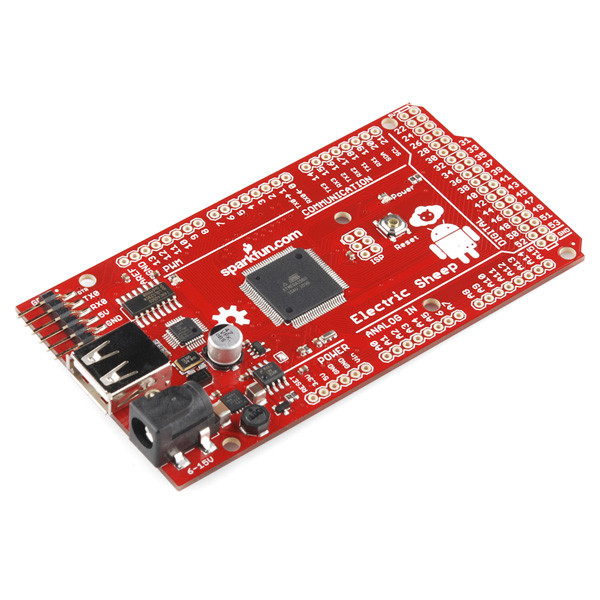
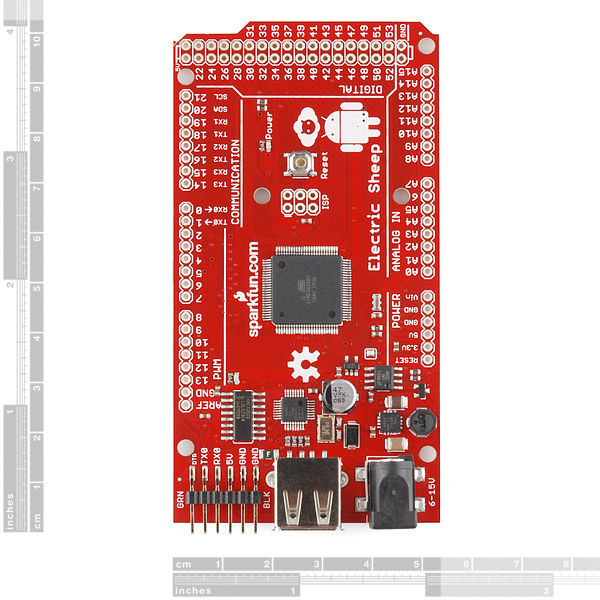
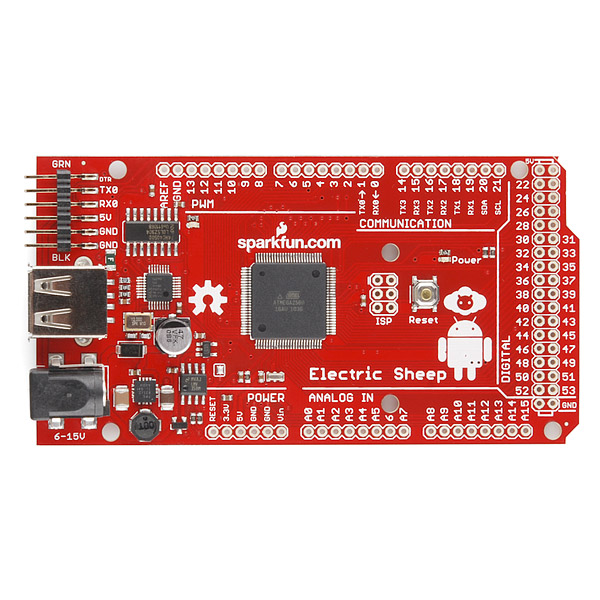

Electric Sheep
Replacement: None. We are no longer carrying this board in our catalog. This page is for reference only.
Do Androids dream of Electric Sheep? Well if not, they should. The Electric Sheep board is a development tool (similar to the Arduino Mega ADK) for creating custom Android accessories. Based on the ATMEGA2560-16AU and carrying the same bootloader as the Arduino Mega 2560, this board communicates with your Android device over USB by taking advantage of Android's "Open Accessory" protocol. Android device-side interfaces can even be created without having to write Java code or mess around with the Eclipse IDE by using HandBag for Android!
Note: Because of the configuration of the Open Accessory protocol, this board needs to supply 500mA to the Android device over the USB connection. If you're running peripheral devices from the board, you will need to provide more current to the DC input, which is rated for up to 1.5Amps.
- ATMEGA2560-16AU Microcontroller Pre-loaded with Mega 2560 Bootloader
- USB-Host Connector On-board for Connection to Android Devices
- Create Android Accessories using the Arduino IDE and HandBag
- Arduino-style Pin Configuration (Shield Compatible)
- FTDI Header for Programming
- Input Voltage: 6-15VDC
- 53.50 x 101.50mm
- Schematic
- Eagle Files
- Datasheet (ATMEGA2560-16AU)
- Using the ADK
- HandBag for Android
Comments
Looking for answers to technical questions?
We welcome your comments and suggestions below. However, if you are looking for solutions to technical questions please see our Technical Assistance page.
Customer Reviews
No reviews yet.
I wrote a post to help get you started fast with handbag and electric sheep! http://coduino.tumblr.com/
Yay! Nice work! Thanks for sharing!
The low volume cost price for this board would appear to be about $25. Why is it $99.95?
Agreed. i would love to have one but not at that price.
The price dosen't matter. It's good to add a Sparkfun Red Mega to your arduino colection :)
Same here. I was excited too, but alas, $100 is a bit steep for me. I just don't see that much value in this product; maybe $20 worth of parts or so...? Plus PCB & mark-up (I know, we all have to eat). Am I missing something?
Agree! i was ready to order (thinking finally a cheap mega type board) but then i saw the price...
I hate to complain about the price after other people have, but...
It costs less to purchase a Mega Pro and USB host shield board which does the same job as this, just across two boards.
Anyone having experience running google demokit on the board? Was successful loading demokit sketch on but android demokit app doesn’t see the board when connected to my Samsung galaxy III s mini (phone proved to work with some other handbag app). thanks for the hint!
So what is the main advantage over the Arduino Mega ADK?
It's pretty much the same board, just in our "pro" form factor to save space and cost. Some of the main differences are: no headers, no on board Serial-to-USB, etc, otherwise the board is generally the same.
The low volume cost price for this board would appear to be about $25. Why is it $99.95?
Not to be confused, of course, with Scott Draves' Electric Sheep art project, http://electricsheep.org/, which has Android support. I'm running it as my background on my Nexus 7, and it's splendiferously wonderful!
I got an actual mega adk a few days ago, after wading through miles of poorly documented libraries, broken example code and vague google "manuals" (Install these libraries, ???, profit) I have yet to get my phone or tablet to even see it. Would not reccomend.
Can the android its self provide the power to the board or do you have to attach another external power supply in order for it to function? Thanks!
No, the android will not supply power to the host (i.e. the Electric Sheep). You will need to power the board over USB or, if you need more current which you might, plug power into the barrel plug.
I've received a Electric Sheep board, but all my os (including ubuntu 11.10 64bit, ubuntu 10.04 LTS, windows xp, windows 7 64bit) can't recognise it. After connecting the board via USB, nothing heppen. Windows was't show any new unknown device to install, and linux wasn't show any device like /dev/tty*. And I use minicom to connect via serial port, lots of " TEST_1: USB TEST FAIL TEST_2: A0 IO TEST FAIL, CHECK FOR JUMPERS! TEST_3: A1 IO TEST FAIL, CHECK FOR JUMPERS!" shows up repeatedly. Any advice ?
What you're seeing is the Test code (an Arduino sketch) that ships out on the chip. This test code is designed to work with our in house test equipment, so without that hardware you're going to see failure messages printed to the serial port. But don't panic! Your board is totally fine.
To remedy seeing those error messages you simply need to start playing around with Arduino or Handbag for Android and start creating your own Android accessories. You can upload to the board via the FTDI headers.
I might be wrong, but looking at the Features, the USB seems to only be for "talking" to Android. The FTDI Header is for programming.
I'd be extremely pleased to see this working with the kindle fire.
I've been unsuccessful thus far. The Fire does not seem to support Open Accessory mode.
I'm not sure there's any advantage over the official Arduino Mega ADK, other than there's not a programmer permanently stuck onto it, which makes it better suited for battery applications.
Besides, Arduino ADK is nothing more than a poor hack. This line of AVR processors has no USB functionality, and trying to add USB functionality by soldering on extra ICs seems very silly. The main reason why there are so many freaking microcontrollers to choose from is that each one of them has different features.
If you really want to develop an Android accessory, at least start with a micro that actually has a legitimate USB PHY and support software for it -- The Microchip PIC24H Android development kit is about $70, and way better in almost every measure.
Arduino ADK is indeed a poor hack. For anybody who cares, issue http://code.google.com/p/android/issues/detail?id=20545 speaks volumes. Aside from the critical nature of the bug, therein lies the subtle reference to 2 package namespaces for the USB Accessory API. That means the API is fragmented (in 2, like the compatibility API)! I've digressed...
I took your advice and took the plunge into the PIC24H dev kit. It's way-fun but I'd caution many because the learning curve is steep. I can immediately see how "religious wars" around Arduino (i.e. open source Atmel and AVR) and PIC programming may have surfaced, or are surfacing. I've been programming for 30 years. Arduino is obviously targeted at learning and prototyping. PIC development is obviously targeted at industrial manufacturing (not that Atmel isn't...the comparison is w/r/t Arudino platform). The learning curve for PIC is much steeper, and to be honest I can immediately see why communities and hackers are seeking an alternative.
Honestly - the software ecosystems being offered by the MCU companies are incredibly scary. I know how to handle these kinds of situations but I know life can be easier. Thus, if I had to pick a side in the war it would be the Arduino side. I'd defend the use of this MCU and the Electric Sheep. The PIC24 is definitely better than the 2560. But, you have to be ready to step your game up in a big way and there's a tradeoff between power and productivity that should be considered. Actually, I have an extra Sheep from a friend since I'm still trying-out PIC development, so even if I love PIC I might end up trying the Sheep just to compare.
For a full time software engineer of 30 years, you seem to have 0 experience in the home hacking arena.
You seem to think its supposed to be a full featured complete kit with fully functional libraries for doing everything and probably a nice pretty windows installer to.
You seem to utterly fail to understand the concept of 'less is more'. The product you are referring to is basically for those of us who just want to avoid soldering the components to the boards ourselves but otherwise want nothing in our way. I want to control every single instruction that gets executed, so adding more stuff is pretty much exactly the opposite of the point of these sort of things.
I also think its fairly clear you don't understand WHY that particular API is split like it is.
Are you sure you're a software developer?
I'm mesmerized by your brilliance and wisdom. Did you intend to enlighten my point? Or, did you intend to disagree? Or was your intention merely to insult in a public forum? What exactly is a home hacking arena?
You don't like me saying the Electric Sheep isn't so bad, I'll give it a shot, and that's worth a personal attack in a public forum?
Just as a general note, we really don't like comment wars and will remove them from the site. Please keep it friendly folks. We do encourage disagreement as to the best approach for hacking and solving problems, as it inspires creative new solutions, but we don't appreciate personal attacks or general bickering.
Look at the many products coming out from android OEMs such as the Moto Atrix lapdock and media dock which both use a MSP430 from TI ~$15 in small volume for a 16 bit work horse (all bells/whistles). You can even purchase their entry level full featured dev board for less then $5. I am sure the ADK could be ported to that board with a better value line micro-controller. FWIW: The media dock accessory has less then $20 in parts yet retailed for $200 at Atrix launch... Although the Arduino is fully open in both hardware and software
So what is the main advantage over the Arduino Mega ADK? It's 12 euros more expensive and it does not have USB B connection or female pins... The part that I do like is the alignment of the power bus and the usb connector, but the ftdi header sticks out?!