- Home
- Product Categories
- Development Tools
- IOIO for Android



IOIO for Android
Replacement:DEV-11343. IOIO-OTG is here! Now you can use the IOIO with your Android device or PC! This page is for reference only.
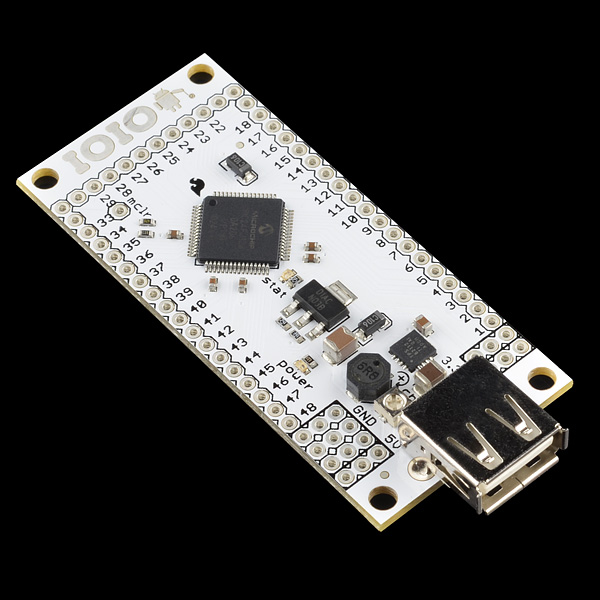
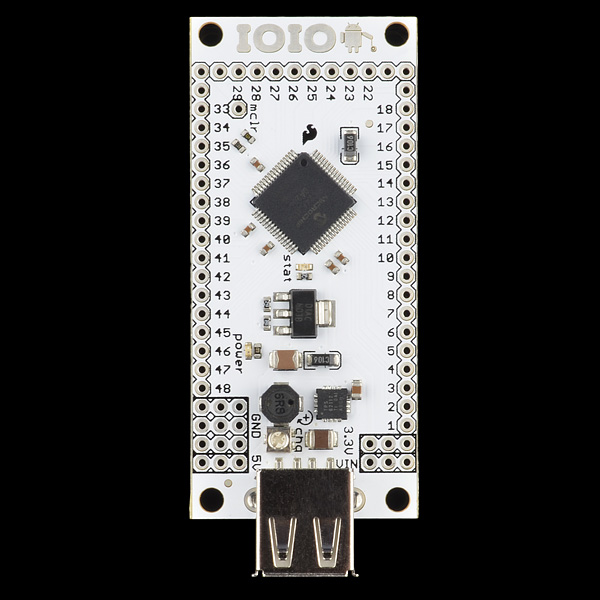
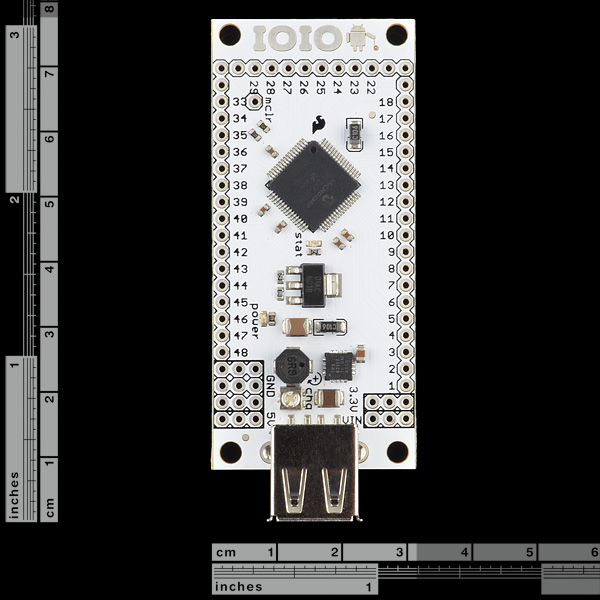
The IOIO (pronounced "yo-yo") is a board specially designed to work with your Android 1.5 and later device. The board provides robust connectivity to an Android device via a USB or Bluetooth connection and is fully controllable from within an Android application using a simple and intuitive Java API -******no embedded programming or external programmer will ever be needed!
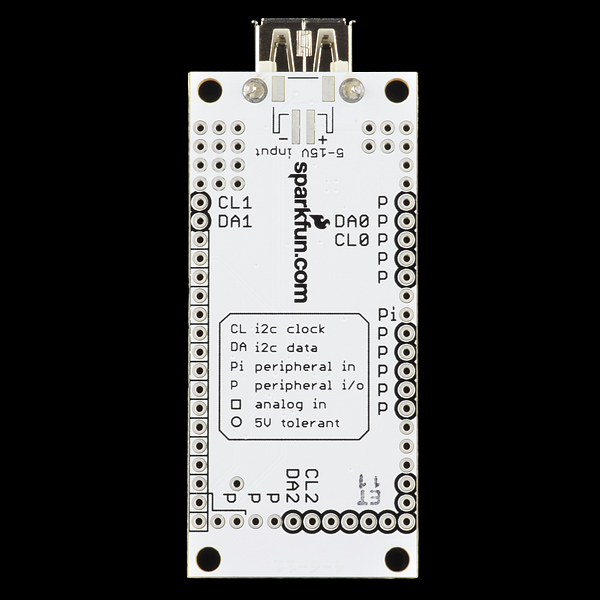
The IOIO board contains a single MCU that acts as a USB host and interprets commands from an Android app. In addition, the IOIO can interact with peripheral devices in the same way as most MCUs. Digital Input/Output, PWM, Analog Input, I2C, SPI, and UART control can all be used with the IOIO. Code to control these interfaces is written in the same way as you write an Android app with the help of a simple to use app-level library. In other words, you can combine the awesome computing power, Internet/Bluetooth connectivity, touch screen, and a variety of sensors from your Android device with the ability to easily add peripheral devices to interact with the outside world. Also, using the IOIO does not require any hardware or software modifications to your Android device, thus preserving the warranty as well as making the functionality available to non-hackers.
The IOIO acts as a USB host and connects to most Android devices that have USB slave (device) capability. So far, the devices proven to work with this board are: G1, Nexus One, Nexus S, Motorola Droid X (among many others now). If you get the IOIO working on your Android device, please let us know in the comments below, thanks!
We're now shipping the IOIO board loaded with the V3.04 bootloader so that it's ready to go with the latest application update, which adds Open-Accessory support. Open Accessory will provide improved latency, throughput and jitter. If ADB is enabled on the Android, ADB will take precedence over Open Accessory. Disable ADB to have IOIO working over Open Accessory.
We have a blog post that shows or has links to many well documented example projects, with source code. It is a great resource, so please check it out!
Note: This product is a collaboration with Ytai Ben-Tsvi. A portion of each sales goes back to them for product support and continued development.
Replaces:DEV-10585
Comments
Looking for answers to technical questions?
We welcome your comments and suggestions below. However, if you are looking for solutions to technical questions please see our Technical Assistance page.
Customer Reviews
No reviews yet.
When will V2 be available for purchase? According to YTai's blog, his end of it was done two months ago in late November? :-(
Here's my experiences with my Nexus 7 pad. The 7 didn't detect the IOIO's Bluetooth dongle, but it found other devices in the room. It's possible that the IOIO's Bluetooth dongle is defective (it's the one Sparkfun supplies, and the LED on it lights up, so I know it's powered), so I'll be trying the IOIO with a borrowed Android phone in a few days to see if that phone can talk to it. I hooked up the 7 to the IOIO via USB cable and successfully ran the IOIO Hardware Tester App, and the HelloIOIO app. HOWEVER, in order to get it to work, I had to go to the 7's Developer Options settings page while the 7 and the IOIO were connected via USB, turn off USB Debugging, then turn USB Debugging back on. It seems this has to be repeated any time the IOIO is powered off then back on.
I just bought some of these last week (September 10, 2012). The IOIOs I got do NOT have bluetooth enabled by default. Luckily I bought 4 IOIOs, so I was able to upgrade the bootloader and firmware to the latest version, which DOES have bluetooth enabled. SparkFun needs to ship the updated firmware with these.
There was a bug in the last firmware rev that made the BT not work (on some Androids) without removing the dongle and plugging it back in (that was a temporary fix). Any new boards should have the most recent firmware and BT should work seamlessly.
Imagine if instead of rows of pins on the edges - the IOIO had a standardized 4-pin connector.
Now imagine that half of the sparkfun boards had the same 4 pin connector.
Now imagine SPI / I2C.
Sweetness.
Wake up - that was only a dream.
With lot of android phones still available in countries like India running at the latest android 2.1 the promising part of the product is that it works for "OS versions 1.5 and above"
WARNING: A number of users are complaining about their IOIO board getting really hot. Ytai hasn't resolved the issue yet, but I believe it occurs when the Android device gets plugged into the IOIO. My battery life went from 62% to 53% in about 2 minutes and then shut itself off. The board is unusable now, since the PIC microcontroller gets hot now even if my Android device is plugged in. See my post on the Google Group (pending Ytai's approval) for more details.
Please contact techsupport at sparkfun dot com, we would like to take a look at one of the boards. This is not normal behavior and you could have a defective board if it was DOA. If the board initially worked and now doesn't, shorting VIN to 3.3V or 5V could also kill the board.
Sorry for hijacking the top comment but I need to warn new buyers. Before you buy this board make sure you can get the library installed first, if you check sparkfun's tutorial http://www.sparkfun.com/tutorials/280 it looks like a lot of people are having trouble in getting the software set up, am one of them, I've been trying for two days. Somebody needs to update the tutorial with step by step screen shots and exact locations of the files. Am not a noob with Java, eclipse or Android, I've used Microchip's Android board and the Arduino's ADK board, I got those to work.
Troubleshooting section works!! I'd like to add Asus Transformer prime with Android ICS in the list of compatible devices :) IOIO is awesome!
Sorry for the trouble. The tutorial has been update and I have added a troubleshooting section. Hope that helps!
What does this board weigh in grams, can it pass serial signal to Android? In a rc project, can I wire the channels from a receiver to this, then have those signals Sent to Android to mix and send back to servoes connected to this board? Example, making a flight controller for a quad copter that uses an android device as the hardware/software? Does that make sense?
Hello ... I want to control my andriod by ioio Joystick to control the mobile phone. Such as the mouse
I mean the use of ioio and Joystick to control the mobile phone, such as the mouse on the computer.
Thanks .....
Can anyone tell is this product really useful to do serial communication with android because this time i use simple ftdi device but android unable to detect that usb to serial converter.
Can this IOIO board use the Wi-Fi USB dongle please? Also how about Modbus TCP, RTU, ASCII. Any libraries?
Hello, I heard that the nice IOIO V2/OTG for PC and Android will be ready soon. Is this really true?
Good with Acer E350 and Samsung Galaxy S!
I need only one(1) IOIO board so if I buy it today, then will it have the latest firmware with Bluetooth installed. Unfortunately, I cannot afford to buy 2 boards just to upgrade to the firmware that supports Bluetooth as shown in the YouTube video (http://www.youtube.com/watch?v=eUKAPP63QtU&feature=youtu.be).
Hi I have recently purchased IOIO board and setup android environmental as per wiki pages .After Installing very first application Hello IOIO on ICS base android device and connecting with IOIO. ON BOard STAT LED(PIN 0 of PIC ) ON Continuously YELLOW.It is not affected by Button event from Android Device . Please do needful Thanks in Advance.
hi i'm new to programming but i have done some simple arduino projects but i want to know if this would work with the Adafruit 16-Channel 12-bit PWM/Servo Driver please reply someone please because i want to buy it
Is that the i2c controller?
I would imagine it would work just fine.
Do any have this device working w/a TouchPad running Cyanogen7? I have another (e'hm) similar PIC device. It will work on a Samsung, but will not on a TouchPad. Before I flip devices I would like to know if I'm just jumping from one fire to another.
During the last two weeks, I have been successful getting the LCD Controller v. 1.1 App (http://www.androidzoom.com/android_applications/tools/lcd-controller_cfpjl.html) for a 16x2 LCD working on my new Nexus 7 using this IOIO board. The board uses an external power supply, 10 wire connections to the LCD and a Bluetooth dongle (Sabrent ) to receive input from the N7. After installing the App on the N7 and turning on its Bluetooth with pairing set for all nearby devices, the powered up IOIO board was found and paired as IOIO(A3:10). Now, the app connects immediately with the board and it is cool to see all the functions - INITIAL, SET AND CLEAR - work when sent from the unattached N7. The App uses the newest IOIO library which allows it to work WITHOUT turning on Developer options or USB debugging. Android applications like this should encourage purchase of IOIO boards, especially for those people who are satisfied with installing compiled Apps (.apk files). For wider appeal, IOIO boards need to be supported by a reliable and detailed software development environment. This would include Java, Eclipse, Android SDK, ADT Plugin and IOIO libraries, each with the versions and setup parameters chosen for consistency.
hi, am just curious. see much as i like the ioio. actually i really love it, i have myself 5 of them, but i usually prefer a bigger challenge, so i kinda feel like i should make one myself, what with the schematics and all, being open source. so what am getting at is, i want to know if anyone has actually built one, personally. and just need to knoe, when i finish building the board, how do i load the bootloader to my new board.
please, i really need this help, i have designed a PIC24FL256DA206 breakout board for a quick prototype, but i need help on uploading the firmware when am done.
You will need a PIC programmer, like this one to load the BL hex. MPLab is a free piece of software we use to load the hex file onto our boards, so you'll probably need to download that as well.
There is also info on the IOIO wiki found here.
Hope this helps!
thanks alot, so basically i just program the pic, and then use it on the board. thanks alot man, i hope i will be able to repay yo help some time.
ok.. I've thought up a cute revision. For next-gen release in a lilypad-like footprint, reprap a plasic container disk connected by small plastic spool connecting yet another disk [even could have possibility of running two IOIOs in parallel]. Bore small hole in spool; insert string. Voila.. the idea is born 'Duo'nkn IOIO' Electronic geeks can "walk the dog", and all kind of stress-relieving tricks in-between hair-pulling tests. Blame too many SNL pho-commercials and my ever-active imagination for this, but I'd actually buy them for christmas gag gifts for my not-so-techy friends =)
Rob
Question about power distribution: So if i understood this correctly... the phone can supply power to the IOIO or IOIO can supply power to the phone (ie. charge it). But is it possible to isolate the power, that is, the board uses its own external power supply and the phone uses its battery. The reason I am asking is because i read somewhere that there needs to be voltage supplied across the usb wire for the phone to recognize it is connected to IOIO. Is this correct? can someone explain? thank you.
A-l-l-m-o-s-t got it working on an LG Lucid: 1.) HelloIOIO app builds and loads fine using ADB. 2.) Running IOIO board from a lab bench power supply outputting +12V. 3.) When I plug the Lucid into the IOIO, I get a single yellow LED flash. 4.) Lucid shows battery charging mode, but 5.) No USB connection showing on Lucid.
Any ideas?
Have you turned on USB Debugging?
Yep, USB debugging on, I've tried different bootloaders via the PICkit3 - no lluck. Could it be I have to 'root' the phone?
has anybody gotten this to work on a nook simple touch?
The nook would need to be able to run an android OS, which I don't think it does.
It does, though I assume you'd have to root it to get very far.
Weird. I guess if you can download an Android app and you have access to ADB (or open accessory) protocol over USB, then it might work.
The footprint in the Eagle files is off. Headers match up, but board size and location of standoff holes relative to the headers is off. That's why we do 1:1 printouts :)
Could I attach a Bluetooth module and use that to connect to the Android instead?
Yup. Check out the Bluetooth mini module in the related items below. All you need to do is pair with the BT when you first plug it into the IOIO. The passcode is 4545, more info on the wiki. Then it is just plug and play.
I'm looking at the related items, but I don't see a Mini Bluetooth Module. Can you give me the product number please?
Thanks!
Edit: Now I see it. Thank you.
Does this work on the HTC Evo 4G LTE on Sprint?
I don't see why not. Any major name brand should work.
Thanks!
I've installed android4 javasdk7. This code can not import eclipse. Publish the new version. I'm not buying the product for the unused code.
You publish the new version. (android 4.03) I can not import the source code. So I'm not buying it.
A IOIO project by two of my students: http://courses.cs.tau.ac.il/embedded/projects/fall2011/IR_on_IOIO/IR_on_IOIO.htm
Thanks! That's a cool project!
Can you program the IOIO using the Android Scripting SL4A language instead of the normal java programming?
Can you send serial data (RS232) through the IOIO to the Android device? I'd like to log data from a fathometer on the Android synced to the GPS position and time. Thanks.
Yes, although you will need a RS232 to UART converter.
Every time I attach my Acer A100 Iconia tablet, the Yellow LED light continually blinks and none of the sample programs seem to work. Is it possible that I bricked this?
It is very unlikely you bricked the IOIO. Try adjusting the trim pot on the board in the positive direction and make sure you have USB debugging turned on.
You also have two options for support. The IOIO user group or email techsupport at sparkfun dot com.
Works Perfecly with Google Galaxy Nexus! (http://www.google.com.br/nexus/)
Is anyone making shields for the IOIO? I was thinking of making one with a robust 5v regulator with 5v, gnd, and signals distributed to mulitple servo headers or one with multiple solid state relays for 120v control and screw terminals or one with a stack of sensors.
Hi i have unfinished project to make adapter for connect ioio card to the arduino shields.
If you or someone want to look my project please follow a link. Feel free to comment my design.
http://uk350.blogspot.com/p/ioio-arduino-shield-adapter.html
Do you guys know when and if this is going to be back in stock? Thanks! J
If? Yes, they will be back in stock. When? Very soon, they are going through production now.
Cool! Autonotify will let me know when I have to buy. Thanks.
How does the autonotify thing work, I just bought the book and am excited to build who knows what!
There's a button up there, right below "Add to Wishlist". You probably need to be logged in to see it.
I went ahead and ordered one this morning and now it's showing BO arrived and 26 in stock! I heart SparkFun!
I wasn't fast enough, but my confidence level in sparkfun's ability to deliver is greatly increased after seeing the restocking. Back to autonotify :)
If you want something ASAP you can always backorder to get it hot off the presses...
Also, I could do that... but I prefer to do my impulse shopping by myself. Letting a robot do it for me is too impersonal :)
Fair enough. Do be careful taking it out of the box, it may still be hot. ;) Have fun!
And back in stock, and ordered! :) SparkFun is the greatest.
How do I determine my IOIO board version? The IOIO firmware download page for the boot loader talks about supporting board versions SPRK0012 to SPRK0016. The IOIO manager page talks about how the flash software tries to determine compatibility by looking at the processor version but that it cannot be certain of compatibility and that you should know you board version.
I can't find any version indicator on the IOIO. I can read the processor's part number (PIC24FJ256DA206). I know the Sparkfun part number from my order (DEV-10748) and when I ordered it. Is there some technique for determining the IOIO board version? A chart or some other procedure for figuring this out would be nice.
This is how I figured it out. Connect your android device to the IOIO via USB. Run any of the IOIO Apps (like HelloIOIO or IOIO Manger) and confirm that it is connected (wink and LED or something). Disconnect your android device and connect the device to you development PC running Eclipse. In Eclipse, hit 1 to open the LogCat file located on you device. Start at the bottom and scroll back a few pages until you find the log entry where the IOIO was connected. You should see some information like “Hardware ID: SPRK0016”. It also lists the Firmware and Bootloader version. Hope this helps. Visit the ioio-users Google group. Good info there.
I just wrote a tutorial/program on using the IOIO here - http://www.roboteched.net/2012/03/making-your-droid-into-your.html
Code is provided and the app is on the marketplace for immediate results. More tutorials on the IOIO will be added later. Feedback would be nice :)
I am trying to connect this to my tablet. When I connect my droid x the app I have works fine. Then I install the same apk on my Samsung Galaxy Tab 10.1" and when I plug in the tab, the IOIO Sample App screen remains disabled. Any suggestions?
Looks cool, maybe once I get a Droid...
Has anyone done any analysis on the 3.3V power supply? I've read bad things about daisy chaining a linear regulator to a switching power supply.
I've never heard of that, do you have a reference? In my experience this is a standard way of making multivoltage and/or efficiently quiet supplies.
Does this come with the bootloader version 3 ? Will it work with bluetooth without me having to flash it?
Yes, current boards have firmware v3.11.
Will it work with samsung galaxy Y(2.2)..? Plz help me out.I have a project .I only have 5 days.I want to connect my android phone with ultrasonic Ping))) sensor. How long will it take me to complete the interfacin between phone n sensor ? Plz provide me d links or tutorial which can guide me step by step through the process..i just want the sensor data to be trasferred into my phone.nothin else.Thanks in advance :) m yet to but it coz m not sure its compatible with samsung galaxy Y.. plz help
[deleted]
My book on the IOIO is out now (Making Android Accessories with IOIO'.
I believe it will soon be (may already be) for sale here on Sparkfun, but it is also available at Amazon etc. Search for "IOIO Simon Monk".
Hey Simon!
Yes, we will have your book available for sale very soon.
Awsome, was able to use IOIO on a few interfacing projects...Was able to do uart with no problem. Although I could use some sample code getting all 4 uarts working...
Has anybody been able to use the ioio with a Samsung Galaxy Player 5 (/YP-G70CWY/XAA) ?
Works on the Pantech Breakout with 2.3.3 via Bluetooth only. Finally. I almost gave up! USB cable doesn't work because of the internal hub. This Bluetooth dongle didn't work initially because of the 00:00 ID address. The Pantech couldn't see it because it doesn't look at that address. I came across a thread on the Basic4Android forums where a user 'Jimseng' had similar problems... Couldn't see the dongle. He suggests installing the app 'Bluetooth Class Zero' (free) and rebooting. Worked great! Now the Breakout is paired and the HelloIOIO app worked right away. I was about to give up and return the phone for a different model... Glad I came across that thread!
Now I just have to get used to Java... :-P
So far i got it to work on almost every android platform I ran into.
I can't quite grok from their descriptions how the IOIO differs from the Electric Sheep. I know the Electric Sheep is basically just the ADK platform, and I know this isn't (unless you load the alternate firmware). But I don't really understand the differences. Can anyone comment?
I have a project in mind where I want to make my Android phone communicate with another device that has a Serial interface. I don't really know at this point whether I could get by with just a "Audio Jack Modem for iPhone and Android" or whether I'd need something like the IOIO to 'translate' for me.
Can it be programmed with an android?
I just bought the DEV-10748, but I can not run it, after it power on , the power led do light on, but no thing happen even I run the sample code like helloIOIO. Which version the board support? I try the 3.11 and 3.02 but not working
What the heck am I doing wrong.
I can't get phone connect to the ioio-board. When I'm connecting the usb-cable to the phone and ioio-board, the phone starts to charge and the usb debugging icon appears but still will the app "Hello IOIO Power" be waiting to get connection...
The odd thing is, that the green led doesn't flash when the USB-cable is connected between the phone and IOIO. But if I unmark "USB Debugging" under Settings/Application/Development on the phone. Then the green led is flashing on connection...
Earlier I had Android 2.3.3 and then there was no connection att all. Now I have rooted the phone and using 2.2.1. What kind of firmware on the ioio am I using am i unabled to determine. But I ordered it couple of weeks a go and recived it here in sweden just a few days before christmas, if that is for any help for you!
Please, someone! Help me! =)
//The Swede
Can the I/O pins function as interrupts?
is it not possible then to have your android device in usb development mode while connected to this board? is there no way to debug, but build a new application after every change?
Absolutely love this product! The wireless update is fantastic and incredibly easy to install. I had considered Arduino because of the amazing amount of resources, open development, and wonderful community, but the ioio has some pretty amazing cost benefits plus 16 bit micro vs 8 bit. Lots of pins on this bad boy. Looking forward to Android + IOIO + Bioloid + ROS! Keep up the excellent work Ytai and Sparkfun, I'm so glad you guys are out there! One more thing for noobs like me, IOIO helps to push development to the Android, where Arduino has incredibly easy and fast sketch loading, pushing much of the code to the micro-controller, so both are designed for entry level and experts alike, but I get the impression Arduino is more of a standalone device, and IOIO is generally designed to accompany an Android device (but you could always write your own firmware) so buyers should keep that in mind (whether they want micro + Android or micro standalone project) both are great. Thanks again. (Still works with my old G1 and my newer phones)
Works just great with my Dell Streak 5 (Mini) running Android 2.3.3
Confirmed on the Toshiba Thrive 32GB. Great device! The only downside is the board's width means that if you put it into a solderless breadboard, you will have no open slots on the sides for connections. You have to use female headers on the board to connect to anything.
Does this work with the Motorola Atrix?
I bought IOIO board from other distributer(probably), and it worked well. But, after I tried to update the firmware using NOT IOIOManager app, but using PICKIT3 and MPLAB, it wasn't working. There was many firmwares (SPRK0012~0016), and I had no idea which one should be used, so I tried every version of firmware with HelloIOIO app, but the result was same. Of course I knew the version of the firmware and app should be matched, and I did.
How can I solve this problem. please help me.
Works with LG Optimus S
Is it possible to run a sketch while the board is disconnected from the phone?
Example: Simple log of data, then download when a phone is connected. Example: Blink LEDs, connect to phone and download different pattern.
Hi, I use cyanogenmod, Android 2.3.3 on my HTC Desire. Now I got IOIO, and try to run BlinkingLed on my phone! But I got some problem! When I connect my phone to IOIO, the debug icon never comes up and just charging! debugging option is ON, and when I connect it to PC then debugging is active! so my phone will not connect to IOIO, what should I do? IOIO is powered with 5+V in VIN and GND, and debugging on my phone is ON!
I am having similar problems. I don't know if I should suspect the Android device or Cyanogenmod. I am leaning toward Cyanogenmod because I believe they build the kernel w/o certain USB support. What support I am not sure. After all, the USB support should either be HOST or PERIPHERAL. And if you can connect your PERIPHERAL Android device to your HOST computer, then why not to the HOST IOIO board?
what version of firmware has this Board?
Additional information on Bluetooth support and an example video can be found here
can i manufacture and sell this board in my country(india)
Of course, you just need to adhere to the licenses on the hardware and firmware. See the schematic for the hardware license and github for the firmware license.
Are these units now shipping with firmware that supports Bluetooth?
They are now!
awesome! glad I got one before they went out of stock again :)
Can I use interrupts with the API Java for the IOIO???? I need use external interrupts for take some information from the I2C bus, serial port or external events then in some cases I will have to use the interrupts.
I would also like to know about this. Bump.
I just received IOIO yesterday .. I tried the Hello IOIO app on "Samsung Galaxy 5" GT-I5503 and it worked directly without any troubles ... WAW very excited to start developing on it.
My first impressions of this interesting alternative to Arduino for Android hardware hacking: http://srmonk.blogspot.com/2011/10/ioio-first-impressions.html
Note.. After adjusting the charge current pot on the IOI0 to its mid-point.. the IOIO is now charging the Samsung Galaxy S2 phone ok. Great.
I just wrapped up my latest IOIO project. I am taking an analog reading from a solar cell, which is moved via servos via slider bars.
http://swantron.com/android-ioio-project-ioioseek/
Amazing ...
Have it working with Samsung Galaxy S2. Cool. Phone indicates it is charging - BUT- when I unplug the usb, I can see the battery is slowly draining. Is it possible to have the IOIO connected and have the battery be charged at the same time.. How.? *Anyone else experiencing this?
have you tried adjusting the charge current pot?
the IOIO is awesome!
I used it to control a RC car with the IOIO plugged to my HTC Incredible that receives motor commands from a computer over WIFI or 3G. The phone also sends the video and the values from the acceleration and orientation sensors back to the computer. The communication protocol between the phone and the computer is UDP.
you can see the video here:
http://www.youtube.com/watch?v=n6ypGlTCbKk
How much current does the phone draw from this board when connected?
I am thinking of using a 400mA LiPo battery (http://www.sparkfun.com/products/10718) and the LiPo Charge/Boost board (http://www.sparkfun.com/products/10300) in conjunction with the IOIO.
However if the phone tries to charge from the board it would seriously cripple the circuits battery life.
Just got HelloIOIO working with an Orange Stockholm, here in the UK. It's about the cheapest Android phone I could find with reasonable functionality: £80.
http://shop.orange.co.uk/mobile-phones/orange-stockholm
BTW, it didn't work until I upgraded the board's firmware to the latest version (others have struggled with that problem: https://groups.google.com/group/ioio-users/browse_thread/thread/7172900591e3001b)
This is pretty sweet now that I got it working. Now I can turn my wife's old phone into the brains for a robot. A tip that would have been helpful to me: make sure you download the right version of the ioio library because the latest one didn't work with the firmware that ships on these.
Works on my Samsung Galaxy 5 (I5500L) with upgrade to Android 2.2. Works too on my Samsung Galaxy Tab. OBS.: Tested with HelloIOIO app of App-IOIO0101.zip package. No sucess using IOIO Manager Application for firmware upgrade. Sorry my English.
Nice product! Is it possible to have a low-powered version?
Simple IOIO / PowerSwitch implementation: http://swantron.com/ioio-powerswitch-project/
And yes, the codaset site is down for good (?). Now on github.
Download firmware etc on this address:
https://github.com/ytai/ioio/wiki/Downloads
wiki on
https://github.com/ytai/ioio/wiki
repo on
https://github.com/ytai/ioio
Tried the HelloIOIO/toggle statusLED example successfully with the following devices, after updating the IOIO firmware to the latest (0300):
Samsung Galaxy S2 (2.3.3)
Motorola Xoom tablet (3.1)
HTC Desire (2.1)
This board is suported for Samsung Galaxy S with gingerbread ?
I'm just starting to experiment with the IOIO and it seems that CodaSet is down, potentially permanently, so the firmware update and documents are inaccessible.
Any updates? Are they being moved to GitHub?
I'm torn between buying this and getting a USB host shield and rolling my own. My project needs a MUX shield. Does the IOIO accept shields?
Works with the Motorola Xoom, with the standard firmware. Haven't tried the ADK fimrware with either my Xoom or my Epic yet...
It works on my Samsung Galaxy Mini GT-S5570 with Android 2.2.1. But HelloIOIO becomes unresponsive as soon as the phone goes into standby mode. The same happens when the screen rotates. On the Nexus S (2.3.3) it works just fine. I haven't figured out yet what the problem might be. Any ideas?
And here's another cool usage of the IOIO board: connecting a Wii Nunchuck to your Android device !
http://trandi.wordpress.com/2011/07/24/android-ioio-wii-nunchuck/
And as you know, plenty of other Wii peripherals (like the wiimotion plus) can be connected in a similar manner...
Dan
They should ditch the white solder mask and go for black. White reminds me of Apple.
Funny, because for as popular as Apple made the white color in electronics, virtually all of their PCBs are deep blue. Moreover, for as simple and elegant as Apple products are, their PCBs are often more complex and built with more sophisticated manufacturing technology than they could be.
Works with my HTC Inspire 4G (Android 2.2).
This is going to be soooo cooooool!!! giddy
EDIT: It works... really slowly. There's a second or two of delay between any user interaction and the board changing state (so as cool as this is, it seems to be unusable for my purposes...).
Anyone else have problems with massive latency...? Or, better yet, solutions...?
One way latency is in the order of 4-5ms. What you're experiencing is definitely not normal. Are you getting this with the example projects too?
Either way, raise your issue on the users forum mentioned above, and people may be able to assist you.
The latency arises with all examples that have user-manipulable output, as well as my project. Relative temporal offsets between user operations appear to be equivalent to the temporal offsets between responses on the board, though - it's like everything's being buffered up. I'm guessing the problem's in my phone somewhere.
I've thrown it to the user forums.
Thanks, by the way, for what is otherwise a brilliant part.
Confirming a working LG Optimus P500 working with (2.2.2 Froyo).
The sample application imported, compiled, and runs. The initial install/lunch always gives me a "force close", but when starting from a menu on the phone it works fine.
You might be running with "Debug" rather than with "Run", and the "force close" you're seeing has a "waiting for debugger connection" on top, which means it just let's you kill the app if you're tired of waiting, but will eventually go away by itself when the debugger connects.
This message looks awfully similar to the "force close" you're getting for an uncaught exception. I was bitten by it myself a few times...
Works with Samsung Epic 4g.
Anyone tested it on a Samsung Charge?
it works with the charge
does it work with the htc thunderbolt?
I couldn't get the test app working with the Thunderbolt.
I was able to get a basic app working on the Thunderbolt, I haven't actually plugged in the IOIO yet.
EDIT - So I did some searching after reading this post. Looks like you can't connect via USB to the Thunderbolt, however Bluetooth should work fine, I'm getting to the point that I'll test it, just busy with the real world....
Ok guys, so after about a month of monkeying around with my Thunderbolt and losing count of how many times I factory reset the stupid phone I got it working with bluetooth and the IOIO. I've hacked my way through Ytai's code to get this working so it isn't pretty but I will post once I clean it up so that others can use it.
Guys if you are interested in what I modified to get the IOIO to work with the Thunderbolt go to the google group: https://groups.google.com/forum/?pli=1#!topic/ioio-users/pW0wlUQnlUI
Also, If someone else with a different HTC that can't get it to work with the IOIO could try these changes and see if it works that would be great!
Today I had some more time to play with it, and it was really easy to control a RC Servo (an ESC or any other standard RC device would work the same !) ...
Here's a video, the explanations and the Android code:
Android - IOIO - RC Servo (or ESC)
Thanks again guys for this great product !
Dan
Has anyone got it to work with the Samsung Captivate for AT&T?
No issues with my Captivate.
It works perfectly with my Samsung Fascinate (VZW), which is also a Galaxy S phone.
Works on my HTC Legend
Your ioio schematic is not complete. Is there a complete schematic available?
It's all open source:
http://codaset.com/ytai/ioio
What's incomplete about it?
Works on
* Dell Streak - Android 2.2 Stock ROM
* HTC Magic - Android 2.2.1 CyanogenMod 6.1
* Notion Ink Adam - Android 2.2 Stock ROM
All without the adjustment of the CHG
Works on my HTC Wildfire running android 2.2.1 with sense. Whoop whoop!!
Great product !
I received my board last week and it took me about 2 hours to write my very first Android program that blinks a LED using this board (actually the older version as here in the UK the distributors were still stocking that one) and allows you to change the frequency and brightness.
I'm quite happy I went for this one, rather than one of the ADK boards which are bigger, more expensive, and especially work only with 2.3.4 phones...
Anyhow, GREAT WORK and thanks !!!
dan
P.S. here are the details of my project and a video
Here's phase 1 of my attempt to transform my phone in an IMU (to be used with my autonomous tank ).
Android IMU - IOIO board - Wii Motion Plus
The basic idea is that the phone (or at least mine, a cheap Orange San Francisco) already has accelerometers and compases, but lacks the most important part, the gyroscopes.
I've already used and really like the simplicity and hackability of the Wii Motion Plus gyroscopes, so I want to add them to the phone, through the IOIO board.
Very nice board, many amazing applications possible, but none handheld... Is there a way to take 3,3V from the android connector, instead of supply 5-15V ??
You can boost the voltage to 5v fairly easily enough, but you would need to ensure that the phone could supply enough current. Alternatively you could tap the phone's battery directly.
SFE sells a 5v boost regulator
http://www.sparkfun.com/products/10255
I also like this one from Pololu due to its size
http://www.pololu.com/catalog/product/798
With all the extra real estate on this board it's kinda disappointing that there isn't an integrated buck/boost regulator.
wow, those didn't last very long
looks like they just got some in...show 168 in stock as of 2:35 EST
What part was the old part and which part is the new one, the schematic has a generic part number. What is the difference between the old and the new???
I just bought the old, so I can only assume that the new one is significantly better.
The new board uses a different type of PIC than the previous. Functionally, nothing changes. Basically, we have to create a new SKU when we use a new part.
What are the old and new part numbers? so I can check the datasheets and see what is different and if it applies to my application.
Thanks in advance.
If you are not modifying the firmware on the PIC (which applies to 99% of customers), then the switch doesn't change a thing. FYI, the old part was a PIC24FJ128DA206. and the new part is the PIC24FJ256DA206, the difference is flash size.