- Home
- Product Categories
- Wireless and IoT
- Bluetooth Mate Gold


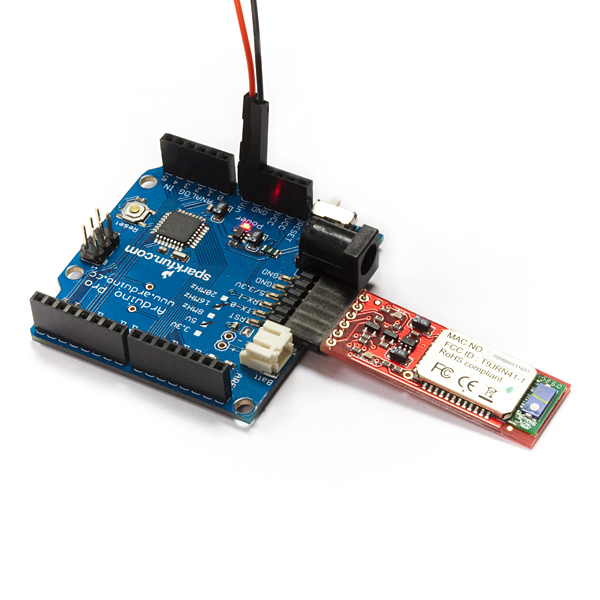

Bluetooth Mate Gold
Replacement:WRL-12580. The firmware on this Roving Networks product has been updated from version 4.77 to the 6.15 version. Go check it out! This page is for reference only.
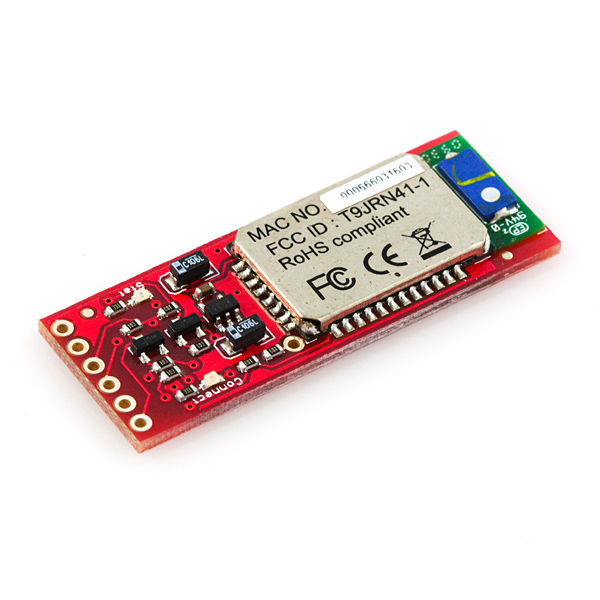
The Bluetooth Mate Gold is very similar to our BlueSMiRF modem, but it is designed specifically to be used with our Arduino Pros and LilyPad Arduinos. These modems work as a serial (RX/TX) pipe, and are a great wireless replacement for serial cables. Any serial stream from 2400 to 115200bps can be passed seamlessly from your computer to your target. We've tested these units successfully over open air at 350ft (106m)!
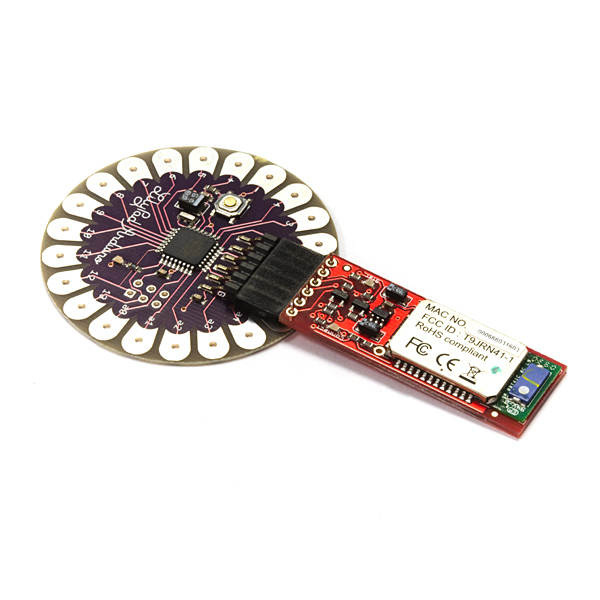
Bluetooth Mate has the same pin out as the FTDI Basic, and is meant to plug directly into an Arduino Pro, Pro Mini, or LilyPad Mainboard. Because we've arranged the pins to do this, you cannot directly plug the Bluetooth Mate to an FTDI Basic board (you'll have to swap TX and RX).
This unit ships with an RN-41 class 1 bluetooth module, a very easy-to-use and well documented bluetooth module. Make sure you check out the datasheet and command set links below. If you don't need the extra range, check out the Bluetooth Mate Silver which uses a Class 2 module which has less range.
The Bluetooth Mate has on-board voltage regulators, so it can be powered from any 3.3 to 6VDC power supply. We've got level shifting all set up so the RX and TX pins on the remote unit are 3-6VDC tolerant. Do not attach this device directly to a serial port. You will need an RS232 to TTL converter circuit if you need to attach this to a computer.
Unit comes without a connector; if you want to connect it to an Arduino Pro, we'd suggest the 6-pin right-angle female header.
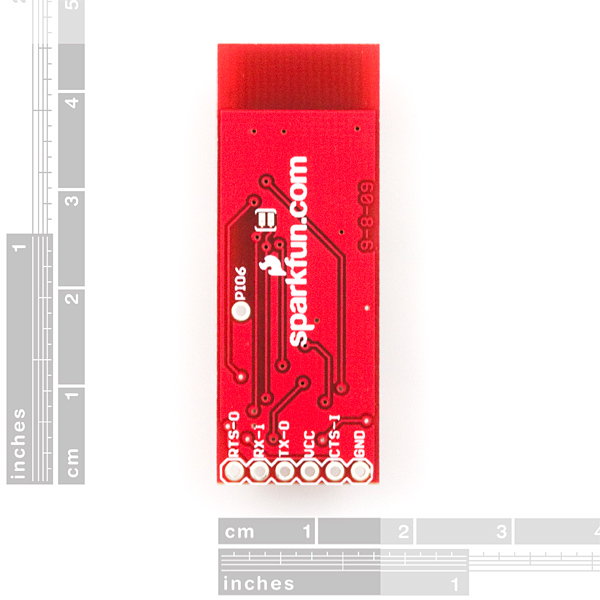
**Note: **The hardware reset pin of the RN-41 module is broken out on the bottom side of the board. This pin is mislabeled as 'PIO6', it is actually PIO4. Should you need to reset the Mate, pull this pin high upon power-up, and then toggle it 3 times.
Features****:
- Designed to work directly with Arduino Pro's and LilyPad main boards
- FCC Approved Class 1 Bluetooth**® **Radio Modem
- Very robust link both in integrity and transmission distance (100m) - no more buffer overruns!
- Low power consumption : 25mA avg
- Hardy frequency hopping scheme - operates in harsh RF environments like WiFi, 802.11g, and Zigbee
- Encrypted connection
- Frequency: 2.4~2.524 GHz
- Operating Voltage: 3.3V-6V
- Serial communications: 2400-115200bps
- Operating Temperature: -40 ~ +70C
- Built-in antenna
® module datasheet](http://cdn.sparkfun.com/datasheets/Wireless/Bluetooth/Bluetooth-RN-41-DS.pdf)
* Check out our Bluetooth Tutorial
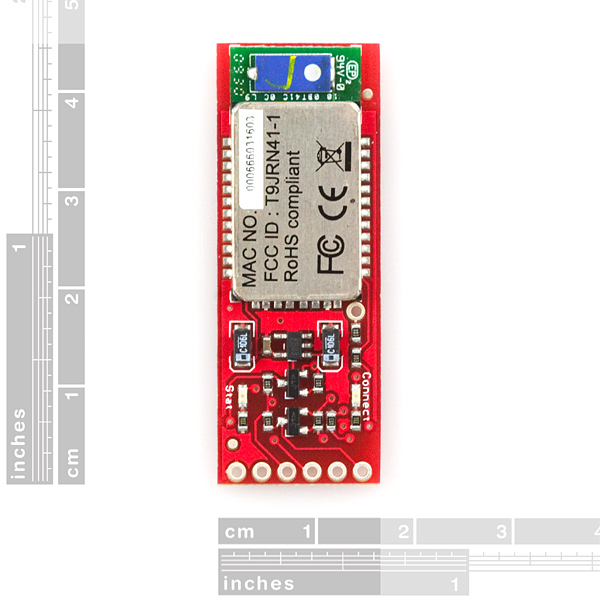
- Board: 1.75x0.65"
- RN-41 AT Command Set
- [Roving Networks Bluetooth
Bluetooth Mate Gold Product Help and Resources
Using the BlueSMiRF
September 16, 2013
How to get started using the BlueSMiRF and Bluetooth Mate Silvers.
Core Skill: Soldering
This skill defines how difficult the soldering is on a particular product. It might be a couple simple solder joints, or require special reflow tools.
Skill Level: Noob - Some basic soldering is required, but it is limited to a just a few pins, basic through-hole soldering, and couple (if any) polarized components. A basic soldering iron is all you should need.
See all skill levels
Core Skill: Electrical Prototyping
If it requires power, you need to know how much, what all the pins do, and how to hook it up. You may need to reference datasheets, schematics, and know the ins and outs of electronics.
Skill Level: Noob - You don't need to reference a datasheet, but you will need to know basic power requirements.
See all skill levels
Comments
Looking for answers to technical questions?
We welcome your comments and suggestions below. However, if you are looking for solutions to technical questions please see our Technical Assistance page.
Customer Reviews
No reviews yet.
I posted a quick tutorial on how I got my Bluetooth Mate working with an Arduino Pro Mini:
http://www.jhwarren.com/bluetooth-mate/
Hopefully it helps some people out.
Hi Jwarren, I followed your tutorial and I succeeded. Thanks a lot for your sharing. Now I wanna send data from the PC side to the Pro Mini to genarate some digital outputs on its output pins. Can you help me with that? Really appreciate that! ^_^
Is this module same as Bluetooth Modem - BlueSMiRF Gold sku: WRL-00582 ?<br />
I'm really worried about how do we plug BlueSMiRF to Arduino Pro Mini( same as BluetoothMate).<br />
Is it possible plug it directly like BluetoothMate ?
Hey, I have a question regarding the level shifting in the schematic.
If you connect the Bluetooth mate to, let us say, an Arduino, then the TX (Arduino) would be connected through the resistor to the RX(Bluetooth Module). Meaning that the voltage at RX in the bluetooth module will be 5V at some point during transmission!
Why aren't there any Mosfet on the RX-line (for proper level shifting)?
Hey,
Anyone know how to get this device to show up in the bluetooth menu on an iPhone/iPod/iPad? It shows up on my windows machine as FireFly-13BB, but it does not show up at all on the iOS devices...
Did you find the answer?
I'm not sure, but I think that the default connection type is SPP which is a Serial Port type connection and I don't think that iOS supports Serial Port Connections. If you are only sending data to an iOS device, consider an HID Bluetooth Module. HID Keyboard mode can be an easy way to send data. If you want to receive data from iOS I'm not sure what you should do.
Update: I got it to work a few times (the light turned green), but most of the time I just get the message, "Serial port /dev/tty.FireFly-2776-SPP' already in use".
When I did get a connection, I looked in the system prefs and it showed that it was connected, but if I look in the Sys Prefs when it complains about being in use, it shows "Not Connected".
I have been testing with a terminal emulator app (coolTerm), the "screen" command in the OS X terminal and the Arduino serial monitor.
I preloaded some test code on the Arduino Pro another user had posted a link to here using an FTDI cable. The few times I got a good connection, I did see the expected steam of numbers and it did respond to my input that reset the stream to 0. I just can't figure out why it will connect every time I try now... ???
Also trying to upload code to the Arduino via BT fails with the "Already in use" or the " programer, did not respond" Errors. I read someplace that is was possible and other places that said it's not. So if the device was operating properly would uploading code like this work or not?
You must connect within a certain time limit. Once it starts blinking faster, the 'connect time' is over, and you need to reboot it. Check out the command set PDF above for more info on how to connect. The rest of your problems sound to be related to having available SPP ports on your Mac.
Hey I wanted to post a few RTFM issues with these modules since you literally have to read all the documentation to get these modules to work.
The key is is '1234'
For 2-wire serial (TX-RX-GND) you must connect CTS and RTS (shorting the pins)
The module defaults to 9600 baud, 8N1 and H/W flow control. (I tried it at 115200 and had trouble (but I was still hacking then, so maybe that works too)
For Arduino users
RX-I(Blue)-->TX(Arduino)
TX-0(Blue)-->RX(Arduino)
You CANNOT program the Arduino through this interface
If you are having connectivity problems try this:
Unplug USB and power externally.
Transmit and receive from Hyperterminal or some other terminal. The Arduino serial port terminal sometimes drops the bluetooth port.
I found that the intel integrated bluetooth in my laptop kept resetting the connection, but a belkin dongle worked just fine.
Also worth noting: Breadboards seem to act like Faraday cages and completely shield the signal in one direction, so be careful monitor your signal strength!
Also consider swearing at it... that seems to help too;)
Hope this helps!
Hi, the question is .. this bluetooth has compatibility with arduino UNO .. in the specifications says arduino pros and lilypad… is a rule? or I can arduinoUno
You can definitely use an Uno, you will just need to run jumper wires to the proper pins. The LilyPad and Pros allow you to plug the Bluetooth Mate directly into them without any jumper wires or header modification, which is why those are specifically mentioned.
I have a question, this bluetooth is compatibility with android and arduino UNO??... in the specification says only arduino pros and lilypad
Easy device..
Does anyone having problem with its distance? I was in a room (5mx3m) with door open and start loosing communication after 3 meters away from the door.
This mate-gold used for a RC car and I use Bluetooth dongle, I have tried 2 different dongles and both are claiming 100m distance.
Hi, I have problems with bluetooth mate parity, I put this script:
And in the Serial Monitor , I put $$$, and D for settings, and after I to inquiry. So when a I put C, appear Trying and next Connect Failed. Someone could help me?
How is this different from using xbee?
I am looking for a example or instructions tot connect 2 together to transmit a serial signal. The need to connect automatically o each other
Does any one know how to set this up or were to find it? Thanks!
Will this work with 3.3V Arduino ? Or will I need level converters?
You can use this with the 3.3v Arduino as-is. The logic control is built in to the Mate board already.
Hi, does the modem only supports 115200bps as the maximun serial communication?
because i was reading in the "RN-41 AT Command Set" that the RN-41 can be configured even up to 921kbps for serial communication.
I'm having problems with receiving large amount of data from the arduino mega. It basically drops it after about 5-10 seconds. Similar to what is mentioned in the article below. I went through various experiments with the setup and currently what works is the 57.6 mode with S~,1 which makes the bluetooth mate to be recognized as a modem (not sure if this was necessary at all) but what really made the difference is using a minute delay before the transfer starts: void setup() { Serial.begin(57600); delay(60000);
Can anyone explain why is this needed?
article mentioned: http://blogs.gnome.org/desrt/2012/04/29/arduino-remote-programming-with-the-bluetooth-mate-rn-42/
Does the CMD escape ("$$$") appear in your data? It could be throwing the Mate into command mode. Waiting a minute gets you past the period during which the escape sequence will be recognized.
Hey guys! i have ordered a bluetooth mate gold for my project and want to conneect the bluetooth module with my android phone. I can only pair the device with my phone. It keeps on saying paired but not connected. I need this thing to get working and connected with my phone as i am building an application for HRM and need this module connected in order for my application to work. Any help will be appreciated. Thanx
Hi,
Just received my Gold Mate and trying to connect the unit using FTDI USB to Serial cable (TTL-232R-3V3-WE). I cannot connect via the serial interface.
The unit powers on and can see it with BlueTooth and able to pair. However, the serial side is a different story.
My cable is connected to the board the following way:
From Mate Gold to FTDI:
GND ..... Black (GND),
CTS-1 .... Green (RTS#),
VCC ... Red (5V),
TX-0 .... Yellow (RXD),
RX-1 ... Orange (TXD),
RTS-0...Brown(CTS#)
I am using minicom and set the baud rate to 9600 8N1 and when I enter $$$, I get no response back. I have tried 115200 8N1 and get nothing as well. I have tried rebooting to get within the command window and no luck either.
I am wondering what I am doing wrong here. This is pretty straight forward, but right now, its kicking my butt.
Appreciate any feedback.
Don
Solved - Able to communicate and configure initiated from bluetooth side. Basically it require enabling / disabling and it eventually work. There must be something in Windows (gave up on the minicom) that wasn't enabling the serial port, even though the properties showed it was enabled... All is working... Speed btw is 115200 on the bluetooth side as well as the serial side.
My saga continues..
1) I am able to connect to the serial aspect of the device using the FTDI cable w/ 115200 8N1. (nice green solid LED)
2) Able to connect to a remote laptop with bluetooth from this device and able to send characters back and forth. (using Tera Term VT)
3) Able to configure the device through the serial port.
What I can't do is get into configuration mode from the other direction.. I am experimenting on baud rate and not sure what the right rate is, 2400, 9600 or 115200, none of them seem to do the trick.
I set the configuration timer to 255 through the serial port, so it shouldn't time out on configuration. (ST,255).
Thoughts?
Didn't have any luck with MINICOM, not sure why. I downloaded the Tera Term, set the settings to 115200 8N1, No Flow Control and BAMN... it worked.
Any thoughts on why?
Update the datasheet link, This is datasheet version 3.1, the latest is 3.3r Also RovingNtworks changed their website, update all the links to that website.
I've more or less got this working on an arduino uno and paired to a macbook running on snow leopard.
I can get communication to happen in terminal, term, and processing, so that's a good start. I'm using this to control leds and 2 dc motors running off an ardumoto shield.
The issue i'm having is that i am trying to control this with my mac's keyboard. I've got that part working, more or less - but what i'ld like to do is have the motors drive in one direction while i hold a key down. I've been using this instructable as a starting point:
http://www.instructables.com/id/Arduino-controlled-Bluetooth-bot/step4/Code/ I've modified that code as necessary to run on an ardumoto shield and it does seem to work - with the caveat that instead of continuous motion, when i hit the "i" key - the motors only turn for 25ms, then stop. On that link the author is able to hold down keys and have his robot move continuously. i can change the code to another delay factor and get longer movements, but thats not really what i want.
Anyone gotten anything working along these lines on Mac?
I am using bluetooth mate connected to Arduino UNO. I set up baud rate to 115200 and i was trying to send analogic input reading from arduino to processing using BT connection. The problem is that when i connect BT (green light on) and i start receiving data from Arduino through serial port, the connection fails after some seconds. However, if i wait 1 minute after having the green light on, it works fine. Is it supposed to take so much time to works perfectly? At Hyperterminal it connects imediatly and works fine! Thanks in advance.
Has anyone successfully connected this bluetooth with itseft so that two Arduinos can talk to each other through the bluetooth connection?
Arduino->Bluetooth-> Wireless Link
With this exact device no, but the RN-41/2 modules can be paired together to form a wireless cable very easily and can be set to auto connect.
The association timeout is a deal killer for me, is there any known way to disable it? I was hoping to use it to periodically reprogram a difficult-to-access arduino pro. If I have to power cycle it, it defeats the purpose.
I set the baud rate to 115200bits/s but I've experienced the transmission much lower, around 12000bits/s. If I use wired connection instead of bluetooth the transmission is fine. Does somebody else experienced the same situation?
I recreated this board on my own using the same BT module, however when streaming serial data from the arduino ( adxl345 accelerometer raw data... so 3 numbers with commas between them ) I end up getting a lot of -1, -1, -1 and then occasionally it will show appropriate values. I do not have this problem with the usb cord, only the BT connection. Any ideas?
Double post
Hey, has anyone tried using the ArduinoBT bootloader on an Arduino Pro? Seems to me that with little modification it should work the same... right? Maybe just changing the pin assignments of Tx,Rx and Reset? I won't have mine until the middle of August so if anyone has any thoughts on this, I'd really appreciate it! Thanks!
I'm getting mine tomorrow. I'll see if what your saying is possible, however I don't own a PRO or UNO just a Mega 1280. I will hook it to the TX/RX pins (Pins 0 & 1) and see what works...
I've made a new tutorial based on Jonathan Warren's post, with updates to new parts and also making it easy for Mac users. Please check it out:
http://www.rioleo.org/setting-up-the-arduino-pro-mini-and-bluetooth-mate-on-mac.php
I am struggling to get my BT Gold module to autoconnect to my droid phone. The devices are paired. I can connect from the phone to the module with blueterm. I can see the phone when I do an inquiry scan. I have tried slave mode and master mode on the BT gold. What am I missing?
HEY guys I'd made the bluetooth paired with my computer, but my problem is when i ran my code in processing and the computer do not send data to the bluetooth. Although the bluetooth has the start LED on it seems it doesn't work because arduino do not receive anything, and my code is correct because when i conect the arduino by direct (usb wire) serial to my computer everything is perfect. I red about NewSoftSerial and try to used it but it keeps making the same someone can help me please?? I also used Putty and the counter program, nothing happen!! I'm desesperate!!! ANYONE THANKS!!!
I had the same problem. i solve it changing the baud rate from the code in processing (115200). this is the baud rate for default of the lilypad bluetooth
Hi, I would start with the basics. If you know that your code works on the Arduino, put it aside. It will be there for you when you're ready. Let's start by trying to connect over Bluetooth, and sending some basic characters. I would pair the two devices, and make the computer the master, the Arduino the slave.
If you have used the example Physical pixel, this is a great code to test with. It allows you to send a command character to the Arduino, and once received, it turns on or off an led. I would run that code, and then send commands over Bluetooth. If it works, you know the connection is good, and you can start adapting your old code back into the system.
What is the difference between the bluetooth modem gold, and the bluetooth mate gold???
Which would you want if for example you wanted to control your arduino remoted with your android phone to do something?
The difference is mostly the pinout. The BlueSMiRFs connect directly to actual Arduino boards made by Arduino. The Bluetooth Mates are made to connect directly to the Arduino Pro and LilyPad boards (that are not actualy made by Arduino, I think they are made by SparkFun.)
Hi,
what are others experiences with the length of the open-air connectivity? I was able to connect with my PC for appox. 10m. Is this maybe because I used built-in bluetooth receiver in my laptop?
Hi,
I have a problem with this one. I cannot even get the lights turn on. I use a Lilypad 328, and power it with this battery:
http://www.sparkfun.com/products/8483
The Lilypad leds blinks but not the bluetooth ones. Anyone can help me?
Thank you
Looks like my board was defective. :( But they replaced it. Perfect, thanks guys :)
I'd just like to know max distance using class2 cellphones...
Class 2 is about 30ft. If using devices of different classes you will generally get the range of the lesser device.
Hi Logxen,
here is my earlier post: Does anyone having problem with its distance? I was in a room (5mx3m) with door open and start loosing communication after 3 meters away from the door.
This mate-gold used for a RC car and I use Bluetooth dongle, I have tried 2 different dongles and both are claiming 100m distance.
Is there any possibilities that my dongle is the lesser device? Any advice with dongles? My recent dongle: http://www.klinikrobot.com/index.php?page=shop.product_details&flypage=flypage.tpl&product_id=546&category_id=106&option=com_virtuemart&Itemid=1
Thanks in advance,
Ah man, I brought this instead of the bluemirf...
can i still use this and connect to the bluesmirf pins on a protoshield v2.0?
Thankfull for help :)
I using this product, to control PIC16F877A PWM. when i using the windows vista system to connect this bluetooth. The problem come out, i can connect it, light become green color, but can not send any data.( i using the visual basic 2005 create a window to control the PWM). MY PC have bluetooh, n it connect my pc bluetooth, become green led, just i can not send any data. Can u Help me, what is the Problem? Why can not send the data go out.
i try to use the "LynxTerm SSC-32 Terminal" this software to test(http://www.lynxmotion.com/images/html/build125.htm), also no data send back.
Can u give me a ideal?
Thank you very much
Hi.......
I think i am doing something similar to you and meet same problem you have.....
May i know you slove your problem le ma??
If you slove it, do you mind teach me??Thanks......
Hope we can change infomation here.....below is my email
reeve333@yahoo.com
My name is reeve.I am using PIC16F877A and VB as well in my project.......
Is there a way to get a output from this in some way saying a paired device is in range? (looking to make a "push to start" circuit in my car with my phone as the wireless key. Thanks!
what does this weigh ???
Setting baud rate works( display command says), but junk data is displayed even after booting.I'm using this module with "9DoF AHRS Razor board".I would like to reboot the "9DoF AHRS Razor board" when PC program try to access bluetooth COM# port.When i use this board with USB cable & if i open COM port ,it reboots.How can i achieve this functionality with this BT module.
Thanks.
It's testing my patience , i read the instruction set & set the default settings after i changed baudrate ( SU,57) i could see the junk data displayed & set the baudrate to 115k. If i use the display commands, it shows baudrate is 115k, but i can open COM# pot with both baudrates. I really don't guess what's going on !!!
seems SF people must concentrate on this.
Thanks
Hi Harinath,
I know I'm going back a year, but did you ever figure this out? I'm having the same trouble.
Thanks!
Junk data is almost always a baud rate issue. Contact techsupport@sparkfun.com and they can walk you through it.
Sounds like you have a baudrate mismatch between the 9dof and the bluetooth module. Contact techsupport@sparkfun.com and they can explain how to get this working.
Any way to get this guy to not reset the Pro after you disconnect?
I just got one of these BlueTooth mates and an Arduino Pro this last week, but have yet to get it working. I tested the Arduino Pro with an FTDI cable and that works fine, but so far I have failed to get the BlueTooth Mate working with the Mac or Arduino Pro. I paired it with my Mac Pro (10.6.4) using the code "1234" and it showed "Success pairing Device!". The device also shows up in the system preferences bluetooth settings, but shows connection as RED Not connected. The LED on the BlueTooth Mate changes from fast red blink to slow red blink, but never goes green. What am I doing wrong?
Just curious, how hard would it be to make one of these talk to a jailbroken 3rd gen iPod Touch?
It's bluetooth, so you can probably connect, but beyond that, it might get complicated. This is really more of a question to ask in an Apple forum. Their hardware seems to change daily.
It works very well as a Serial link between Arduino and PC. Bluesmirf: connect Tx to Arduino D0, and Rx to Arduino D1 - also +5v and GND. Make sure serial speed is set to 115,200bps in Arduino sketch (I could not get it to work at any other speed).
All that is needed is a bluetooth adapter for PC, I use Blueman in Ubuntu linux to connect Bluesmirf as a Serial device - rfcomm0 on my machine. Then open a terminal and type the following to see the serial readings:
$screen /dev/rfcomm0 115200
Setup takes about 5 mins from opening package to reading serial monitor wirelessly.
I'm using putty and entering $$$ returns CMD. Hit d or e (you can't see the actual characters in the terminal) and hit enter should work. I'm trying to change the default baud rate without success. By typing SU,9600 changes it permanently and even after restart putty shows me (with the "d" command) 9600. However even after adjusting the windows FireFly bit rate parameter, uploading a code to arduino set to 9600 and finally setting the serial monitor to 9600 prints me rubish. Because of the pipeline I'm using 9600 is a must because 115200 creates huge delays. I was wondering if anyone had success with baud rate changes and arduino?
Progress..
After powering down the modul and re-pairing the device in windows it started working. In fact I tested almost all bps settings and all work fine until the bluetooth mate's default bps, the arduino code, and the receiving part (or the serial monitor) are all consistent with the bps setting. It is important to use SU,9600 (SU,57.6 SU,115K etc..) instead of U,9600,N because this second is only a temporary change.
Now the new problem is that if I'm using power from the USB (USB->arduino->3.3V->Bluetooth mate) it works fine. If I'm using a 9V battery (battery->arduino->3.3V->Bluetooth mate) a part of the data becomes chaotic.
Really close to become wireless..
Is it recommended to use 6xAAA instead of 9V?
I also found this info below, but I'm not sure since Bluetooth mate is actually connected to Rx and Tx.
http://www.practicalarduino.com/news/id/61
I can power the BTMate and transmit serial data between my PC the Arduino Pro.
Now I'm trying to connect two arduinos through bluetooth and transmit data from one to the other. In order to connect the two bluetooth modules without using the computer, I need to enter command mode to configure the right settings so the modules can link to each other on their own.
I have been successful at entering command mode (using the '$$$' and the BT returns 'CMD'). But after that I can't seem to get any sort of response for any other commands, not even the '---' which is supposed to exit command mode.
Any insight into this would be greatly appreciated.
How would one go about setting this up with an Arduino Duemilanove?
I know where to connect: Vcc, GRND, TX, and RX.
I don't know how to connect: RTS and CTS.
I've noticed that CTS goes to GRND on the Arduino Pros. But there's no RTS pin on my Arduino Duemilanove.
Thanks in advance
The bluetooth mate was designed with the Arduino Pro in mind:
http://www.sparkfun.com/commerce/product_info.php?products_id=9219
Take a look at the schematic for the pro, JP9 will tell you which pins go where. Also, you can probably get away with no flow control and connect CTS to RTS. That is what I typically do, just connect CTS to RTS, and both of them to nothing else.
I'm curious if it works in small distance (3m) but not open air. I am planning to place it inside a plastic box and into a foam ball.. so there will be approx 4 inches of foam, some plastic and a hand most of the time in the zone. Will it still work?
Bluetooth (as I recall) uses a spread spectrum 2.4GHz radio wave to talk over. This is a flowery engineering way of saying it will get the same reception as a cell phone. If you buried it in the earth in a concrete box it wouldn't transmit. If you cover it in foam you will still get "reception".
so, yeah, it will still work
If i had 2 Lilly pads attached to these could i communicate between the two or is this strictly a connection to a computer.
The picture of the bottom of the board shows a silk-screen label of "PIO6" (the only connection that isn't on the edge of the board), but the schematic shows PIO4 goes to "JP2", and PIO6 is not connected. Which one is correct??
It's mislabeled on the board. That is PIO4, which is broken out for factory reset goodness if you should ever need it.
I am having difficulties getting this to work. I have a RRRB arduino clone and I am using a MacBook Pro. My Mac sees there is a Firefly device to pair with. What is the pass code? If no pass code how do you set it up? I was able to get the Bluetooth Mate to slowly blink red.
The passcode is 1234, red (slowly blinking) means that the module is ready to receive. I don't have access to OSX, but in Linux you have to use rfcomm to setup a Pico-net, and then you get a device on /dev/rfcomm0 that you can do what you want with. I suspect things are not that complicated in OSX
The standard passcode for most of our Bluetooth products is 1234. For Bluetooth in general, 1234 and 0000 are pretty standard unless otherwise specified.
Wow, very nice product! Was looking for a way to wirelessly talk to MaxMSP but this seems to be the best way to have a very easy serial connection. And it's not that expensive compared to for instance the xBee...
Can you auto reset wirelessly with this device? I dont see a dtr pin :S
Sorry if this is a dumb question
Having real difficulty getting this to send serial data.
Soldered on an header an connected to an Arduino Pro Mini.
Can connect and place in command mode, but other than that no other serial data is getting sent over. Cant even exit command mode or read the settings back.
Unit is brand new (other than adding the header) so everything is at defaults.
Have another of these which straight from packaging. Can connect, put in command mode but thats it
Did you have any luck getting it into command mode? I seem to be having the same problem.I'm able to enter command mode, but after that, no serial data seems to get through. I'd like to connect two arduino pro minis via bluetooth if at all possible.
ok, found out that the baud rate is incorrect hence no serial data.
strangely, shorting pin 11 and pin 4 sets the default to 9600 and will now work with arduino. Yet still cant set it in command mode??
ok, ill have to say, great little product, if you can get it to work. after spending 2 days i now have 2 of these modules which are unusable.
You connect it up as you would do with the FTDI cable, supply with 5v power and make an connection to the bluetooth adapter. All you can do then is put it in command mode as nothing else will send on any Baud rate unless Pin 4 is raised high to default it to 9600.
Tried everthing i can think of to get this to work. Ieven attempted to solder pin 4 on the rn41 to vcc pin 11, to raise it high which will work, but unless you are an expert at soldering then you end up shorting it to the shield or the gnd pin.
Great idea but would but much more useful if this pin was set to an jumper ready
Has anyone got one of these units up and running properly? All I can do is pair it. I've tried it with my Arduino Pro Mini, Arduino Diecimila, and with Windows XP, Windows 7, and on a mac. No luck getting it to do anything but blink its red light. I've run out of ideas. Any help would be greatly appreciated!
I got mine 2 weeks back, tested it, works fine.
Blinking red (fast pulse) means its not paired. Blinking red (slow pulse) means its trying to pair. When its paired, the green LED should light up.
For me, when I searched for near by devices it was discovered as 'FireFly'. You might want to try this:
Once discovered, pair and create a virtual serial port. Your bluetooth software should help you do this. Once you create the virtual serial port, remember the port number (eg. COM2)
Then you can use terminal software like Realterm (for windows) to check if the module is RX/TX properly. Connect to the virtual serial port under 'Port' tab and 'Open' it. Realterm will try to connect Usually the Realterm console should just echo what you type. That means its all good.
Something to remember: The terminal software tries to open the port to connect, so you would have to free the port by disconnecting (if your bluetooth software is already using it). So keep it paired but also keep the port free.
HEY guys I'd made the bluetooth paired with my computer and It's exactly as you mention A.G., but my problem is when i ran my code in processing and the computer do not send data to the bluetooth. Although the bluetooth has the start LED on it seems it doesn't work because arduino do not receive anything, and my code is correct because when i conect the arduino by direct (usb wire) serial to my computer everything is perfect. I red about NewSoftSerial and try to used it but it keeps making the same someone can help me please?? I also used Putty and the counter program, nothing happen!! I'm desesperate!!! ANYONE THANKS!!!
Hi, I had quick question about the headers used for this module.
I soldered the female header (PRT-09429) to my custom pcb and used the right angle header (PRT-00553) to hold the module. But the right angle header pins do not seem to make good contact with the module.
Is there a way I can secure the module without soldering it with the pins? I am just concerened about damaging the chip
100-9 is 20% off? Does this mean I have to order exactly 91?
I'm looking to control my playstation with a PIC, using a bluetooth interface.
Is this compatible with the PS3? I tried finding information on what protocols they use. I've come up with HID and L2CAP. I see this uses SPP -- is it possible to convert this to HID? Can I use SPP with the PS3?
Try the WT-32; it was the only device I could find that implements Bluetooth HID (although it's a little expensive -- a WT-12 would have done the trick, but SparkFun doesn't stock them). Also, you'll need V4.0 of Bluegiga's iWrap firmware -- see my comment on the WT-32 page.
This module is Serial Port Profile only, no HID. Unfortunately PS3 is HID - I don't think it will work.
yes, you should be able to program an Arduino wirelessly with this, it's just a wireless serial connection.
Hi, one thing is not clear to me: is this a replacement also for an FTDI Basic Breakout board? if I deploy a prototype with an Arduino Pro and one of these, will I be able to patch the software later via Bluetooth or I will have to open it and connect the FTDI again?
also: I have a Pro Mini; is this OK also for that model or just for "normal" Pro and Lilypad? Thx!
Great questions. This is a replacement for the FTDI cable. Plug this into your Arduino Pro, Pro Mini, or LilyPad, and you get serial stream on your computer over Bluetooth.
I don't believe the Arduino software has enough flexibility in the serial bootloader to load new code over the wireless. We'll try it out and double check.
Can you tell me how to download a sketch using the Bluetooth Mate in place of a FTDI Basic Breakout board? I am going from Intel Mac to Pro Mini. Can transfer data, but the bootloader doesn't bootload. Thanks!
This is possible but it takes both some soldering and a software kludge.
Works on my mac, I just have to remember to switch the DTR toggle back when using USB instead of bluetooth.
Hi Nate, did you have some time to try it out? does it work?