- Home
- Product Categories
- Wireless and IoT
- Bluetooth Modem - BlueSMiRF Silver



Bluetooth Modem - BlueSMiRF Silver
Replacement:WRL-12577. The firmware on all our Roving Networks products has been updated from version 4.77 to the 6.15 version. Go check it out! This page is for reference only.
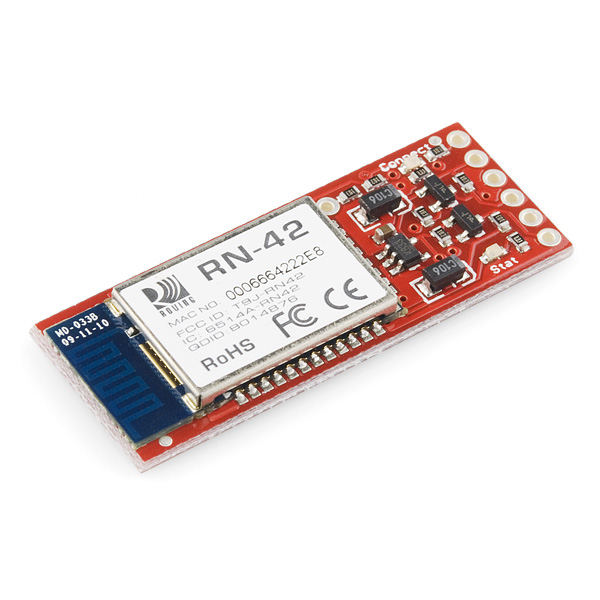
The BlueSMiRF Silver is the latest Bluetooth****wireless serial cable replacement from SparkFun Electronics! This version of the popular BlueSMiRF uses the RN-42 module which has a bit less range than the RN-41 module used in the BlueSMiRF Gold. These modems work as a serial (RX/TX) pipe. Any serial stream from 2400 to 115200bps can be passed seamlessly from your computer to your target.
The remote unit can be powered from 3.3V up to 6V for easy battery attachment. All signal pins on the remote unit are 3V-6V tolerant. No level shifting is required. Do not attach this device directly to a serial port. You will need an RS232 to TTL converter circuit if you need to attach this to a computer.
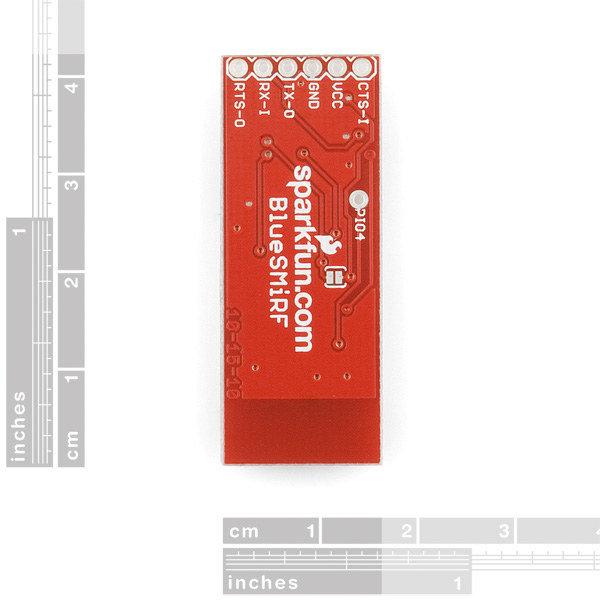
Unit comes without a connector. Please see related male and female pins below.
Specifications:
- FCC Approved Class 2 Bluetooth****Radio Modem
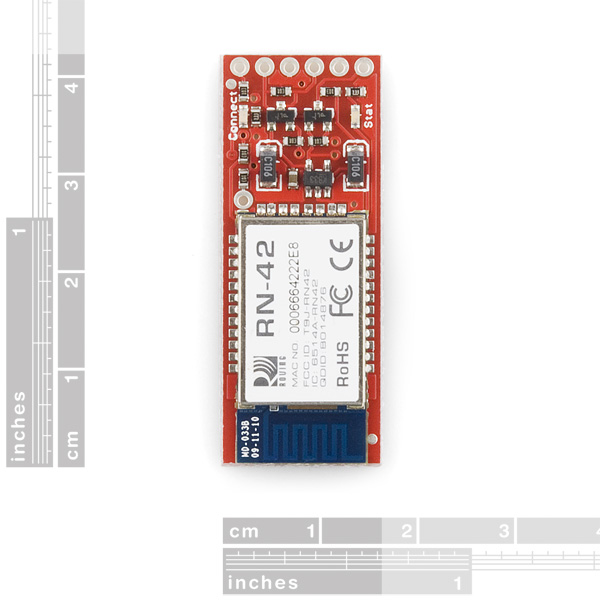
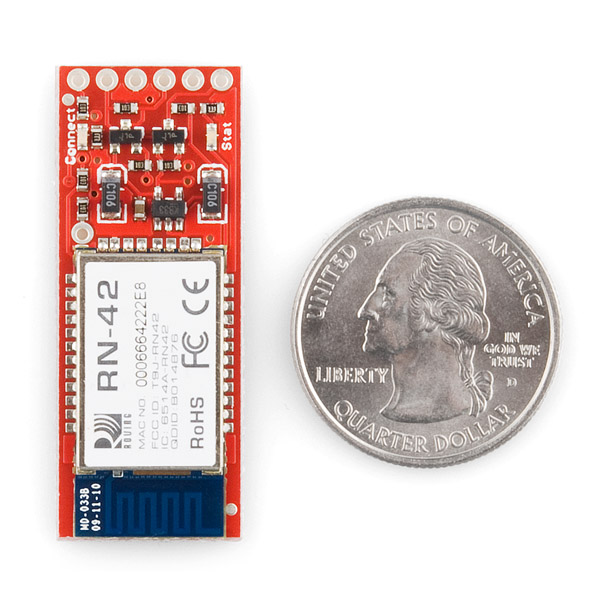
- Extremely small radio - 0.15x0.6x1.9"
- Very robust link both in integrity and transmission distance (18m)
- Hardy frequency hopping scheme - operates in harsh RF environments like WiFi, 802.11g, and Zigbee
- Encrypted connection
- Frequency: 2.4~2.524 GHz
- Operating Voltage: 3.3V-6V
- Serial communications: 2400-115200bps
- Operating Temperature: -40 ~ +70C
- Built-in antenna
® module datasheet](http://cdn.sparkfun.com/datasheets/Wireless/Bluetooth/Bluetooth-RN-42-DS.pdf)
* Hookup Guide
* Wiring Example
* Connecting to a SSC-32 Robot
* GitHub
This is a single unit only. We recommend the purchase a USB dongle to interface to a computer if you do not already have access to a computer with Bluetooth connectivity.
- 45x16.6x3.9mm
- RN-42 AT Command Set
- [Roving Networks Bluetooth
Bluetooth Modem - BlueSMiRF Silver Product Help and Resources
Using the BlueSMiRF
September 16, 2013
How to get started using the BlueSMiRF and Bluetooth Mate Silvers.
Core Skill: Soldering
This skill defines how difficult the soldering is on a particular product. It might be a couple simple solder joints, or require special reflow tools.
Skill Level: Noob - Some basic soldering is required, but it is limited to a just a few pins, basic through-hole soldering, and couple (if any) polarized components. A basic soldering iron is all you should need.
See all skill levels
Core Skill: Electrical Prototyping
If it requires power, you need to know how much, what all the pins do, and how to hook it up. You may need to reference datasheets, schematics, and know the ins and outs of electronics.
Skill Level: Noob - You don't need to reference a datasheet, but you will need to know basic power requirements.
See all skill levels
Comments
Looking for answers to technical questions?
We welcome your comments and suggestions below. However, if you are looking for solutions to technical questions please see our Technical Assistance page.
Customer Reviews
No reviews yet.
Hello I am currently trying to use the bluesmirf gold bluetooth to connect with another bluesmirf gold bluetooth. One of the bluetooths reads the acceleration from an accelerometer (which I bought from sparkfun as well) while the other is attached to my computer so that the acceleration readings can be sent wirelessly. This project has been smooth sailing up until this point, for some odd reason the code from one bluetooth to another works perfectly and sends the correct acceleration for about 5 trials per day and then it will suddenly stop working and I am no longer able to get the acceleration data to successfully print to the serial terminal. Even weirder, once it begins messing up, if I comment out the line in which I initiate the accelerometer (accel.init(); ) and also comment out the line where I read the acceleration ( accel.read();) and re-compile the code works perfectly fine. Everything that I wanted to print out begins transmitting to the serial terminal once again without failure (of course without the proper acceleration data that I need). For some reason my code does not seem to like the parts that involve the accelerometer, has anyone else run into a problem like this? I am using the arduino IDE to do all of this. I just cant wrap my head around why the code would work perfectly for a little bit and then suddenly stop working without me re-compiling the code. Any suggestions would be extremely helpful!!! Thanks in advanced!!
I should share my recent experience hooking up this device. Sparkfun's Bluetooth tutorial is out of date. The default settings are 8N1 at 115.2 kbps. To enter command mode, you need to type $$$ before the 60 second (default) power-up timer expires. Here's what I suggest you do to get up and running quickly: 1. Jumper RTS/CTS with a solder blob. 2. Solder wires to VCC, GND, TX and RX. 3. Apply power to VCC and GND. 4. Connect to the Bluetooth device on your PC (initializes as COM40 on my PC).
5. Open Hyperterminal at the settings described above for whatever COM port your device initializes to. 6. Holding the TX wire to the RX wire, type random letters in Hyperterminal. You should see these printed on the screen (with ECHO off--i.e., the characters are sent from the PC wirelessly to the chip, down the TX wire, back up the RX wire, and then back wireless to the PC).
7. To enter command mode, disconnect from Hyperterminal. Power down your BlueSMiRF, power back up, connect to Hyperterminal, and enter $$$ before 60 seconds is up. The BlueSMiRF will respond with "CMD". Then type D and you should see device information printed to the screen. Type --- to leave command mode and re-enter data mode.
Hope this saves you some time.
This module doesn't seem to work well in the presence of other Bluetooth units. I was experiencing sporadic disconnections (especially when during high data rates), which disappeared when I turned off the BT keyboard on my computer. Are there any settings one can add to make this module more robust to other BT hardware near it?
It's somewhat elusive, but to get this device working set your baud rate to 115,200 bps! Took me forever to figure this out.
Thank you sir. You just saved my life.
Is it possible to connect point to multi- point using this. if possible please let me know how to do.
Following the tutorial, which by the way now shows the default baud rate to be 115,200, I am able to use the following script to temporarily change the baud rate to 9600. But if instead I connect the BlueSmirf to the hardware Serial port and replace "bluetooth.command" with "Serial.command", the baud rate stays at 115K. I have tried changing and adding delays, but no luck. Any ideas? I am trying to use the Bluesmirf to read a lot of data from a RocketRobot Android robot controller app and I think the amount of data might be overwhelming the SoftwareSerial.
SoftwareSerial bluetooth(bluetoothTx, bluetoothRx);
void setup() { bluetooth.begin(115200); // The Bluetooth Mate defaults to 115200bps bluetooth.print("$"); // Print three times individually bluetooth.print("$"); bluetooth.print("$"); // Enter command mode delay(100); // Short delay, wait for the Mate to send back CMD bluetooth.println("U,9600,N"); // Temporarily Change the baudrate to 9600, no parity // 115200 can be too fast at times for NewSoftSerial to relay the data reliably bluetooth.begin(9600); // Start bluetooth serial at 9600 }
Battling to get my Mac to communicate with the Bluetooth Modem. It recognizes it and using "Cool Term" terminal it pair with the device. From there nothing. I have shorted CTS to RTS as suggested on various forums, and the connected RX to TX on the understanding that this would effectively echo back data sent. Help please!
Is it possible to connect the BlueSMiRF Silver directly to a standard USB port? Or is it necessary to use any adapter / converter?
More than any other feature, I want to be able to upload program changes to Arduino using wireless technology. Can you suggest which product here or anywhere is good for that? I'm afraid the necessary pins are not available with this board. darn it. I would think many customers would want this. Thanks for any advice.
I'm fairly sure this module can upload program changes. It's just like an FTDI cable, except wireless.
hey don't use hayses with the new ones, use the commands in the advanced user manual here: http://www.rovingnetworks.com/products/RN42
I too like many others it appears read the out dated Bluetooth tutorial and started out trying to connect via the uart at 9600 baud. Once at 115200 all is good and it is extremely simple to use
Does someone of you know how to setup a piconet with this Bluetooth modem? Because I want to send data to multiple Android devices at the same time.
recently got my module. I was wondering what the best option would be to get the connection status in a set interval.
Goal here would be: If bluetooth smirf connects to my phone (and only to this device!)...have arduino do action1.....once i leave the proximity and bluetooth disconnects do action 2 and run that proximity check every couple of seconds or so.
i am looking into the $$$ command sets from this [url]http://www.sparkfun.com/datasheets/Wireless/Bluetooth/rn-bluetooth-um.pdf [/url] manual but i am not sure going into command mode very couple of second is a great idea...perhaps its not even possible.
Hi, I have been trying to use this module and I want to save power when I am not transmitting. Here is the user manual - http://www.sparkfun.com/datasheets/Wireless/Bluetooth/rn-bluetooth-um.pdf
Now My requirements are these 1. keep the module connected to my pc 2. transmit "Hello" to pc when a button pin 12 goes high on the arduino, this will happen by button press
So when I am not transmitting, I want to be able to keep the device in sleep mode. The command for that is SW,8000 However my module is still consuming 25 miliamps when not transmitting. Has anyone tried this?
I used this module in my little project. I created an easy-to-build platform, then I make it move from my Android phone/tablet. It is a nice, "user friendly" modem!
Further details on my blog: http://arduinoomni.blogspot.com.es/2013/02/the-remote-controller-app.html
what if i want to use the SPICLK pin and the rest of SPI on RN42 bluesmirf ?? , ?!
Once this device has been paired with something say a phone and the phone goes out of range / the connection is lost. When the phone is brought back into range will it automatically pick up the connection again or do they have to be paired / activated again? Thank you for the help!
Can the RN HID firmware be burned to this device? I'm aware you guys are selling a separate breakout with the RN-42-HID firmware, but since I already have one of these lying around from a previous project I was hoping to repurpose it if at all possible.
The photo shows two C106 diodes on the PCB. Looking at the schematic I don't see them. Is this PCB a later revision?
I suspect that you're looking at C1 and C3 - they're in the top left of the schematic.
Squeeze a bit more out of the unit in SSP mode:
Set the baud on the RN-42 to 921600 $$$ SU,92
Set the interface rate on the micro-controller you're using to 921600 as well and connect rts-o to a digital input and use this line to govern sends.
Something like: { while (digital_rts_o == 1) { } // printf or putc here, though not a (long) loop // as you'll be bypassing the point of querying // the rts line and crash your BT stack. } I get 20KBytes/sec easily, 21KBytes/sec with (on the) desk distances.
Before this, I would get around 12KB/sec.
I did the above with an mbed 1768.
Someone help please!! I connected the bluesmirf to PC via bluetooth, and after sending $$$ command got the CMD back and red LED started blinking fast. So far so good. But then when I type D, or E, or any other command I get nothing back. If the string I enter in command mode is too long, I only get "!" character back. Typing --- or --- doesn't do anything as well. When I'm in normal mode, and connect TX and RX together I get all characters I type in terminal back alright, which means both TX and RX work fine. What the heck am I doing wrong? Settings on terminal: 115200, parity - none.
If you're using the Arduino Serial Monitor for your terminal, you have to set "No line ending" for the $$$ command. Any data within 1 second of the $$$ command will nullify that command. All other data must be sent with a carriage return, so set that option in the Serial monitor AFTER entering your $$$ command.
Just install PuTTY and use it to send your commands....
This works great with the Bluetooth on the MAC and arduino! http://tekstop.wordpress.com/2012/07/26/wireless-switch-using-arduino-and-a-mac/
Is it possible with this module to send a relatively low resolution video steam to a smartphoneand at the same tima recieve simple strings from that phone? Will I get lag or image breakups?
Hi everybody,
What's the difference between a BlueSMiRF Silver and RN-42 Bluetooth module?? I mean what happens if I only use RN-42 without any modem to transmit data around.
Thank you so much.
The BlueSMiRF silver is actually a breakout board based on the RN-42 module, so it is simply a board that facilitates using the RN-42 module. You could use the RN-42 module without a breakout board, but you would then need to examine which pins you will need access to and solder directly to the pads on the module itself. Generally, customer who simply need to send basic serial signals use the BlueSMiRF boards instead of the bare module as it is faster and easier to interface into a project.
The BlueSMiRF is here to help connected the RN-42 to your setup easier and quick. You will be able to do all the same things if you got the RN-42 modem by itself. I recommend taking some time to look at the Typical Application Circuit in the RN-42 datasheet if you were planning to just get the RN-42 module by itself. http://www.sparkfun.com/datasheets/Wireless/Bluetooth/rn-42-ds.pdf. Email me at techsupport@sparkfun.com if you had anymore questions!
I've connected the bluesmirf to my MCU and see "CMD" after sending "$$$" and the red led starts blinking fast. but when I try to send any other command, like "D", it gives me back the message. "No remote address!". Does anyone know what this means?
just means that nothing has been paired to it yet pair it to any bt host device and then enter command mode it should then work
In my experience, the D command should work regardless. I have been able to command D, E, etc with all pairings removed and no stored addresses. Pay special attention to the fact that a carriage return after $$$ will nullify the command, but a carriage return is required for all other commands.
I would like to use this for a wireless between two arduinos. Can I communicate between two of these instead of from one of them to a to a computer?
Yes, you would just need to pair them together.
I'm looking for a bluetooth modem that will retain its settings. I want to use this to go from a RS-232 off a ham radio to a tablet via BT. So the ham radio won't be able to send any set up commands.
Will this thingy work? (obviously with level shifting)
yes this would work for that depending on the voltage of the signals you might not need level shifters. as for the set up commands no the radio wont be able to do any because it doesnt have the commands for this module, however this module can be remotely configure via the tablet if you have a terminal program on it that can do serial ports and custom commands
You can also store a BT address in the module and set it up as Auto-Master (or something like that... it's in the manual) so it attempts a connection to the paired device on startup.
I have successfully connected one RN42 module to an android phone using the standard SPP UUID. My need is to interface more than one RN42 module. I am working on that... but it seems that RN42 does not like to connect to any SPP (with UUID type #1101 )profile other than the standard UUID which is 00001101-0000-1000-8000-00805F9B34FB. Any reasons, ideas, has anybody tried to interface two RN42 over android simultaneously. Thanks in advance.
If I issue a data command to the bluesmirf, should bluesmirf automatically send that data command to the arduino?
Background:
I can connect to the unit just fine (green light).
I can send '$$$' and 'D\n' and 'H\n' and various other getters and setters just fine (via Coolterm.app for Mac).
The board can print data just fine from TX (board) => RX (bluesmirf) just fine (because the sketch tells it to) and this data appears on my terminal (Coolterm.app for Mac).
The only thing that does not work is sending data (strings from Coolterm.app) to the bluesmirf and having bluesmirf send the data to the board.
Is this not possible? Am I missing a step?
Ah shoot, this is an RN-41 (T9JRN41-1) that I have.
Is there any way to test if the TX port is defective?
This is a bluesmirf that was lent to me, if I can get TX (from bluesmirf => board) working, I intend to buy one of my own.
As I mentioned board => bluesmirf works fine, and sending $$$ and other commands from Coolterm.app => bluesmirf works fine.
Phew there is some major back and forthing on whether this can be used to hook up to an UNO/Mega to uplad sketches. One guy has a pro set up but his diagram doesn't make sense and it requires software changes in the IDE. Does anyone have an image showing how to do this? Summarising what I have read, can anyone check to see if this is right? My board arrives in a few days and I'll probably let the smoke out :)
Anyone know if this is right? anyone done this? anyone got a diagram?
I have had a look at the datasheet and the DTR signal is not broken out onto the board, so I don't think the RTS line thing will work.
Noob Question. Why did you convert the pins to 5V and not leave it in it original value of 3.3? Can I simple connect a wire directly to the pin instead? Can I connect this 5V RX/TX to a 3V power MCU? Can I power it with 3V instead of 3.3V?
Thanks for the help
I agree, Sparkfun should make an update. Since there are no connections to RTS and CTS on the Protoboard shield to the BT module you have to jumper RTS and CTS for the BT module to work. 115200 baud is the default as the comment below. Some BT tutorials for the Arduino indicate 9600, so if you don't change it on the BT module, make sure you set Serial.begin(115200).
Does anyone get the wireless connection working with linux? Edit: Finally got it working. ;)
The description regarding the TTL converter circuit confused me forever! I wish they were more specific! I was running my bluetooth module TX/RX lines through a max232 into my pic. It wasn't until I took out the max232 that things worked correctly.
Data sheet link is dead
http://www.rovingnetworks.com/products/RN_42 new link
Works great but does anyone know if I can use two of these simultaneously in the same area?
I think the voltage regulator is MIC5205-3.3BM (KB33 on the picture). In the MIC5205 datasheet, I can read that the max input voltage is 16V. Why this module operating voltage is 3.3V - 6V? Do you think I can use it whith VCC up to 10V?
how can i connect two arduinos using two of these modules?? is there anyone that can help me please? please, please, please :'(
the link:
Roving Networks Bluetooth® module datasheet
is not working anymore
what are the cts and rts pins for?
Is it possible for this to be connected to by a phone so it can transmit information back and forth?
Maybe I'm not seeing it, but could you put a date on your product pages? Statements like "this is the latest" are meaningless if we can't put things in order. It would also help figure out if a tutorial might be out of date wrt the product.
Hi,
Can someone explain what the difference is between this and the module itself RN-42 ? I mean what does this do that the module itself do not ? I see some more electronics on this. Is it just a board soldered with the RN-42 ?
This board adds a voltage regulator, Leds, and some Rts-Cts logic.
could a xbox 360 wireless controller be linked through this to the arduino with out using a computer?
Doing so would would be difficult. To my knowledge, no-one has even tried.
The short answer is yes. The long answer is, you'd need to write a computer program to receive controller packets and help you reverse engineer the packet structure. That's the hard part. Once you've done that, it will be relatively easy to write a program to parse those packets on the Arduino.
I experienced this module with bluetooth connection to a DELL portable computer using Toshiba bluetooth stack. I found that it works good up to 19200 bauds with hyperterminal or a C program. With higher baudrates, there are random disconnections so it's unusable. If anybody has an idea to improve that ?
Other comment is that Bluetooth virtual serial ports are not officially supported by Matlab. Take care.
Regards.
I found the problem at high baudrate. The issue was not due to the bluetooth module but to the microcontroller software sending messages too fast. Typically you should wait at least a couple of ms before sending a new string. Finally it works nice at 115kbauds.
Regards.
My Planet Express Team used this Bluesmirf module this year for the Sparkfun AVC competiton.
I've created a demo app which shows how connect an Android phone to an Arduino with the Bluesmirf module. The demo can control an led and read a potentiometer. It should work with Android 2.0 (ecliar) and above.
Here is the demo.
https://github.com/jeffboody/bluesmirf-demo
I have a Bluesmirf Silver wired to an Arduino Pro Mini, I have programed the Arduino to power on Pin 12 when the board recieves an H, as in the example given. However, when I run my program (Labview) the LED does not light. Any advice? I can see that the data is being sent to the bluetooth, but after that, it gets lost somehwere. Thanks
I should add that I have no trouble pairing/connecting etc as the light goes from flashy red to solid green. :)
Yeah, I have the same problem. You can generalise this a little more by showing no data is "available", let alone the specific 'H' character. Also, I don't seem to be able to enter command mode over the bluetooth connection either (no response on my terminal program). Have you had any luck with this? Cheers.
Hi
Does anyone know how to mount a Bluetooth server and/or bluetooth client with BlueSMiRF Silver ?
please help
This is just perfect! Works with an Arduino Uno nearly "out of the box". (Altough you can't really programm the Arduino over Bluetooth, I think!?)
I have a post about how to do this with an Arduino Pro 3.3v but the same should apply to any other. http://ariverpad.wordpress.com/2012/02/26/uploading-arduino-sketches-wirelessly-using-a-bluetooth-breakout-board
I don't see why you wouldn't be able to; isn't this basically just a two wire serial communication, but without the wire? The Arduino is programmed with that same two wire serial, so you should be able to use the IDE without any changes.
I don't actually have one of these, but that's what it seems like it should do.
can someone give a definite answer on whether you can or can not program a Arduino with this?
The answer is "yes, with a little more work." The Arduino needs to be reset during the upload process, which is not possible via tx/rx. There is a pin on the RN42 that can act as a reset if hooked up properly. There's also an additional pin broken out on this board, though I don't know if it's the pin you need. I have yet to undertake the project myself, but it is on my to do list. I've done the research to know it's possible, but I can't help you beyond that, yet.
Could you tell me what is the difference between Bluetooth Modem - BlueSMiRF Silver and Bluetooth Mate Silver? what can you recommended me for to communicate with cellphones Nokia S60? Nokia uses RFCOMM protocol and SPP service profile.
Please someone can help me
Do we jump CTS and RTS by dropping a little solder on the back jumper? The datasheet says there's a label J1 to do it... but I'm assuming its outdated because I don't see that..
Yep. It's a solder jumper so you just put a dab of solder on the pads and you're good!
Is there any way to get an Eagle part of this? I don't see it in the SparkFun library. Or, should I just re-create the given schematic in my schematic?
does anyone have the basic set up code for this device? I am using a Mac and have established a connection, however i cant seem to locate a simple Arduino Sketch to make a light blink. Any help on this? i have looked at the Wiring tutorial and still nothing...
Thnx!
It is nice to see you have added this design to your catalog, I believe it will make a through-hole Bluetooth (BT) solution possible for more inventors with low budgets [mad props SFE].
I highly recommend this module to anyone starting out (and not requiring the 100 meter range of class 1 BT) because this baby is configurable via wireless BT link using a rich command set.
will you be brining out a Bluetooth Mate Version?
This is significantly cheaper than the BlueSMiRF Gold. Since it's the same breakout board design, are we likely to see a price drop on the BlueSMiRF Gold in the near future?
Question is based on the price difference between the RN-41 and RN-42 modules.
it has "a bit less range" than the gold but by how much?
Strike that, the range is listed on the RN-42 product page as 50-60 feet
I'd say that's much more than "a bit less" Thanks for the info.
why not have the pins be compatible with the Bluetooth Mate? or the uart adapters you sell?