- Home
- Product Categories
- Specialty
- Thermal Printer


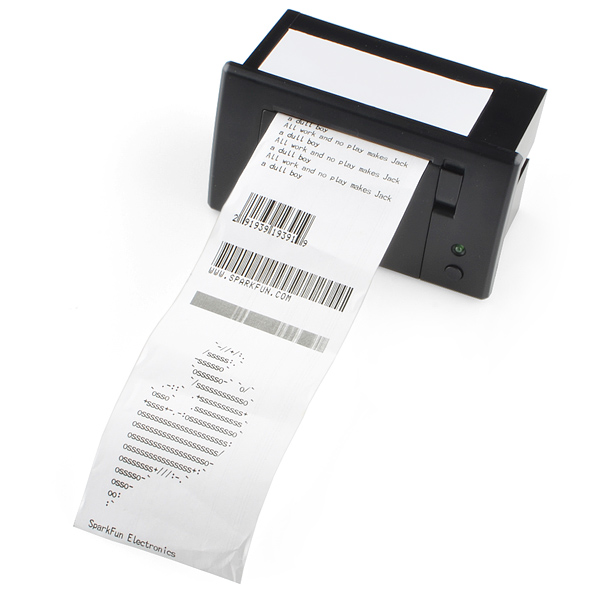

Thermal Printer
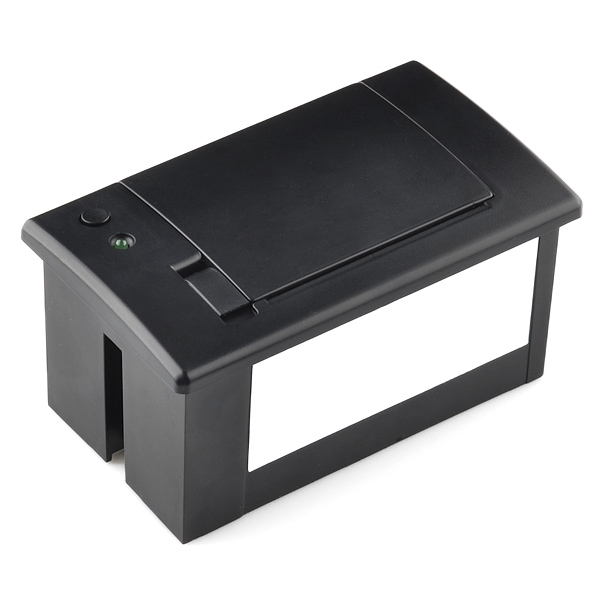
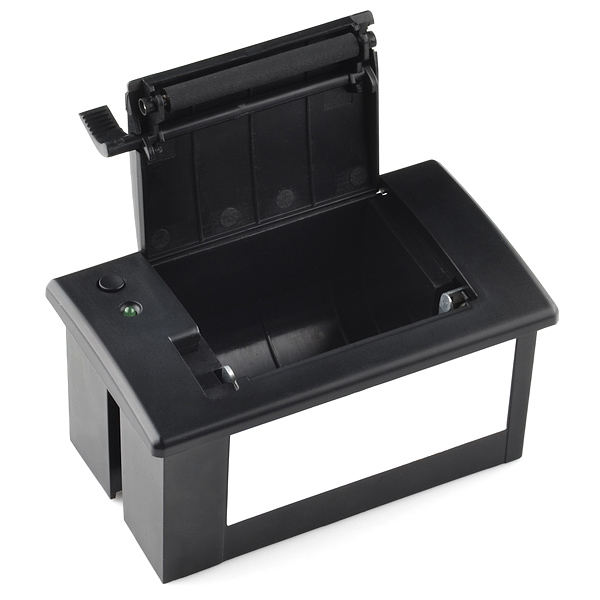
This is a thermal printer like you would find on a cash register or adding machine. It will print simple strings passed to it via TTL serial, bitmap images (poorly) and it even generates several different formats of barcodes!
The thermal printer takes 2.25" (57mm) wide thermal paper with a max roll diameter of 1.5" (39mm). Thermal paper is inexpensive and commonly found in most office supply stores in 85ft lengths. You may have to remove some paper from these rolls in order for it to fit into the printer. But, you can always use the excess paper in the printer, since you don't need to have a 'core' in the paper for it to work.
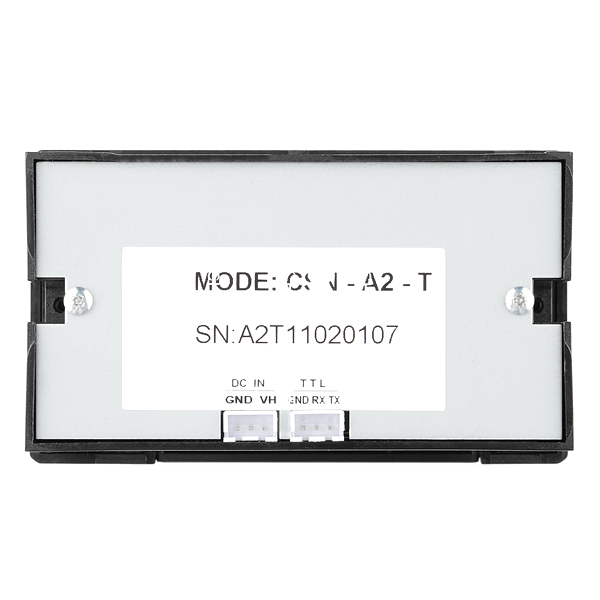
The back panel has 2 3-pin connectors; one for power and one for serial communications. The thermal printer ships with default 19200bps baud rate. If you're using this printer in conjunction with an Arduino, you're going to need to connect it to the "Vin" pin and attach an external power supply, as the printer will draw more current than USB is capable of delivering. We've found that these printers can draw about 1.5A because they need to generate heat, the best supply for the job is our laptop-style power supply (see related products below)
The print head has a rated life of 50km! That means this printer can handle a marathon's distance (~30 miles) of printing before the head hits its rated limit.
Use this printer in any project where you need a hard-copy of the output, or in an art project where you want to keep the output to stick on your fridge, or to build a DIY cash register for your lemonade stand!
Thermal Printer Product Help and Resources
Resources and Going Further
Need some inspiration for your next project? Try pairing the thermal printer with a coin acceptor!

Check out these related blog posts:
Power
This part uses a lot of power. Make sure that you have a power supply that is capable of outputting 2A. Try using the Power Supply - 5V (2A).
Core Skill: Electrical Prototyping
If it requires power, you need to know how much, what all the pins do, and how to hook it up. You may need to reference datasheets, schematics, and know the ins and outs of electronics.
Skill Level: Noob - You don't need to reference a datasheet, but you will need to know basic power requirements.
See all skill levels
Comments
Looking for answers to technical questions?
We welcome your comments and suggestions below. However, if you are looking for solutions to technical questions please see our Technical Assistance page.
Customer Reviews
4.5 out of 5
Based on 4 ratings:
1 of 1 found this helpful:
Presently integrating into monitoring system. Seems to work well!
It is an excellent deal for the price
It took me a little bit to get it working as I think the TX and RX pins are mislabeled on the unit. Additionally, getting baud rate settings correct was key. I am sure for an expert, this would have been easy enough, but it took me a bit longer. Anyway, I managed to get it running with my Arduino MEGA board and even got it printing bitmaps using online resources. Great community, thanks for all of the help!
-E
For those who like VB.NET or C#, I made a small library to use this printer with your computer and a FTDI breakout board.
You can find it on my blog : http://wp.me/p1TgKg-8
Thanks to you. Here is ported to NET MF: https://github.com/jpmanson/ThermalPrinterNetMFLib
Most 5V TTL devices I've used will read a 3.3V input. Could you guys check if a 3.3V signal will work with this device.
This is pretty cool. I think I need one to "thoroughly remove uncommon words of anguish" in my life. (The manual is entertaining.)
I notice there is a tx connection as well as a rx. I couldn't find any reference to what the device might transmit. Does it ouput anything? I suppose it might just echo the rx line.
Could a slot be cut in one of the sides or bottom of the device to allow it to use larger rolls of paper?
The TX signal is used for outputing sensor data from the printer. It is also used for firmware upgrade.
You're right. I just checked the list of commands and there is a "status" command. The printer will let the program know if there is page or not (and some other info) when asked.
Very cool. Thanks.
No need to thank me :-)
I just tested mine out. (I've had it for several months without using it.) It works fine with a 3.3V signal. I was surprised to see the unit transmits at 3.3V.
Possibly the TX is for support of XON/XOFF. I have two on the way, and will let you know when they get here and can check.
For those still looking for paper for this, U-Line (uline.com) sells a somewhat affordable box of 50 rolls for around 20 bucks. I have the printer, and I have confirmed the rolls fit perfectly inside. I assume this is where sparkfun sources their rolls from that they sell on this site. Look up model/part number S-18644 on uline's site.
That's awesome, thanks! Their product says 1.5" diameter. I just put a piece of pipe 1.526" in diameter into my printer, fits perfectly. Paper is ordered.
(8/7/2013) Edited to add: Yup, got it in today and this paper fits in the printer and prints great, too! :D
Has anyone been able to get a bitmap image to print? A number of comments suggesting it isn't exactly straight forward. And if anyone has, can you post a photo of the printed bitmap? The product image shows the Sparkfun logo printed, but zooming in shows it's just ASCII art.
Yes, you can. Try the Adafruit_Thermal library. It's straight forward.
Can't seem to find a good way to convert the image to a bitmap. Any ideas?
Follow the instructons on the Adafruit Lerning System.
I just buy this product, and I got a problem when I'm using external power supply, I want to ask if i use 12V 1000mA it will cause the thermal printer crash and died ? because I just use 12 V 1000mA power supply then my printer RIP ... :( would you like to show me complete video tutorial connecting with arduino mega 2560 with external power supply as well, 2 printers was died because this problem. Sorry for bad in english thanks...
When trying to print a test page, the printer prints out only multiple lines of "CP437" - one "CP437" on each line. Any ideas how to proceed, fix it?
This happened also to me. You can use two 18650 batteries.
i got same issue , i can't print test page, also can't print any thing using ' Adafruit_Thermal' i have got some response with http://tronixstuff.com/2011/07/08/tutorial-arduino-and-a-thermal-printer/ , with baud rate 9600
any idea how can I fix this test page issue and make it working with decent lib to quickly proceed with printing
thanks
I would like to know a supplier for the actual printer. like this Though this printer would work for my project, i need the actual "Printer" so i can run the paper through a second stage of lamination, followed by a serrated edge where it comes out. So that would mean this wont work. I would get the one on digikey (linked above,) but it is to expensive. I need it under $50.00 That is why, I would like to know the supplier and part number for the printer used in this product.
We have just released an open-source, distributed software system for connecting printers like this to the internet, and making it really easy to produce great-looking (graphic!) content for them using normal web-design tools. Check it out - http://gofreerange.com/printer - source code here including the server and the arduino sketch.
Can you include a scan/photo of a sample print from the device?
I have one of these connected to an Arduino and have used the SoftwareSerial library to communicate with it. I haven't touched the hardware or the sketch in a couple weeks, but when I fired it up it wasn't working. Before printing a new message I was using available() and read() to make sure the printer was ready and not already printing, but now those are both returning false. I'm wondering if the TX on the printer has died. Has anyone else had issues with the TX on these?
On the test printout there is a "FontB" mentioned. Not sure if that contains all letters, but it's much smaller. How can I activate this font?
I want to interface it with atmel micro controller. Help needed?
As per the user manual it should flash 3times with 1sec interval, which confirms that the startness is OK. However when am powering ON, indicator light is flashing only 2times. Please let me know how to correct this or does this indicate that is there any problem with the printer itself?
I want to print ECG using Micro-controller, please let know that can it print ECG (good or bad)?
I wonder if this works with an Arduino Due, too. The Due runs with 3.3V instead of 5V and I'm not sure if the output pins have enough voltage.
I am using this in conjunction with an arduino mega. It prints fine on roll thermal paper. If I use thermal labels sometimes it prints ok, but usually it prints normal on the left side but lightens up toward the right. I upgraded to a 9V, 2A power supply which made it print faster and seemed to help, but why the major difference?
Does this one works and prints at least an A4 size of paper stock as maximum? Thermal printing in some places are no longer allowed because they fades easily. Like the business we have, we used to use thermal print type for our own print needs like vouchers and receipt but we noticed that is is not that quality we need, so we tried the service print of Digitek in San Francisco, you can check their print samples at http://www.digiteksf.com/products/.
Check out my Portable Battery-Powered Receipt Printer (PBPRP). http://sfe.io/w90716
Hey I can't find the any bitmap conversion software about that works. Anyone any ideas?
Has anyone figured out a way to alter the paper path for external paper feeding?
I have an idea for an unattended, coin operated kiosk application that would print around a foot per user, and a 34' roll isn't going to cut it.
Also, are there any procedures for discovering that the printer is out of paper (perhaps if I am considering an alternate feed arrangement that would wind up being on me anyway)?
Yes, you can cut a slot in the front lid.
From the looks of it, the paper is front-advanced via the roller on the door; the drive mechanism is on one of the sides.
You could probably take a Dremel with a fairly wide cutting wheel and run a slot in the lower side and just have the paper feed through the slot over the rollers. In that case you would have the ability to print on as much 1.5" paper as you could get your hands on.
The only things you would have to make sure of is that you don't Dremel through wires or electronics or make a path such that the paper doesn't contact the heating head. It may be worth your while to see if you can disassemble one to scope it out first - these things are cheap for what they can do, but I'd rather not throw $50 away if I don't have to.
Hi, I connected the printer to an Arduino uno + Ethernet shield (instructions here: https://github.com/exciting-io/printer/wiki/Making-your-own-printer) and now everything is powered via USB. If I press the printer button when I switch it on, I get no test page... do you know how to fix this?
You should have at least 2 amps to make this thing work properly.
I'd like to use this printer but I see it uses digital pins 2, 3 for data. I'm using this on a MEGA. Is this just the default? Can I assign to other digital pins, or can I assign to the analog pins?
Thanks Doug
What's the max resolution for printing bitmaps?
Can anyone advise on the best method to power this using batteries? I'd like to combine it with an Arduino Yun (using my phone as a hotspot), so there are no longer any need to tether it to an Ethernet shield or external power supply.
I've tried 4xAA and 9V batteries with little success. It prints but there are obviously not enough Amps to heat it properly - prints are faint. Possibly 4xC?
Thanks
I am powering this off 4xAA just fine. You can adjust the heating values in your code. Put this into your setup after you declare the printer:
Thermal.write(27); //return after this Thermal.write(55); //return after this Thermal.write(255); //return after this Thermal.write(255); //return after this Thermal.write(255); //return after this
Managing the settings is... odd. The first two (27 and 55) get your printer ready to accept the next three commands and tells the printer what those commands will be. In this case it sets the print density and heat time to the max.
Note: If you are using the "Hater-Matic" sketch, replace "Thermal.write" with "printerOutput.write".
Hope that helps!
Does anyone Know how to set the baud rate on these?
Here is the manufacturer of CSN series printer, cashinotech. They too make the larger A5 that ive been happy with :) Cashinotech. They dont sell directly to end customers.
OH and reminder: Datasheet states that the 12V is optional, and these printers that Sparkfun and competitors sell, dont have that option.
I made an Arduino library that can generate QR codes and print them to this printer: https://github.com/grintor/QRprint
So I followed the connection instructions from here: http://tronixstuff.com/2011/07/08/tutorial-arduino-and-a-thermal-printer, but when I start the thing, the LED flashes twice for a moderate length, then goes into a cycle of 1-second flashes that are a second a part.
I consulted the manual: http://tronixstuff.com/wp-content/uploads/2011/07/a2-user-manual-1.pdf, and the two initial flashes indicate that "printer is not found."
Anyone faced a similar problem? Is the printer faulty?
Are you sure this printer is fo 57mm thermal paper? 57mm don't fit.
Anyone know of an even smaller printer unit than this one? Ideally I'd love to have a printer that basically printed fortune cookies or strips - not unlike a label maker printer.
I made a CAD drawing of this printer; you can get it on GrabCAD.
I made it print somewhat quickly once I realize the stickers on the unit are relative to the controller (DCE) and not the device (DTE). :P
Still haven't figured out how to do bitmaps from within an Arduino (plot an array of INTs) ... I'll Github it once I do. The examples on the Net I've found all are not working for me. :P
i dont think the code provided in the bildr tutorial is correct
What are the specs on the mounting screws?
it's too bad that this is on back order. i just had the idea to use a printer (this one) to print out a physical log of attached network clients, as they attach.
using dd-wrt and an available serial output from your favorite linksys router, one could have a command that sends this serial-printer the mac and ip of a new client on the network.
...an admin's news ticker if you will.
When will it be back in Stock?
I have contacted the manufacturer and there are firmware that can upgrade the printer to accept Baud rate of 115200. I can now print full graphics at a very good speed.
Now over to Sparkfun to provide this to all who would buy and use this.
The print quality in full graphics is very good.
Can you post the firmware upgrade tools on GitHub?
There are three files I 've got from the manufacturer: 701(1100,100,80)(115200)_EN_V3.5.bin - firmware Printer Setting Tool.exe - Set Baud after firmware upgrade Prn2103.exe - Upgrade Firmware
It is a bit tricky to get it working. It would be best form Sparkfun to get the official permission for them to make available. There are hidden protocols via UART/RS-232 which is not published.
How to do the firmware upgrade?
Do you have a link to the upgraded firmware?
Will this tolerate 5V serial from my Arduino? Has anyone tried it?
Just to answer my own question: I finally hooked it up and yes it take 5V serial just fine.
Hi, is this printer compatible with Raspberry PI?
wow... wasn't it $10 less last week? Is there a shortage of black plastics?
Still $50 here.. Not sure if that's what you saw, but they've been $50 ever since they first started carrying them IIRC.
Could I make this work as a USB printer with one of these (+ external power source)? I can write the (Linux) software to address the USB port, but I don't know much about low level hardware.
Yes, that should work fine. You'd need to have the computer send the appropriate command codes to set the printer up before sending text to print.
I spotted a command to set Bluetooth parameters (bit rate and password, if I remember well...) in the Command Set document. Does the printer really have a built-in Bluetooth radio? That would be awesome...
What happens when you send it a "\033[F" character? Lol.
It will start the World War Three. :-) LOL.
I ported the arduino library to mbed platform, it is available at Thermal mbed page and Thermal Sample mbed page for the sample program.
Does anyone know why the sample file with arduino 1 is not possible to compile because of error. thanks
Use an older version of the Arduino IDE (<1.0)
Here is a library for .NET Micro Framework (For Netduino or Fez Panda, Cobra, etc.): https://github.com/jpmanson/ThermalPrinterNetMFLib
The manual says its possible to use the printer to print Chinese characters but I can't seem to find out how I can do this :(. IF anyone knows how, awesome!
has anyone actually measured the current draw of one of these? i need to figure out how to power it with a battery.
You can use 6 AA batteries. The printer will draw more than 2 amps.
Does anyone know how to print these unicode characters? \u2591 \u2592 \u2593 They're part of the default character set.
Do you have converter cables able to connect the printer to an arduino sensor shield ? Connectors and tools needed in case of manual interventin? Thanks
It seems the printer connectors/wires are not compatible with an arduino sensor shield connector. Do you have a cable converter? Would I like to change the mc-side connector of the provided cable, which connector & tool shoud I buy ?
Hi, I have an arduino uno board. Unfortunately I can not print properly. I can only print random characters that are not what I wrote.
Anyone can help me? Thanks in advance
what protocol use? 8 bit or 9 bit (8 data bit + 1 parity bit)
It uses the very common 8 bit data, no parity, 1 stop bit.
I downloaded the example code, but could not find
NewSoftSerial.h. Any help?
Thanks
Zarcov
I found the library myself. Here is the link, just in case...
http://arduiniana.org/NewSoftSerial/NewSoftSerial10c.zip
Cant it print hebrew fonts?
i had no success with defining custom font faces. don't recall seeing predefined hebrew characters either in the test printout nor the manual.
Can it print other languages? (say - hebrew?..)
Has anyone managed to define their own character? According to the manual defining a black square instead of an exclamation mark (ASCII # = 33) it should be as easy as:
Thermal.print(27,BYTE);
Thermal.print(38,BYTE);
Thermal.print(3,BYTE); //s
Thermal.print(33,BYTE); //n
Thermal.print(3,BYTE); //w
Thermal.print(34,BYTE); //m
for( int i = 0 ; i < 3*3 ; i++ ){
Thermal.print(255,BYTE);
}
//Enable user defined characters
Thermal.print(27,BYTE);
Thermal.print(37,BYTE);
Thermal.print(1,BYTE);
But it doesn't work at all. I always get the exclamation mark and i'm kind of stuck. I don't live in any of the regions covered by predefined character sets and i need to make some funky custom characters.
Gotta love the engrish in the manual.
"Printer control panel built-in GB18030 Chinese character, thoroughly remove the uncommon words of anguish"
Ever since getting mine, I've only used common words of anguish, so I guess they're right.
So I'm having trouble getting this going.
My configuration is
Wires-
Printer: Arduino
Green: Digital 2
Yellow: Digital 3
Black: Gnd (the gnd next to VIN)
Red: VIN
Black: Gnd (the other gnd next to VIN)
Power-
I've plugged a 9V 1000mA supply and a 4-5.5V 2.6-2.3A supply into the arduino and got the same results.
Arduino Code-
I ran the sample code but get nothing (not even in the serial monitor)
Results-
The LED on the printer lights up, flashes twice strongly then settles to an intermittent weak flash. If I press line feed the paper advances 1/2", I don't get demo mode at all.
The Arduino is a Duemilanove which works (blink test runs fine).
Anyone got any ideas? I suspect my problems lie on the Arduino side (since I see nothing in the serial monitor) and the printer side (is my power supply insuffic.? or something else?
Cheers
I had some trouble too, I mixed up the RX and TX, so I defined it correctly in the software. Mine prints from the arduino and still has the weak flashes from the led. I assume you have the new soft serial as well. Also, I had the baud settings wrong. Check the printer defauld baud rate by holding the button on the printer down while plugging the power in. Make sure this is the same value in the software, and on the serial monitor. Hope this helps,
A second question...
I picked up a 5V 2AMP power adapter and that extra amperage made all of the difference, it's now printing like a champ!
But that leads me to a power supply question.
I'm going to be driving the printer with an Arduino UNO with an Arduino ethernet shield on it. I would love it if I could drive everything with just this one power adapter. My question is, if I use this power adapter on the Arduino and just connect the printer to the Arduino VIN pin, will I be OK? Can the Arduino handle up to 2 AMPS going through it? Will the big current changes that I imagine the printer causes when it goes from printing to not printing and vice versa be OK? Or should I play it safe and use two separate power supplies, one for the printer, and another for the Arduino?
Just wondering, in the Chinese manual it shows two places to connect power...pin 2 for variable power, and pin 3 for I believe 5V only (the manual's English translation says this...
+5V,输入电源 input voltage (一般情况下只用+5V,VH 不输入 gerneral
condition,only use +5Vm VH not input )
...which is confusing only to me, being an English only reader and speaker. So, if you have a 5V power supply is one pin better than the other? (the cable you've provided uses pin 3).
Has anyone killed one yet? After about two weeks of printing a Twitter feed the printing is light and the paper isn't feeding properly. It also seems to lose some lines. I added a bunch of delays, but it still acts funny. I certainly got the goodie out of it, not complaining, just wondered if this is an expected failure mode, or if I handled it poorly.
If anyone is interested I have deconstructed the example code and written a beginners' tutorial about this printer - http://wp.me/pQmjR-1LD
Please use caution with thermal paper. Is a source of BPA. The same (proven to mimic estrogen) stuff that used to be in plastic water bottles. See: http://www.sciencenews.org/view/generic/id/61764/title/Receipts_a_large_%E2%80%94_and_largely_ignored_%E2%80%94_source_of_BPA
Also, please remember not to insert body parts into 120V outlets, and that playing with matches whilst doused in gasoline can prove hazardous to your health.
How do you suggest I "use caution" other than not use it?
Do-not-eat. :P
How many characters wide is the printout? As in if I wanted to display the text on an LCD, how wide does the LCD need to be?
Can you maybe make a very simple breakout, like just the 2 plugs to 5 0.1 inch headers?
We won't be making a breakout. It comes with pre-terminated wires with the connectors.
Has anyone used this with a Netduino Plus?
I'd like to make a program which reads in twitter posts, or a web http POST and print out the string to this printer.
Does it come with a software? Otherwise how am i going to print alphanumeric lines?
The printers firmware accepts ASCII characters. Just send the few command bytes needed and then send data as if it were a serial terminal.
Hey, i'm new to all of this and just started building my first arduino project. I'm having a very hard time understanding how to print a bitmap image to a thermal printer. I looked at your example code and got more confused. It just prints a grid of strange symbols. How do you actually call up the image file? I know this is prob not the right place for this but any help would really be appreciated.
Thanks a lot!
Never mind, the sticker on the bottom photo shows it as TTL :)
TTL implies 5V so technically it's incorrect. The printer uses 3.3V logic.
Is this printer RS232 level or TTL level serial?
It's 3.3V level serial.
Wow, a lot of comments on this page! Good news, we have a source for paper and should have it in soon. Give us a week or so and we should have some listed.
How about offering a power and data cable? Thanks.
QUEST FOR PAPER:
Office Depot Item # 109-317 seems to fit width wise (57mm), but the roll is too big. I had to strip about half of it off to get it in the printer. So far, this has been the smallest diameter roll I have found. Caveat - I have not tried printing on it yet, but as it is thermal paper, I assume it will work.
UPDATE: The printer will print on this paper, however, it is slightly too wide, and causes feed problems. I would not recommend its use and suggest waiting for the Sparkfun paper. I hope they ordered a ton of it.
One clarification to the manual while I am here. To invoke the self-test you must hold the feed button down and then apply power. The self-test begins as soon as you release the button.
The manual is misleading when it says "Powe on, press the [feed ]key, for a while , relax the key, it will print out one testing sample ."[sic]
I got mine today :D
Should be noted that for 5v operation you need a REALLY BEEFY supply, I have a 2A switch mode PSU that I was using and it was having a hard time running the printer.
With my own testing it pulls approx 1.5-2A whilst on 5v
With a decent 5v supply you can pretty easily use factory defaults and it prints quite fast.
One negative is this thing is so addictive to play with you'll be burried alive under receipt paper xD
That's nuts, can anybody else confirm this? At that current you wouldn't be able to use the recommended wall adapter.
There is no mention of current draw in any of the documentation as far as I can tell.
http://www.walmart.com/search/search-ng.do?search_query=thermal+paper&ic=48_0&Find=Find&search_constraint=0
Thanks for posting this, but I couldn't get the link to display any results. A search at their site for thermal paper only yields one result, and it doesn't list dimensions for it.
I need one piece for integrate in prototype design please confirm the stock for buyed
Regards
Saul,
Stock levels are shown right underneath "Pricing", and appear to be kept up to date in real time. If it says 10 units are in stock, and you order 5, it will immediately update the stock level to show 5. I ordered the last unit of an item yesterday, and when I went back to look at the data sheet it already showed out of stock, so I think you can rely on the numbers shown.
Unfortunately, the little printers are showing out of stock at the moment. I happened to be on here Thursday when they were announced and quickly ordered two of them. Four to five days later they were all sold out.
The good news is you can click on "Autonotify" and they will let you know when they are back in stock.
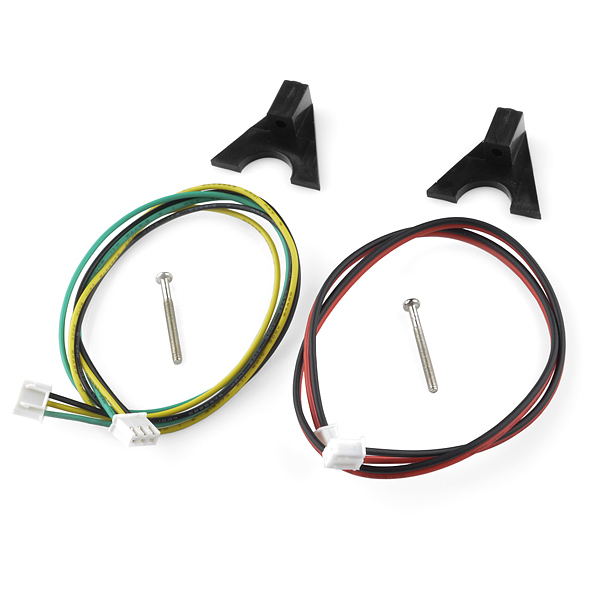
Do these come with paper, or the cables as shown in the images?
Yes it come with the cables but it does not come with paper. You can buy paper from SparkFun or from an office supply store. As you'd expect, the paper is a lot less expensive if you buy a bunch at once from an office supply store.
Question for SF. How reliably can you supply these things? I've got two coming to play with, but if they pan out, I am considering them for a commercial project I am developing.
Is this RS-232 and TTL or just TTL Serial? The documentation refers to both.
I know it transmits and receives with 3.3V logic levels. I doubt it would work with RS-232 levels but I haven't tested this (and don't plan to).
Could you potentially print a QR-Code from this?
For anyone wondering, most modern black and white label printers use this technology. Also, you've likely seen it if you eat at fast food. Receipt printers use it as well. In the case of the fast food, you might see part of your receipt blackened from sitting next to a hot element for too long.
This guy did it with the same printer - even looks like he has his code on the link. I'm going to be doing something similar but i haven't gotten into it yet.
http://hackaday.com/tag/thermal-printer/
Yes, it should be able to print a QR-Code. You'll need software to generate the QR-Code bitmap and software to transmit the bitmap to the printer in line chunks small enough for the printer's buffer to handle. Check out the command codes doc for the bitmap print commands. It looks pretty straightforward.
is there some sort of sticky-back thermal paper you could print with this, for example if you wanted to make a barcode sticker for something..?
Yes, there is. It's called thermal printer address labels, such as for Dymo label printers. Just search for thermal labels. There are hundreds of vendors and tons of label shapes and sizes.
Sparkfun? will there be sticky paper in the future?
have a look at the old gameboy printer paper, might have some trouble since its not as wide, but it does have a sticky backing
I had to order this when I saw it....probably gonna make something that generates barcodes as a sort of "key" for a project. Now all you guys need to get is a fixed barcode scanner something like this
http://www.carolinabarcode.com/images/ArticleImages/RunMyStore/BarcodeScanner2.jpg
On a more technical note
If I use a 9v power supply instead of a 5v do I have to use a level shifter on the serial? In the example code it said 9v power supply and nothing about level shifting. So I am assuming not but just wanted to double check!
Keep the awesome products coming Sparkfun!
I just checked this. When powered with 9V the tx line idles at 3.3V. It must have 3.3V controller.
Is the bitmap print function fine enough for 3d barcode? Could be killet geochache box that prints every visitor proof to take to another location to scan.
A 2-D barcode might be possible, but 3-D? You'd need to find some clear thermal paper to start with...
I believe what he means is a QR code, not a code on multiple planes.
Make sure you get thermal paper without BPA just to be safe. http://en.wikipedia.org/wiki/Thermal_printer#Health_concerns
typo,
than USB in capable of delivering should be
than USB is capable of delivering
Thanks, fixed!
Sometimes I wonder what Chinese street market you guys find things... I have been looking for this for 3 months now! Of course here it is! :-) Gonna buy many soon for a project we just finished developing. Thanks!!!!!!
I'm gonna use this in my next project. Its gonna be a news ticker with weather updates with an alarm for me too get up
I've wanting to use one of these in a project for a long time! You guys are awesome.
Any plans to sell a printer with a built-in cutting blade?
Since I assume Sparkfun is just buying these from someone they may not have a lot of say about the design, but adding a tear-bar to whatever enclosure you use seems pretty simple. For those who want a quick and dirty solution, go steal the tear-bar off of a box of aluminum foil, and fasten it to the printer by means of your favorite diabolical attachment method (duct tape, epoxy, 1/4-20 stainless bolts, tig welding, making your children hold it in place when you want to print, etc.)
Yeah, even just a perforated line would be awesome. I noticed in the video he had a little trouble tearing it properly.
You guys plan on making an arduino shield?
Yes, I'll call it 'wires'.
But really, I just shoved wires from my Arduino into the included connectors. Male headers from a protoshield would also work.
Well I was thinking something that could also power it
Very cool product. Lots of interesting ideas come to mind. An Arduino that prints out all the tweets on my Twitter feed? Pointless, I know, but just the kind of project I'd build.
Was think the same thing! It also be cool if you could use the hot side of a Thermoelectric Cooler to "erase" the paper.
Is this even possible? Would it turn it completely black or white again?
Ummm, no.
Take a look at the wikipedia article on thermal paper.
You can, however, heat it up further and turn it fully black. :-)
Yeah, or leave it in sunlight for a couple of weeks, and then use it with a Sharpie.
Personally, I plan on saving all of the output from it until I have enough to build myself a paper-mâché house, or perhaps an invincible paper-mâché exo-skeleton.
Ohh, wait, even better, I'll just use the thing as intended. I'll print stuff, and when I don't need it anymore I'll throw it away. Eureka!
Paper source?
We're checking into it, but ANY office supply store (office max, office depot) and even wal-mart and such have paper. It's very common.
Will you guys carry the print head?
Why would you bother to replace the printhead in a $50 printer? By the time the head wears out, the printer is probably getting worn out too. So you'll spend $20 to $30 for a printhead, and put it in a printer that craps out a month later? The smart move is to just spend $50, get a new printhead, and a new printer too. Your time is worth more than that. If it were a $4500 Fargo thermal label printer repairs would make sense, but not on these little jewels.
no, sorry, just the printer.
actually this looks alot like a thermal printer i saw once on an aircraft, just not A4 width :)