Home | Product Categories | ZigBee & 802.15.4 | WRL-08687

XBee Explorer USB

sku: WRL-08687 RoHS Compliant

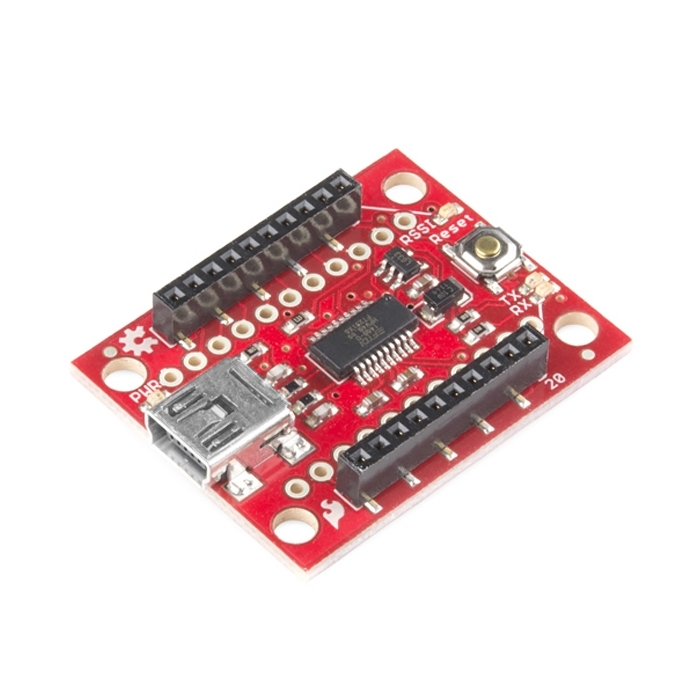
Description: This is a simple to use, USB to serial base unit for the XBee line. This unit works with all XBee modules including the Series 1 and Series 2.5, standard and Pro version. Plug the unit into the XBee Explorer, attach a mini USB cable, and you will have direct access to the serial and programming pins on the XBee unit.

You get the red board only. XBee modules and USB cable sold below.

Note: As of August 2010, all new boards now include a MIC5219 voltage regulator which is good for 500mA.

Documents:

Pricing

In stock

24.95
22.46
19.96

47 in stock

price
10-99
100+


Add to Wish List


Comments 76 comments

  • This is a great board, but could be even better with the addition of a reset button!! It’s easy enough to make your own, but it’s one of those nice-to-have features!
    clokey – Your question is fairly old, but in case you’re still wondering – you probably want to use a different board for programing your Arduino. It can be found here: https://www.sparkfun.com/commerce/product_info.php?products_id=8772. (You can actually do some fancy stuff and use the board on this page to program an Arduino remotely, but I get the feeling that isn’t what you’re looking for.)

  • deen, these XBee modules program though the same serial connections that rcv and xmit data, so in short, yes this will do the trick.
    Sparkfun guys, I know there are 150 in stock, but maybe you could make a USB key version of this that slides into your port like the new AVR board. MiniUSB is nice, but I have cords everywhere and boards this small tend to not stay put when there is any stress/movement of the cable. I would love this type of thing anytime you make a USB board, because a simple USB extension cable could always turn it into a tethered board.
    Thanks

  • I’ve had a couple of these things lying around, and only just now connected one to my WinXP machine. I don’t have anything currently plugged into it.
    This thing takes the old “+++AT” commands. I’ve discovered a few of them (ATZ – reset, ATE – echo off, ATD – dial), but I can’t figure out where to find the whole command set. After all, when this thing has the XBee plugged into it, who’s to say where the AT commands wind up – on this board or on the XBee?

    • You’re questions are a bit odd, but let me try to help: The board just passes serial commands from the computer to the XBee unit. You’ll have to have an XBee in the socket to really do anything. The X-CTU software makes it really easy to set the parameters on the XBee units so that you don’t have to mess with +++ or AT commands.

    • If you’re looking for AT commands for the XBees, you need to download the product manual – Sparkfun has one listed for each of their Xbee modules that they sell. For the most part they are the same commands – but they’re not at all similar to modem commands (other than +++), and the XSC module is significantly different from the others.

  • If I solder 0.1 headers to the bottom and plug it into a breadboard, can I use the board without USB to connect a microcontroller and an xbee, assuming I provide power. I just want both options for USB and for breadboarding the xbee without buying two different breakout boards and I’m hoping that is an option.

    • Well, I went ahead and try it anyway, and it works. I put 0.1 headers on the bottom and connected it to a microcontroller, provided 3.3v and it seems to work just fine.

  • I designed a new version and sent my Eagle Files to Sparkfun.
    http://img.photobucket.com/albums/v232/BillFleming/XBee-Explorer-v16.png
    It has a reset switch and easy access TX, RX, 3.3V, GND, and 5V on the front to use this for other devices. I think you could attach right angle headers to it.(and still see the LEDs)
    I also put all of the silkscreen and labels on the top only. I think if you hook this into a breadboard it will be easier to hook up pins now. (You can’t see the pin labels on the bottom when you plug this into a breadboard)

    • That’s a nice idea Bill! I hope Sparkfun guys adopt your design. Adafruit has already opted for similar design by adding headers to these 5 pins. Adafruit board is easier to connect to breadboard with no soldering efforts. I am not expert in soldering, and afraid of soldering where SMD components are in vicinity. Hence instead of soldering 0.1 headers to XBee explorer, I bought an XBeee breakout board for each radio.

      • It doesn’t look like they did adopt it but another site I get stuff at has a hybrid of the three designs. I was gonna pick up another Sparkfun one with an order but alas they are sold out. For those that are interested heres another option USBtoXbee

  • I was all excited to start playing around with my new XBee kit including this part, only to discover that the X-CTU software isn’t 64-bit compatible. No Vista or Windows 7 support. :( Now I have to mess around with an emulator or some nonsense… sigh
    No Linux or Mac support either.

    • I’ve had success getting it to work under Wine on my 64-bit Ubuntu installation, as well as in a Windows XP VM on my Mac. Of course the X-CTU software is out of our control, though.

      • For Windows 7:
        Go ahead and install X-CTU. On the shortcut to it, right click to get properties. On the Compatibility tab, click “Run this program in compatibility mode for:” and from the drop down list select “Windows XP (Service Pack 3)”

    • It doesn’t list 64bit support or Win7 support, but try it, rigth?
      X-CTU works perfectly fine under 64bit win7 althout it says 32bit and winXP

      • XCTU 5.1.4.1 runs fine in Windows 7 x64. I just flashed 4 radios using it.

    • Good news for Mac and Linux people! I was able to get X-CTU up and running on CrossOver-Mac (Wine) from CodeWeavers.com. I submitted the app to their repository with a couple of how-to tips.

  • In addition to using the board as an USB to XBee connector, I would like to use it as the basis for a stand-alone XBee application. Thus I have to supply battery power for the XBee.
    As the XBees can operate with supply voltage of 2.8 – 3.4 V is it possible to connect a 3V battery pack (2x AAA) directly to some of the pins/holes of this board?

  • Can this board be used as a general USB to FTDI board (similar to https://www.sparkfun.com/commerce/product_info.php?products_id=8772)
    I have an arduino mini that I want to program and thinking that I can use this board which I have just purchased to play with some XBee parts. Am I barking up the right tree?

    • I think you can.
      I don’t have this board, but I made my own board with the same chip FT232RL (basically the same circuit) and I use it with my bare bones Arduino, with my XBees, with the Propeller micro, and as a serial micro/PC interface for debugging, too! You just need to patch the right signals.

  • I think you should add a Arduino compatible connector on the end and a 3V3 regulator as the FIDI chip can only provide 20mA so cannot power a pro.

  • This is a great board for having play with XBee and quickly setting up communication addresses. But I’m having trouble upgrading the firmware of my XB24 modem. Can this board be used to upgrade using x-ctu?? I want to use my modem for monitoring analog input but from the manual i need firmware ver. at least 10A1 (currently it’s 1084).

  • can someone tell whether this can be used to program the Xbee module?? Or is it just to interface to the PC to receive and transmit data??

  • This is a great board and makes experimenting with the xBee very easy. But I do have to agree… a “reset switch” is pretty much necessary when you start playing around with differnet firmware/command sets. Something like the “Mini Push Button Switch sku: COM-00097” would be perfect (leads could be bent flat for surface mount on the bottom of the PCB so you’re using a part you alrady stock.

    • Not quite as convenient but you can easily reset the module by pulling it from the headers and re-inserting. I reset switch might be useful but I don’t think it’s necessary.

  • Is it going to be back in stock? I don’t see that backorder is allowed… If it’s not the case, what are the alternative?
    Thanks!

  • i just received this board and 2 breakout boards. i knew these things were small but i had no idea. i’ll be working with the 300 ft range xbee at first but can’t wait to start messing with the higher power versions.

  • Any idea if/when these will be restocked?

  • Can I assume that, like the FIO board, the regulator on this is incapable of powering the XBee Pro models?

  • Does anyone know where I can find the 2mm SMT connectors used on this board to interface with the xbee?

  • I have a 1mw and a 60mw pro Xbee, can I have my 1 mw hooked up to the explorer USB and receive data from the 60?

    • Pros work with the 1mw, as long as they aren’t series 2. Series 2 works with series 2, and 2.5 with 2.5. You should be able to mix and match those two, assuming it’s just a Pro.

  • I’ve been experiencing the same issue outlined here
    http://www.digi.com/support/forum/viewthread_thread,7476
    when trying to flash my xbee series 2 device as API using XCTU. The digi thread suggests that it could be an issue with the interface. Can this board be used to flash an xbee module with API firmware successfully… It works with AT mode, and I can’t imagine that it wouldn’t with API but wanted to ask. Thanks.

  • I think it’s misleading to list the high power XBee modules that draw too much power to work with this board, as it implies that this board will work with these modules. I also think it would be nice to mention the current limitations on the product page, or at least include the part number for the regulator used on the schematic.
    Note: the same thing can be said for the FIO and the “Regulated Explorer” product.

    • The pros will work just fine, and they work on FIOs as well, they just don’t transmit at full power.

    • We don’t want to be misleading, and I certainly agree with your analysis of the datasheets, but do you have personal experience using them together? I used the 60mW Pro XBee units on my AVC vehicle and base station. The Explorer worked wonderfully and the vehicle had the same 3.3V 150mA vreg. The Micrel MIC5205 is rated at 150mA, but I’ve done some stress testing on it and found it can output closer to 300mA without too many problems (depends on input voltage). Yes out of spec. Yes not guaranteed. But are they compatible? They are. But as Jamo points out, the power amplifier within the high power modules may not operate at full potential. If it’s truly a concern, the RS232 board with external power will power the modules at full power.

  • I’m trying to use this to configure my Xbee Series 2.5, but I don’t know where to begin. I’m new at this sort of thing, but I’m trying to learn. I may sound completely retarded, but what do I do after I take the explorer out of the box and connect the XBee?

    • Series 2.5 is a bit tricky if you’ve never played with XBee units before. Series 1 is much easier if you’re just looking for a serial cable replacement.
      To get started, turn on two modules (either in a breadboard or explorer board) and type serial from one terminal window. You should see it in the other window. You now have a bi-directional serial wireless link!

  • I’ve been using the USB Explorer for some time now, worked fine. I have two of the XBEE PRO’s (XBP09-XSC) Both work fine over the FTDI cable, and are configured properly.
    Recently the USB Explorer has stopped working. When plugged in the board has the power light come on, and is recognized as an FTDI (USB Serial Converter) Device. However, when in X-CTU, I select COM3, correct settings and click Test and it simply says “Unable to communicate with modem.” Is it possible that I have short-circuited the chip on there? Any other possible tests I can perform? or is it possible to turn the board into an FTDI-Cable board?

  • I am trying to use this with a Pro 900 (WRL-09098) and it is not working. I have tested the modules in official Digi dev kits and they work fine. The USB Explorer will not transmit or receive. The power light is on, the RSSI light is on and the tx light flashes when characters are sent to it. They just don’t get to the other end. Any ideas?

    • Looks like it’s the power issue alluded to in other comments. The Vcc on the XBee is only 2.8V. Without the module plugged in the Vcc is at 3.3V. Perhaps you should offer a Pro version of this board with a beefier regulator.

    • So, I replaced the MIC5205 with an MIC5219 (500mA) thinking I needed more current. Still didn’t work. On further inspection, there was a cold solder on the ground pin of the XBee connector. Touched it up and BINGO! it works great. I left the MIC5219 on because it’s working so I don’t know if the MIC5205 would work as well.

  • Would this be an effective way to program the HSC08 chip on the new Xbee-Pro ZB Programmable boards? They’re my new front runners for my first real microcontoller project. Would the codewarrior suite program through the explorer board, or am I better off wiring up a BDM unit?

  • can anyone help me. i need to program 2 xbee pro with this(http://microcontrollershop.com/product_info.php?products_id=2367). and able to revive data from a Atomic IMU 6 Degrees of Freedom. any clues?..

  • Can I use the ftdi chip on this board to program an arduino directly, without an xbee inserted?


    If so, can I do this using only the thru-hole connections on the board?


    I have one of these and I would like to avoid having to buy a ftdi breakout for some standalone arduino projects.


    Thanks

    • Well, it worked.
      Connect 5v, gnd, and the other pins to the correct connections on the 6 pi header, and you have an ftdi programmer. (remove xbee, obviously)
      The only tricky part was figuring out which pin, Dout or Din, went to Tx and Rx. I messed it up initially, but the correct connections are:
      Din to Rx (pin next to green wire on header)
      Dout to Tx (next pin on header after Rx)
      Also, because I was bored, I made a one-chip arduino, where the resonator and header are soldered directly on top of the atmega chip. I successfully programmed it with my new ftdi breakout.

      • Hey Sciguy, any chance you can provide a bit more info on how you did this? I am trying to get a set of Xbee’s working with a Fio board without having to buy an FTDI breakout board or cable. I did get the Xbee (series 1) Wireless Kit with the USB Explorer. Assuming from your post that I can use that as an FTDI breakout board to program the radios? Can you explain any of the steps you took to do so (software, hardware steps) – I am a bit of a noob and am lost in various different articles saying there is one definitive way to do this (though all are different and require more gear than I have). Cheers!

  • Something that was almost a show-stopper for me was the lack of a firmware update utility for Linux (yes, silly I know). So, for anyone else that also happens to use OSS, I would like to introduce xbee-comm . As a warning, I have only tested this on the two “Series 2” radios I have, but if you’re feeling lucky you can give it a go with yours.

    • Nice work roysjosh! I was able to use it to update a series 2 device to 2x8C without problems.

  • The voltage regulator on the board is only rated up to 80mA while the xbee pro versions needs 215mA. Beware if you buy as this board will not have the power needed to make a strong signal. I am having to resolder new voltage regulators to deal with this low amp output. Thanks sparkfun…

  • For people asking how to reset a bricked XBee, follow the instructions here:
    http://www.instructables.com/id/Changing-Xbee-Baud-Rates/step5/Un-bricking-a-frozen-Xbee/
    Since the XBee Explorer doesn’t have a reset button, take a piece of wire and short the RST pin on the back of the board to GND. You must do this while the X-CTU program displays the message window indicating it cannot connect to the XBee.

    • It’s much easier to wire a jumper like on this picture:
      http://marc.merlins.org/perso/arduino/2011-05.html#PC-Breadboard-Xbee-Adapters_-Sparkfun-and-Adafruit
      Hopefully they’ll add a jumper/switch in the next version.

  • I wanted to use the device as a socket for the Xbee on my Breadboard.
    I could send/receive Data to/from my µC when I had the Explorer connected to my PC over USB. But when I wanted to run it independent I couldn’t receive any characters on the µC anymore. Checking the Rx line with an oscilloscope showed that the RX line had a constant Voltage and didn’t send out the charachters that were recieved(The RSSI LED was on when I was typing on the other side but not the RX LED). Yet I saw signals on the line when the explorer was connected via USB.
    I had connections to the 5V, GND, DIN and DOUT pins.
    Anybody got any ideas why this doesn’t work? I guess its something about the FT232. How could I work around this?

  • So, all in all this is a good breakout board. One warning though: I’ve been able to use it with normal XBees (both series 1 and 2), but I had some trouble with a couple of XBees Pro S1 due to the fact that the board doesn’t carry a reset button. To update / restore the firmware on the XBees via the X-CTU Win software I had to short circuit a couple of pins (pin 5 – RST and pin 10 – GND) directly on the board… you can do that with a simple clip, but hey why doesn’t Sparkfun put a small button on the board? It took me a couple of hours before figuring out what I had to do!

  • This is a great board, but I had an idea when working on my current project — add the circuit necessary to charge a single cell LiPo, and a place to connect a jst connector or solder in two battery leads. I’m making a tiny (as much as I can) xbee sensor, and currently I have to add another board to it. Putting a charge circuit on this would make a self-contained xbee sensor node. It’s already regulating, so I wouldn’t think it to be too hard. just plug it into the usb to charge or to reconfigure the xbee.

  • I just started to use two of these boards a few weeks ago. A curious thing has happened in the past week: the power LED (next to the mini USB connector) on one started flickering a few days ago and the LED no longer illuminates now. But the XBee and communication to/from the XBee seems to be working OK. The power LED on the second board is flicking also but remains mostly fully illuminated (for now).
    Both devices are powered from a USB hub (powered from the PC). I think there is plenty of power available — I don’t have any problems with the other peripherals on the bus.
    I’m hoping this is just a dud LED or LED resistor and nothing more serious.
    The date on the PCB is 10-8-08.

  • Which FTDI driver to use? There are two drivers, VCP (Virtual COM Port) driver and the D2XX (Direct USB via DLL) driver.

  • Hi
    I bought one of these and it works great. I was about to buy the adafruit adaptors but noticed that on this board there are a number of header pads at the opposite end to the usb connector and that these pads provide RSST, RX, TX, 5V, GND.
    Now Im thinking I could use this board to connect my zigbee device to my quadcopter. Do those pins provide the right stuff, saving me the need for another board ?
    regards

  • I wrote a review of the ladyada vs this adapter.
    This adapter is definitely simpler to use, and it’s nice that it’s prebuilt.
    I’ve found the RX/TX LEDs essential when you’re blind flashing a module.
    The only thing this is missing is a reset button, which is essential for blind flashing and flashing modules that go to sleep (ZB END DEVICE AT).
    I wrote a picture of a hacked up way I did that:
    http://marc.merlins.org/perso/arduino/2011-05.html#PC-Breadboard-Xbee-Adapters_-Sparkfun-and-Adafruit
    but I would have saved a lot of time figuring it out if it had come pre-installed.
    The module is also missing an ASSOC LED, which can come handy.
    But please, just add a reset button or jumper, this module is great for module flashing and programming otherwise.

  • Hi,
    Is it possible to use this board to program the Programmable XBee Pro ZB?
    http://www.digi.com/products/wireless-wired-embedded-solutions/zigbee-rf-modules/zigbee-mesh-module/xbee-zb-module.jsp#overview

  • Hello! Which FTDI driver to use? There are two drivers, VCP (Virtual COM Port) driver and the D2XX (Direct USB via DLL) driver. I want to connect my laptop to the xbee module. Thanks!

  • I’ve read the tutorials on how to use this to do wireless bootloading. All of them talk about putting a jumper on the XBee Explorer.
    So, does this mean if I want to have a Fio talking with a host computer wirelessly, I’d need two XBee Explorers – one for programming (with the jumper) and one for regular communication (without the jumper)? I suppose a switch could be installed.
    Am I understanding this correctly?

  • Here is a blog post I did on the using the Xbee explorer with an Arduino with the SparkFun Xbee Shield. I use this setup for controlling my pan tilt antenna for my UAV.
    http://fisherinnovation.com/i/2011/06/12/simple-xbee-communication-with-arduino/

  • How do I get this working with X-CTU on my Windows 7 (32-bit) PC? I have no problem using X-CTU on COM port 3 with the ladyada Xbee Adapter and USB cable. I can program the Xbees just fine that way. But When I plug the XBee Explorer into my PC, X-CTU doesn’t see it. I clicked on the link above that says USB FTDI Drivers, but I wasn’t able to follow the documentation because it was so complex. I downloaded CDM20814_WHQL_Certified.zip from www.ftdichip.com/FTDrivers.htm, but there is not install program.

    • It’s working now, I did a windows update and now it works. It’s kind of strange because I saw there was an optional update called FTDI USB Serial Port and I tried to install just that update, but it kept failing. So I went ahead and did all my important updates and now this I have a COM4 port I can use with X-CTU and the XBee Explorer. According to my update history, the FTDI update never was installed and now it doesn’t even show up in my optional updates. Perhaps some other update took care of this functionality.

  • Is this board needed to do specific functions with the XBee? Or can all the functionality of this board also be done with an Arduino?

  • Maybe some of you great minds have a hint for me.
    Environment & settings:
    – 2 XBees, one configured as Zigbee coordinator (AT), other configured as Zigbee end point.
    – One Arduino with Xbee shield with simple program echoing what is sent to it.
    – One Xbee explorer, attached to
    a) Windows XP machine with hyperterminal or
    b) Ubuntu 10.04 machine with minicom / picocom / perl program
    Problem:
    On Windows XP everything works as expected, the (formerly via xctu configured) Xbees work like charm, the link is stable, the sent characters are correctly echoed (in fact the echo isn’t exactly an echo…so I can tell if I am fooled by “local echo” feature of the terminal program ;))
    On Ubuntu, I can enter AT codes and get the proper (slow…it takes a few seconds) responses (PAN ID, the ID in the network, the joined network) but I don’t get any response (the echo stuff) from the other Xbee.
    The tx LED shows activity whenever I hit a key in the terminal program. So far (on the Ubuntu m

    • continuation:
      So far (on the Ubuntu machine) I tested minicom, picoterm and a self written PERL program.
      The Arduino program sends some greeting stuff after initialization, this is received and displayed correctly on the Ubuntu machine!
      Any pointers what to check next? To me it appears like a strange problem:
      The communication Ubuntu Xbee (via FTDI USB, /dev/ttyUSB0) seems to be ok, otherwise I wouldnt get any response. The AT codes are working and I can see the greeting message that is sent from the Arduino program.
      The Arduino echo program itself works properly, because it works using Windows XP and hyperterminal.
      It seems I can’t send characters from the Ubuntu machine to the Xbee attached to the Arduino (otherwise it would echo the sent characters…)
      Thanks for reading this long post and for any hints, they are greatly appreciated.

  • I just received my XBee Explorer USB, but when I plug it into my computer (tried both a macbook and a mac mini) it does not show up as a serial connection in /dev. It is listed as a device connected to the serial bus however. I have searched, but have not found anyone else having this problem. Can anyone point me in the right direction?
    Update: Although not mentioned in any tutorial I have read, and I’ve read several, you will need to install a driver for the FTDI chip to get the USB explorer to work. After installation, the explorer works fine.

  • three questions:
    1) does this board(with transceiver) plug directly into your computer and then transmit the serial codes to the receiving end of the transceivers?
    2) my project requires multiple servos, it is actually a robot, so would i hook my arduino UNO and receiver then send the commands?(with the transmitter on the other side, of course)
    3)i am new to electronics and wanted to try to use two of SFE’s gaming sheilds to control x and y movement of the robt instead of rewriting a code?
    Also, could i use the arduino as a comand, sending the movement to the bot, without another Arduino on the bot?

  • I have been using an XBee Explorer USB (WRL-08687) for about two months without issue. Recently it suddenly stopped working and no longer shows up as a USB device in X-CTU. A second one that I bought later works fine. One minute it was attached to a Linux machine reading Xbee sensor data just fine. The next minute it was dead. Is there any way to revive it?

  • Just received my XBee Explorer and 2 XBee Pro 900 modules. I run Linux, so I figured the first order of business is just to establish a connection. I plugged one of the modules into the Explorer, plugged in the USB, the power LED is lit, and I see /dev/ttyUSB0. Great.

    But after trying minicom, screen, etc, I get absolutely no response.

    Anyone have any clues? The XBee Explorer description says that it works with the Pro.

  • Well, I started a Windows VM, and used X-CTU and got it to work. I really didn’t want to change the FTDI drivers on my Linux box since they work for everything else.

  • curious…when I check the eagle file and the pics on the site…there isn’t a connection to the USB ground pin. How does this work?

  • I’ve read lots of people having problems with X-CTU for Linux and Mac. I’ve just found a brand new cross-platform network management suite, and there’s also a free version. I’ve downloaded it from here: http://www.moltosenso.com/#/pc==/client/fe/download.php

    So, I’ve stopped using Wine or Virtualbox. Hope that helps.

  • So, with this device, it will be possible to send serial commands to another Xbee device?