sku: WRL-09976
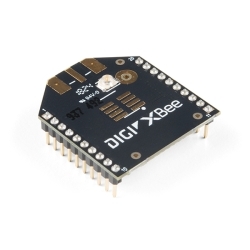
Description: This new revision fixes some minor spacing and labeling issues, but functionality remains the same.The XBee Shield simplifies the task of interfacing an XBee with your Arduino. This board mates directly with an Arduino Pro or USB board, and equips it with wireless communication capabilities using the popular XBee module. This unit works with all XBee modules including the Series 1 and Series 2 (and 2.5), standard and Pro version. This is SparkFun's own design and is a distant relative to the official XBee Shield from Arduino.
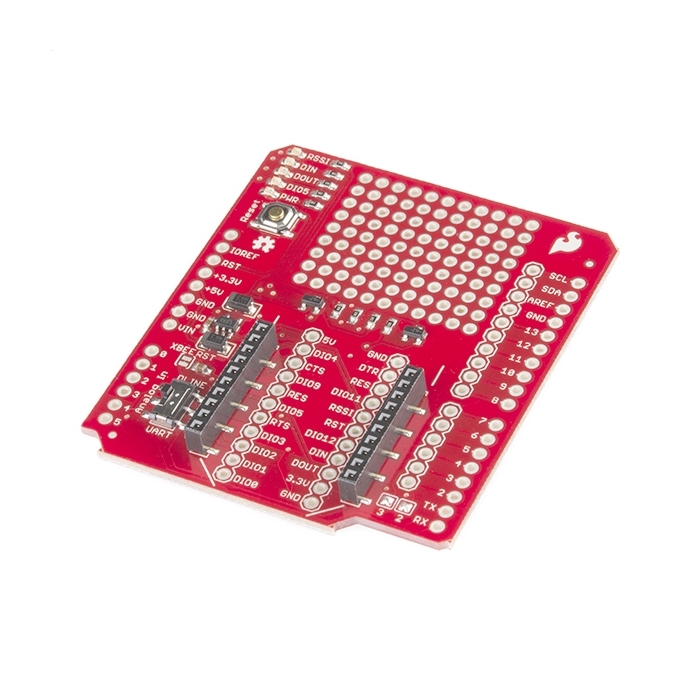
The serial pins (DIN and DOUT) of the XBee are connected through an SPDT switch, which allows you to select a connection to either the UART pins (D0, D1) or any digital pins on the Arduino (D2 and D3 default). Power is taken from the 5V pin of the Arduino and regulated on-board to 3.3VDC before being supplied to the XBee. The shield also takes care of level shifting on the DIN pin of the XBee.
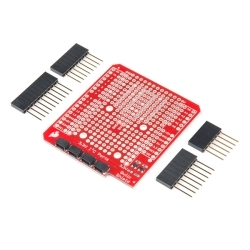
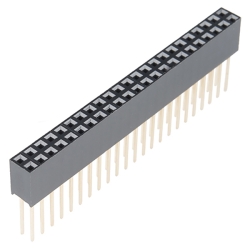
The board also includes LEDs to indicate power and activity on DIN, DOUT, RSSI, and DIO5 pins of the XBee. The Arduino's reset button is brought out on the shield, and a 12x11 grid of 0.1" holes are available for prototyping. The shield does not come with headers installed; we recommend the 6 and 8-pin stackable headers. The XBee module is also not included.
Features:
Documents:
Replaces: WRL-09841
WRL-09111
XBee Explorer SerialWRL-08687
XBee Explorer USBWRL-09085
XBee Pro 900 XSC Wirelimit 5 per customer
WRL-09132
XBee Explorer RegulatedPRT-09280
Arduino Stackable Header - 6 PinBOK-10324
Building Wireless Sensor NetworksRTL-09897
XBee Wireless Kit RetailWRL-09097
XBee Pro 900 Wire Antennalimit 5 per customer
Comments 59 comments
WRONG! – See update below.
Question / observation: Regarding the diode between the arduino transmit pin and the XBee receive (DIN) – Isn’t it pointed in the wrong direction?
Observation 1 from the schematic – The diode is “pointed away” from the XBee module on the DIN pin, thus preventing the incoming signal from outside the module from reaching the receive pin.
Observation 2 from a real XBee module & a bus pirate – The module doesn’t receive communications from the arduino or bus pirate when appropriately connected. The XBee module transmits just fine, but never responds to commands – because it never receives them. I placed the bus pirate receive pin against the XBee module’s DIN pin and it doesn’t receive anything. Then I short the diode and it works just fine.
Update – I have been corrected. The behavior the XBee expects is for the DIN pin to be pulled LOW, not pulled HIGH so the Diode is correct! See: http://forum.sparkfun.com/viewtopic.php?f=13&t=21154
I have an Xbee shield, XSC Xbee, and a 5V Arduino. I could receive cleanly, but anything sent was received as a zero (0x00).
The diode on the DIN pin was the problem for me and many others.
See these other forum posts:
http://forum.sparkfun.com/viewtopic.php?f=13&t=21832
http://www.societyofrobots.com/robotforum/index.php?topic=9790.0
My solution was to replace the diode with a 100 ohm resistor. 500 ohm also worked.
I prototyped a voltage divider to get 3.3V instead of 5V, but the XSC data sheet says it can handle up to 5.5V on DIN. So, I just used the resistor to limit the current.
I seem to have learned an important lesson about reading the comments before buying. This shield simply doesnt work with the Arduino UNO – no data is received by the XBee on DIN, unless a change is made like the one mentioned above.
Sparkfun should pull these shields until they are able to fix the problem. I have switched to a 4 year old XBee shield from one of your competitors, which I pulled from another project, and everything works fine now.
I removed the diode and replaced it with a 470 ohm resistor. In my case I’m using the 900mhz Xbees. With this change I can transmit and receive. I only had 0802 sized resistors which are a bit too big. Using the newsoftserial library with the switch set in the ‘bit bang’ mode I can debug my sketches using feedback to my PC from the USB serial port.
Is there still a problem to receive data from the XBEE on an Arduino UNO? I just cannot get anything to be received, though I can send fine.
Just to be as clear as possible about this product, and the other regulated XBee boards that Sparkfun sells (this is just their “Xbee Explorer Regulated” in shield form, really).
It does NOT work with Xbee PRO XSC unless you can fine soldering that tiny black SMD diode off by itself on the opposite side of the board to the switch. The instructions to use X-CTU to change an internal pull-up do not apply to the XSC Xbee.
The most horrible solution, but it works, is to simply de-solder the diode carefully, without destroying either of the two pads it sits on, then bridge the gap with a small wire. You need a very fine tip soldering iron to do this and good eyes or a loupe. Without this change when the Xbee sitting in this shield transmitted, the remote got hex 00 (displayed as a “.” in X-CTU) for every character. I’ve no idea if this diminishes the life of the Xbee versus replacing the diode with a resistor.
After this change, I could write a loop-back sketch – read and write while available – and using another Xbee pro XSC (plugged into an Xbee explorer), use X-CTU to do the “Range Test” successfully. All “good” packets no bad ones.
tips: * using this shield with a Uno (with only one UART) and having the UART available for driving the USB port, say for debugging, you need to have the switch set to “DLINE”, then you can use a bit-banging serial library like NewSoftSerial to talk to the Xbee. warning: NewSoftSerial is really a half-duplex serial library, it cannot send and receive simultaneously without corruption.
Same goes for using a Roving Networks RN-XV (XBee form factor wifi module) – I was very frustrated that I could only send data one way. I was able to remove the diode and add a wire to bridge the gap.
My iron was NOT up to the task (hmm… xmas is coming) and my eyes hurt, but I got it done. What a pain.
I cannot recommend this product, or the related XBee Explorer Regulated (that I did the same surgery on.)
Will XBee ever change their pin spacing to .1"?
I doubt it. It would make the Xbee module a fair bit bigger.
They could change the pin layout.
What regulator do you use on the shield?
What current rating do you suggest?
As for the diode D1 is a 4148 fast enough?
I also would like to know if the regulator is capable of handling Xbee Pro current levels before selecting this shield.
The regulator is the MIC5205 Series 3.3 V 150 mA.
But the xBee Pro TX current is rated at 215mA
Suggestion, a version of this sheild that doesn’t do the 3.3 regulation or conversion. I am using the 3.3v based arduino so don’t need the extra parts.
Does Xbee Shield WRL-09976 work with Arduino Uno? The doc says just Pro and USB shield. If not, what interface should I use?
ah… sorry, answered my own question.. I see that “USB board” is an inclusive term… includes UNO, etc.
The voltage regulator(MIC5205 Series 3.3 V 150 mA) on the board are only rated up to 150mA while the xbee pro versions needs 215mA. Beware if you buy as this board will not have the power needed to make a strong signal. I am having to resolder new voltage regulators to deal with this low amp output.
Thanks for pointing this out. Parallax does the same thing with there modules.
Sparkfun: Could you please incorporate a reg that can handle more current and in the mean time include the caveat in the description noting that this will not run the Pro at full power.
If used with an XBee Pro will it still be able to make a connection with another XBee Pro, or is the signal too weak for that?
And what voltage regulators do you recommend as replacement?
Or the full 800 mA of the Xbee Pro 868… From the specs: “Transmit current: 500 mA typical at 3.3V (800 mA max)”
Hi Everyone,
Maybe this is a noob question, but ill answer…
How i know in which PIN this shield connect the XBee to my Arduino? I know to transmit and receive data from XBee im only need 4 connections. Ground, 3.3V, Transmit and Receive.
Im guess this should be…
Pin0 Receive
Pin1 Transmit
GND to GND
V3.3 to V3.3
Im right?
Thanks
I’m new at this, just a simple question… What do I need to do to connect the xbee to the arduino? I mean just solder pins to the shield and plug it on the arduino? or something else is needed? thanks.
You need 2 arduino stackable or normal male headers of each six and eight lengths. You also need an XBee.
I don’t know if someone has some problem with Xbee baudrate configuration using Xbee Shield with an Arduino board… anyway you can simply solve the problem with the NewSerialSoft library using Arduino as a bridge between Xbee and PC. You can use the test example from the library changing both the real serial and the software serial baudrate to the Xbee baudrate (9600 by default). Note: the switch on the Xbee Shield must be on “DLINE”!
I hope this can be useful. :)
EDIT: this method only works at the default baudrate of 9600 (or less)… I’ve done some tests
I am looking at the Schematic and am woundering where the three jumppers (SJ1-SJ3) are located physically on the board. I see what looks like one of the jumpers at 11 O'clock from the DPDT switch, but where are the other two jumpers?
I’m very disappointed in this product. I purchased it due to the reputation of SparkFun, but the product looks like it was hastily designed. I use the DLINE position of the switch to free up pins 0/1 for other serial transmission, but this causes XBee transmission over pins 2/3! Why default to the only 2 hardware interrupt pins available??? I know we can desolder the “2” and “3” points adjacent to pins 0/1, but why default to pins 2/3 in the first place? Also, as mentioned in previous comments the onboard voltage regulator is only rated for 150mA, but the description claims support for XBee Pro (which is rated at 215mA)!!! After as many revisions that this product has had you’d think that major issues like these would have been addressed. Makes me reconsider future purchases from SparkFun :(
Great shield…works well, but WHY aren’t the header pins included? It can not be used without the pins, so why are they separate?
Maybe you want short ones to go with your Arduino Pro, maybe you want long ones for the Uno, maybe you want stackable, etc, etc, etc.
which GND is this device using, the digital or one of the analog ones. i need to know because i am bread-boarding this shield
Check the schematic above, it should tell you.
Hi all. Does anyone have connected this shield to Arduino Mega? I’ve not used Mega, so I’m not sure if this field fits on Mega. Another question (by the way), does anyone know if I can connect several shield to Arduino Mega?, by example: XBee shield + GPS shield + Cellular shield. Thanks in advance
You can stack as many shields as you want assuming none of the same pins are being used. All 3 of these shields use serial ports, because serial is common all 3 let you use either the default hardware serial pins 0,1, or use pins 2,3 using special code to make them look like serial. The Mega actually has 4 hardware serial lines so you should be able to connect them with a little bit of modification. If you have any other questions feel free to email us at techsupport sparkfun.com
I see that the shield protrudes slightly onto the power/USB jack of the Arduino UNO. With the 8 pin headers, the TX and RX pins seem to be suffering from a lose connection. I have a feeling this is because its slightly lifted towards the protruding end. Anyone facing this problem and if yes, how did you overcome? TIA.
I am having a slightly different problem due to the shield protruding onto the power and USB jacks when installing into an Auduino project enclosure (PRT-10088). The top cover of the enclosure will not seat down completely. I haven’t powered anything up yet, so I may end up with the same TX and RX problem you are having. As for a solution, I am considering filing out a small notch in the edge of the XBee shield so it clears the USB jack housing, then filing off the top of the power connector housing just enough to allow the XBee shield to sit down a little more. This is an indication the XBee shield design is not very professional. I am not happy about this. Does anyone at SparkFun have any better solutions?
In case someone wondered, the regulator used by the official Xbee shield is the MC33269. Its datasheet can be found at www.onsemi.com/pub/Collateral/MC33269-D.PDF.
Hi,
Can I combine this shield with Ethernet Shield (sku: DEV-09026 — http://www.sparkfun.com/products/9026) on Arduino Uno?
I have this Xbee Shield (http://loja.lusorobotica.com/shields/39-arduino-xbee-shield-s-xbee.html) and it uses SPI like Ethernet Shield, so I can’t use both together.
Is the XBee shield compatible with the uno?
yes.
Is this also compatible with Series 2 ? I mean with XBee 2mW Wire Antenna – Series 2 (ZB) – WRL-10414
yes, there is only a small firmware different between the series 2 and 2.5, but the hardware is the same.
does this work with xBee WiFi ?
[edit] I take it back – having some issues, still debugging the root cause
can I get a BOM for this board? Some of these SMD parts are hard to find.
Also why is the price so high? I could probably spin off 3 of these boards for the same price…just seems like its too high for a board with a couple smd parts on there. Drop it to 10 and you got a deal.
Hello There,
I got this xbee shield and the series 1 xbee chip antenna.
I am trying to make two xbees talk to each other. So I used two arduino uno boards, two xbee antennas and two xbee shields. While I’m trying to upload code to the arduino boards, it always fails to connect the board. But if I take the xbee shield and xbee off of the arduino board, I can upload the code to the arduino board without any problem.
Does anyone know what might be causing the problem? I tried disconnect the board and then connect it again, I also tried pressing the reset button. Neither worked…
Thank you!
I think the Xbee affects the TX and RX pins. You could try switching the serial selector switch or whatever its called. That should disconnect the Xbee from the TX/RX pins. Switch it back when you are done uploading.
Is there any documentation about actually getting this to work with the Arduino Uno? I have read a few sites that say they are able to communicate with it but I have had no such luck trying their approaches.
Okay, I am trying a simple exercise with this plugged in to a duemillenove. I am running the PhysicalPixel sketch.
I am powering the assembly off USB.
I am not able to get the arduino’s LED to respond to any signals. Other than installing the headers, is there any other wiring I am supposed to do? Will this work with it plugged in to USB?
Sorry to be so elementary.
A few comments on this board and its limitations.
1. The diode is on the board installed correctly, it is a quick and easy level shifting method that does work. When the board gets a low signal the diode acts as a short pulling the pin low. When the board gets a high signal it relies on the XBees internal pull-up resistor to pull the pin high (at the appropriate voltage level). The Series 1 and Series2/ZB modules have this pull-up enabled by default. The 900MHz modules need to have the pull-up enabled, but it is available. Especially with all the new chips with the XBee footprint coming we may change the design in the future, but for now as long as your chip has a pull-up resistor available this shield should work fine. 2. If you want to connect your XBee to your computer you will need an XBee Explorer. You can not remove the chip from your Arduino and just plug in the shield. There are many different XBee shields out there and Sparkfun’s is just one of them. On some of these shields you can, but doing so removes other features from the board which we decided to keep.
Hey folks. So, if I want to use the DLINE setting instead of UART, but I don’t want to use pins 2 and 3, how do I change the default to other pins?
How is it possible to use the external interrupts (pins 2 and 3) with this shield? Thanks.
You can use pins 2 and 3 as long as you’ve configured the board to use pins 0 and 1 as the serial port. See the schematic for details.
Hey Guys,
When i plug my board on my uno and try upload any code i receive this message.
avrdude: stk500_recv(): programmer is not responding
Anybody can help me ?
yep. xbee is sharing the UART. code is trying to load, but it’s interfering with the xbee. unplug the shield and try again.
So, I wanted to use the xbee shield (with arduino uno) as a USB interface (basically an xbee USB Explorer). And it works, although at 9600 bps about half the bytes are corrupted. Any idea what’s going on? I suspect software serial, although it seems to work well in my other projects. I have included the sketch below, any help?
include
define rxPin 2
define txPin 3
SoftwareSerial mySerial(rxPin, txPin);
void setup() { Serial.begin(9600); mySerial.begin(9600); }
void loop() { if (mySerial.available()) {
} if (Serial.available()) {
} }
Sounds like your'e dropping bytes. Assuming you are NOT using Arduino 1.0, Get the NewSoftSerial library and use it insted of SoftwareSerial. It can do higher baud rates than SoftwareSerial.
Hi,
This new shield works whit Chip Kit Uno32 whitout make some modifications?